EasyManua.ls Logo

Technics SC-S2350 - Page 27

Technics SC-S2350
60 pages
Print Icon
To Next Page IconTo Next Page
To Previous Page IconTo Previous Page
Loading...
ES
DISC
GROUPING
PLAY
EN
ES)
ea
|
|e)
DISC
GROUPING
PLAY
PIE
Ieee)
O
Group
(A)
L
Ug)
PERRA
PRR
PREORDERED
HACER
RTO
TERS
PRPC
A
HUET
ETH
EHS
HHHE
REF
EEE
EEE
HERO
OEE
GROUP
ENTER
ten
|
Group)
G@OCD
E)
(JENTER
|
A
AA
L
LI
ose
Indication
goes
out.
DISC
GROUPING
PLAY
wwa
D
Fr
A
croup,
=)
O)
ENTER
L
LI
osc
i
|
Listening
to
compact
discs
|
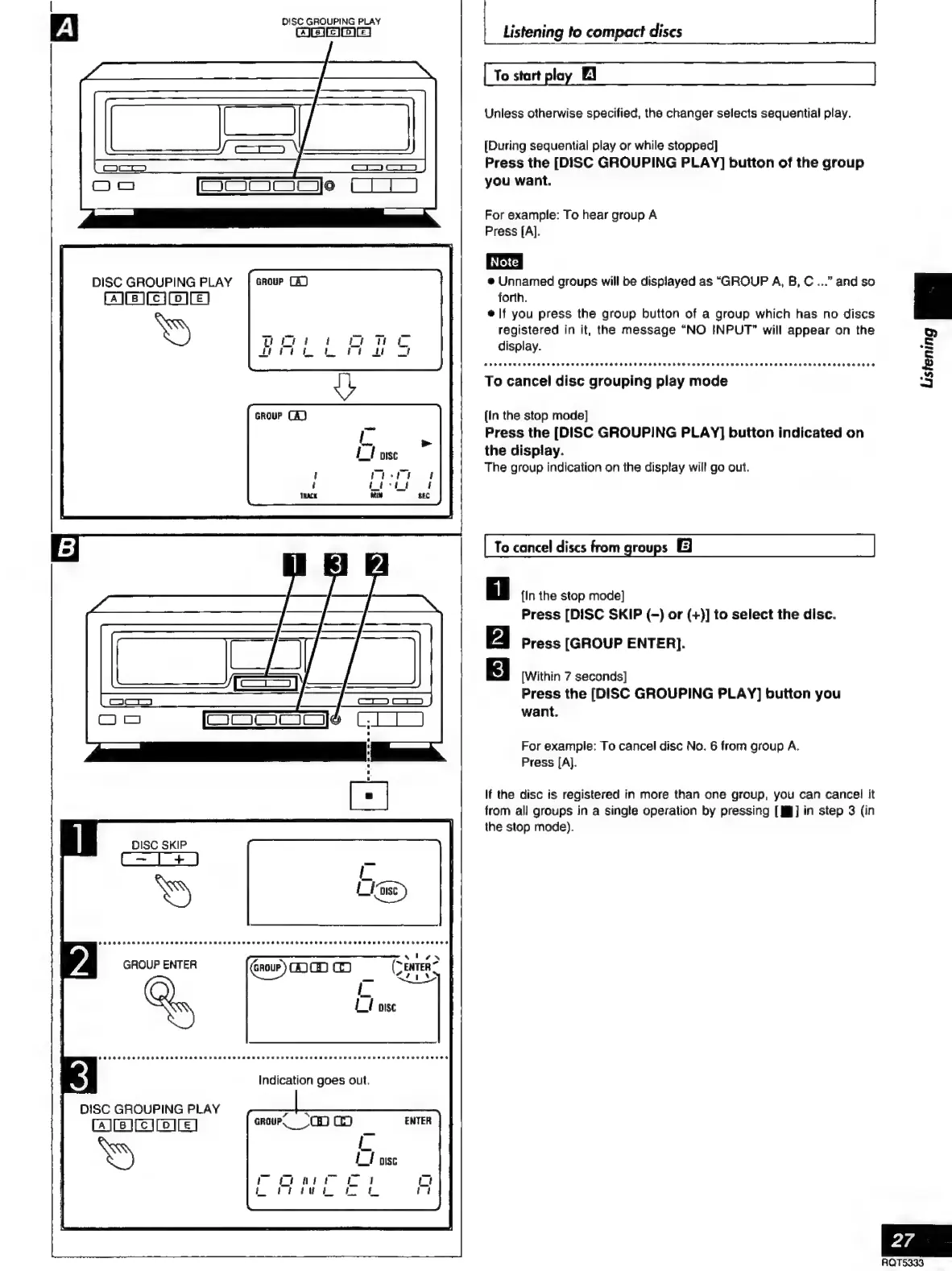
To
start
play
El
Unless
otherwise
specified,
the
changer
selects
sequential
play.
[During
sequential
play
or
while
stopped]
Press
the
[DISC
GROUPING
PLAY]
button
of
the
group
you
want.
For
example:
To
hear
group
Á
Press
[A].
e
Unnamed
groups
will
be
displayed
as
“GROUP
A,
B,
C
...”
and
so
forth.
e
|f
you
press
the
group
button
of
a
group
which
has
no
discs
registered
in
it,
the
message
“NO
INPUT”
will
appear
on
the
display.
To
cancel
disc
grouping
play
mode
[In
the
stop
mode]
Press
the
[DISC
GROUPING
PLAY]
button
indicated
on
the
display.
The
group
indication
on
the
display
will
go
out.
To
cancel
discs
from
groups
Él
{In
the
stop
mode]
Press
[DISC
SKIP
(-)
or
(+)]
to
select
the
disc.
Press
[GROUP
ENTER].
[Within
7
seconds]
Press
the
[DISC
GROUPING
PLAY]
button
you
want.
For
example:
To
cancel
disc
No.
6
from
group
A.
Press
[A].
If
the
disc
is
registered
in
more
than
one
group,
you
can
cancel
it
from
all
groups
in
a
single
operation
by
pressing
[MY]
in
step
3
(in
the
stop
mode).

Related product manuals