6LIVE
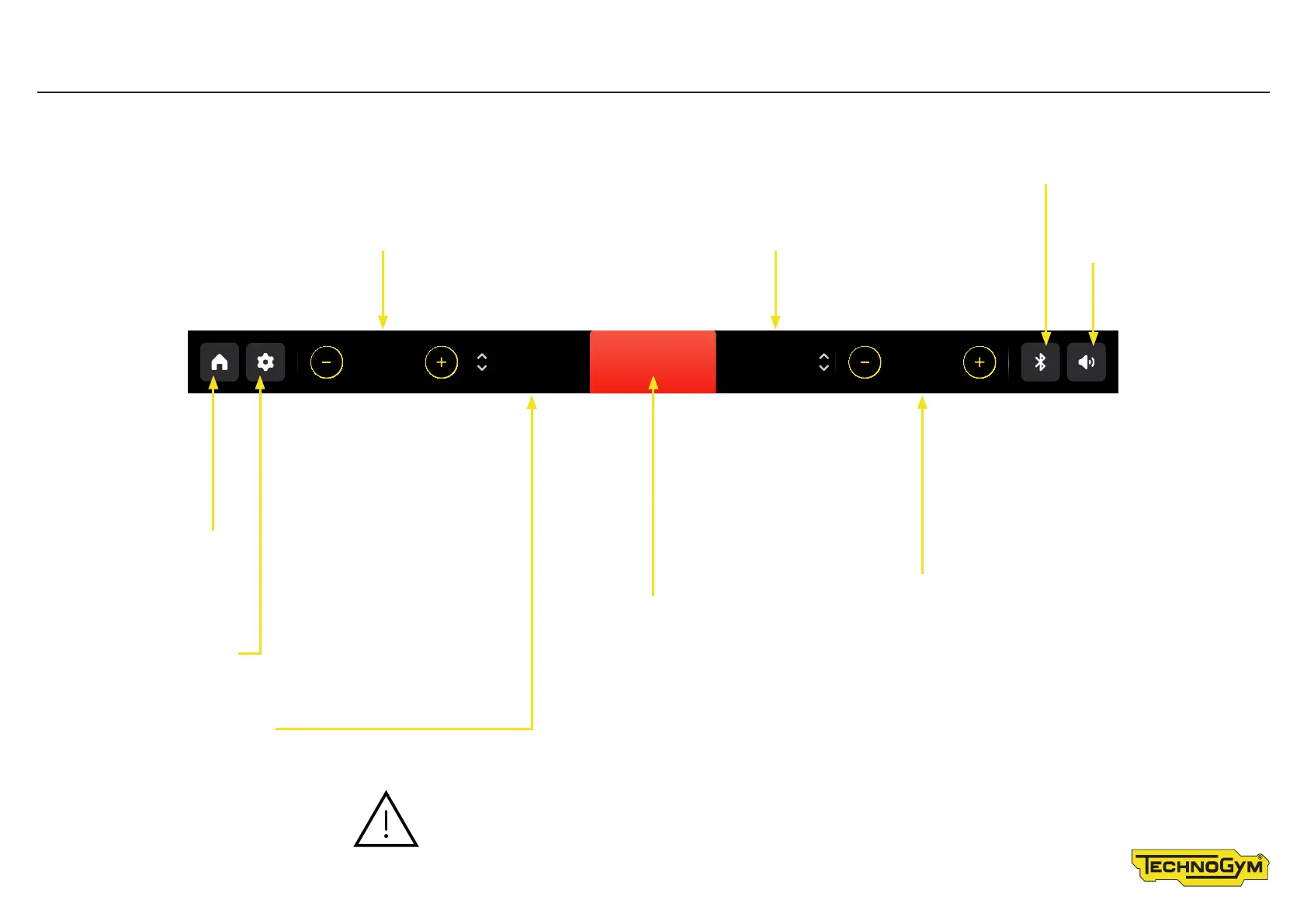
Status Bar – displaying the workout with the Run
Touch the HOME symbol
to go to the homepage
Touch the SETTINGS
button to change language,
measurement unit, and
operate the fans
Change speed buttons (Run)�
Use the + and - buttons in the speed
box to change the speed of the treadmill
belt during the exercise� The speed
increases or decreases by 0�1 km/h
each time you press the button�
You can also use the Fast Track control
on the right to change the speed�
Change gradient buttons (Run)
Use the + and - buttons in the gradient box to change the
gradient of the treadmill belt during the exercise� The gradient
increases or decreases by 0�5% each time you press the button�
You can also use the Fast Track control on
the left to change the gradient�
Time left / time elapsed
STOP button
Pause the exercise�
Distance covered
Touch the BLUETOOTH
symbol to manage the
connection of devices
Touch the AUDIO
symbol to control
the audio volume�
CAUTION. Press and hold the buttons to change speed and
gradient, for faster speed/gradient changing� Speed shown in the
unit of measurement entered using the settings button�
TIME
00:120.0
DISTANCE
0.26
SPEED
0.8
PAUSE
STOP
GRADIENT









 To Next Page