
 Need help?
Do you have a question about the Technogym EXITE and is the answer not in the manual?
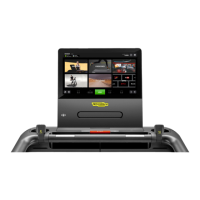
Interface for workouts, entertainment, and Technogym App Store content.
Reads workout data from Technogym key and saves results.
Connect headphones for audio content playback.
Standard USB port for data transfer or charging.
Optional sensor for NFC/RFID/Smartwatch connection.
Optional feature for wireless device charging.
Connect personal device via sensor for cloud sync and program display.
Steps to connect Bluetooth headphones and heart rate monitors.
Explains HOME, SETTINGS, AUDIO, and BLUETOOTH symbols on the status bar.
How to press START for time-increase basis exercises.
Controls for treadmill gradient and speed during a Run workout.
Explains the PAUSE/STOP button for controlling the exercise.
Displays RPM, heart rate, and allows level adjustment.
Explains HOME, BACK, BLUETOOTH, and AUDIO symbols.
Recommended speeds for optimal HD audio-video experience.
Specifies Wi-Fi standards, security, DHCP, and router settings.
Details content available on the EXCITE & ARTIS homepage.
Details content available on the EXCITE 10' homepage.
New, exclusive content with personal trainers, music, and advice.
How to choose and adjust workout level for Technogym sessions.
Details on free routes, licensed routes, and annual updates.
Description of video routes and product compatibility.
Sequences of exercises targeting muscle groups and training goals.
Steps to start, set duration/effort, and cool down.
Details on exercises based on goals or constant heart rate.
Lists interval exercises like Hi-low blocks, Hills, Cross training.
Lists Maximal, Submaximal, and Military test categories.
Displays time, calories, distance, and heart rate.
Details data shown for Bike/Top/Recline and Run.
How to pause, restart, or finish an exercise session.
Using buttons for rapid speed and gradient changes during a Run.
Using buttons to adjust the exercise difficulty level.
Using side buttons for quick adjustment of level, speed, and gradient.
How to start exercises using the START button.
How the training dashboard appears and maximizes automatically.
Description of the cool down stage and its settings.
How workout results, including heart rate, are shown.
Challenging interval training with a wide intensity range.
Smooth intensity changes with slight gradient variations.
Quickly change speeds using the Fast Track Control for interval training.
Specifies that this exercise is available for Run.
Intensity changes at medium/high effort levels to combat boredom.
Anaerobic exercise at constant speed for performance improvement.
Select exercise duration, distance, or calories to burn.
Enter personal data and machine settings before starting.
Details stages, time, and workload for these equipment types.
Details stages, time, and workload for the Run equipment.
Stages, time, and workload for the Climb equipment.
Stages, time, and workload for the Top equipment.
Calculates max V02 based on perceived effort and training level.
Gradual intensity increase; stopping at perceived toughness.
Submaximal protocol for Run with user-set workload.
Details warm-up, effort stage, and how the test ends.
Submaximal protocol for Run with user-set workload over stages.
Details warm-up, effort stages, and workload settings.
For fit experts; measures exhaustion and maximum tolerable workload.
Recommends HR monitor; test ends by STOP or last stage.
Exhaustion test for fit individuals, needs HR monitor and max HR.
Details warm-up stages and the speed-increasing test stage.
User defines starting speed, increase, and step duration.
No warm-up; test ends upon exhaustion and pressing STOP.
User defines starting power, increase, and step duration.
No warm-up; test ends upon exhaustion and pressing STOP.
Maximal test for any person on Top Excite; requires resistance input.
Recommends 10 min warm-up; test is 30s at max speed.
Maximal test for any person; requires personal data.
5 stages, 3 min each, with increasing speed and gradient.
Maximal test for any person, including high-risk individuals.
7 stages, 3 min each, with specific speed and gradient.
Maximal test for very fit people; user enters speed.
8 stages with variable speed/gradient; advises 5 min warm-up.
Maximal test for very fit people; requires personal data.
10 stages, 2 min each, constant speed, increasing gradient.
Maximal test for high-risk individuals with heart conditions.
7 stages, 2 min each, with increasing speed and gradient.
Maximal test for any person; stages for men with speed and gradient.
18 stages, 1 min each, with constant speed and increasing gradient.
Maximal test for any person; stages for women with speed and gradient.
8 stages, 3 min each, with constant speed and increasing gradient.
Complete distance quickly, adjustable speed, fixed gradient.
Lists tests for Run, Bike, Recline, and Synchro.
Requires HR monitor, personal data, and training session count.
Goal is HR > 125 bpm for 6 mins at constant power.
Lists circumstances under which the test is cancelled without results.
Confirm duration and enter body weight; HR monitor not required.
Goal is to burn maximum calories in 12 minutes.
Run 2.4 km with 1% gradient in the shortest possible time.
Run 2.4 km with 1% gradient in the shortest possible time.
Requires HR monitor and personal data; ends at 85% max HR.
Details stages with increasing speed/gradient and warm-up.
Cover 3.2 km with 0% gradient in the shortest possible time.
Cover 2.4 km with 0% gradient in the shortest possible time.
Cover 4.8 km with 0% gradient in the shortest possible time.
Variable workouts based on fitness or smart test results.
Steps to choose profile, goal, and effort level.
Adjusts workload to maintain a chosen heart rate steady.
Requires HR monitor, goal settings, age, and START.
Performed at constant heart rate based on fitness level and intensity.
Requires HR monitor, age, intensity, duration, and START.
Aim is to burn maximum calories in available time.
Requires HR monitor, personal data, duration, and START.
How to access the configuration menu via buttons and password.
Lists main configuration parameter categories.
Save/import settings via USB key for easy transfer.
Language, units, URL, Internet, and TV settings.
Set maximum exercise duration and pause time.
Set cool down time, user speed, gradient, and LED time.
Enable/disable screensaver and set its duration.
Option to allow language modification on the homepage.
Select time format and manage mywellness network data.
Option to set the time manually if network time is disabled.
Manage channel lists and search for channels.
Adjust picture settings and select the TV standard.
Save/import TV settings via USB, save changes, clear channels.








 To Next Page
 General