42
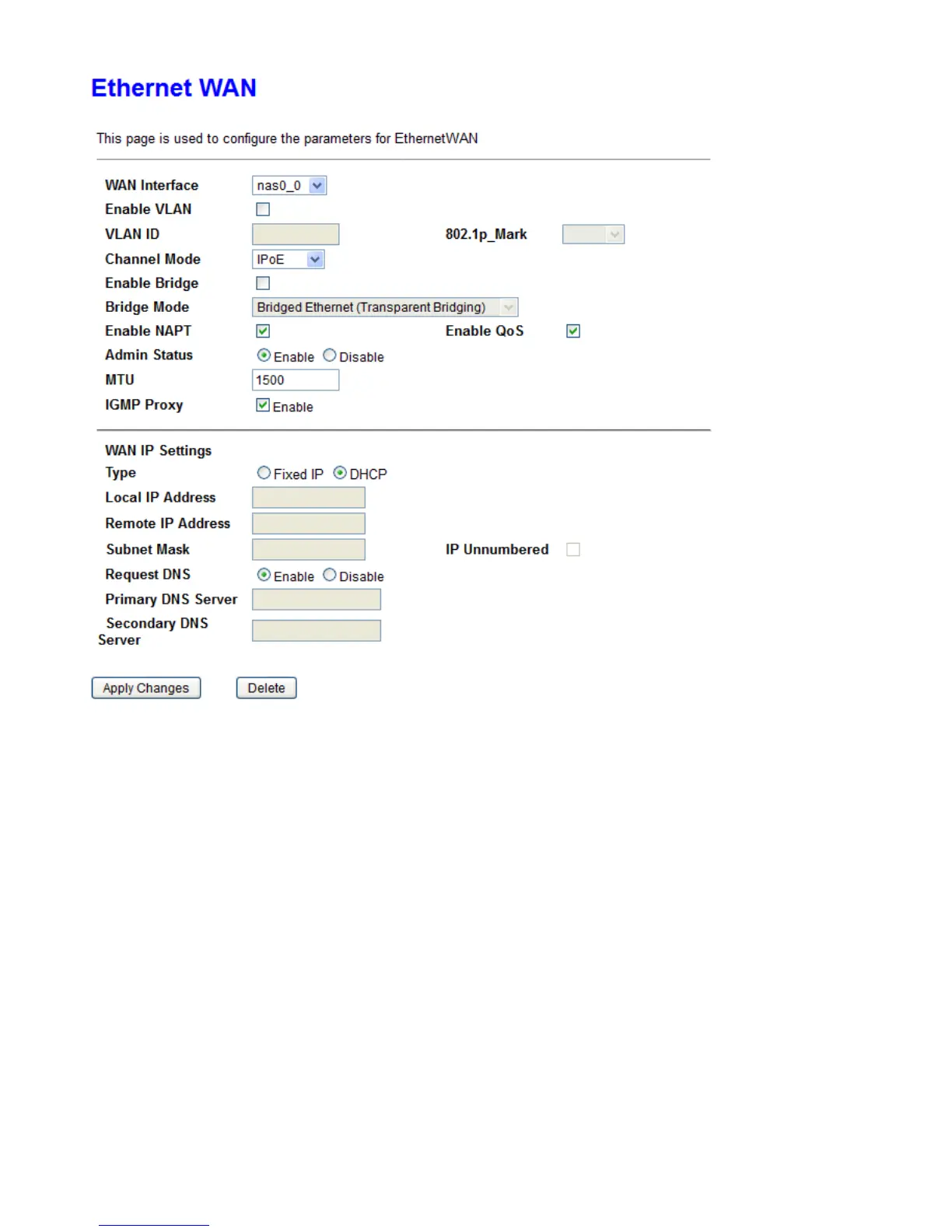
WAN Interface: Select the profile for configuration or new link to create a new profile.
Enable VLAN: User can check this box to enable the VLAN on specify profile.
VLAN ID: Assign a VLAN ID tag between 0 and 4094
802.1p_Mark: Select an 802.1p priority level between 0 and 7.
Channel Mode: Select the channel mode for WAN connection.
Bridge Mode: Set bridge mode to make all transparent between Ethernet and WAN or PPPoE packet only.
Enable NAPT: Enable/Disable the NAT function for WAN connection.
Channel: Enable/Disable the channel.
Default Route: Specify the profile will be activated as default gateway for Internet connection or not.
Enable QoS: Enable/Disable the QoS for WAN connection.
MTU: Most ISP offers MTU value to users.
Enable IGMP-Proxy: Enable/Disable the IGMP Proxy. If disabled, the IPTV will not work with NAT enabled
mode.
IP Protocol: Setup profile’s IP protocol to be IPv4 only, IPv6 only or IPv4/IPv6 dual stack.
When Channel Mode is set to IPoE, you will have the options below.
Type: Setup the WAN interface is use static IP or activate as DHCP client and get WAN IP from ISP.



 To Next Page