51
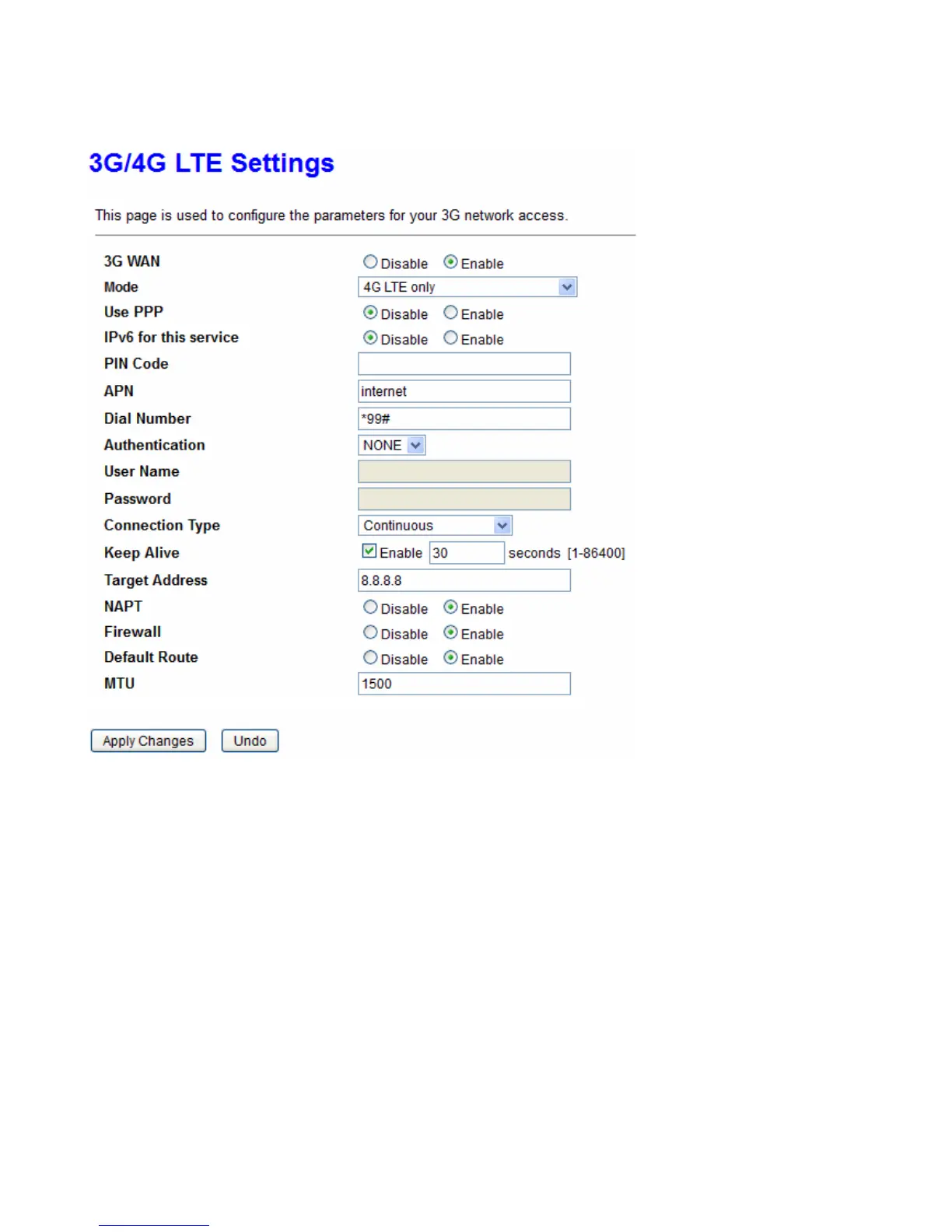
3G/4G LTE Settings
3G/4G LTE dongle related settings can be found in this page.
3G/4G LTE WAN: Enable/Disable the 3G/4G LTE dongle detection function.
Mode: There are 6 options of phone service standards: GSM 2G only, UTMS 3G only, GSM 2G preferred,
UMTS 3G preferred, Automatic, and Use 3G/LTE 3g dongle settings. If you are uncertain what services are
available to you, and then please select Automatic.
IPv6 for this service: If to enable IPv6.
PIN Code: Enter the PIN code for your SIM card (optional).
APN: Enter the APN name if required by your ISP. The default value should work with most ISPs.
Dial Number: Enter the dialed number that is provided by your ISP, the default value should work with most
ISPs.
Authentication: Select the authentication type that is provided by your ISP.
User Name: Enter the username that is provided by your ISP (optional).
Password: Enter the password that is provided by your ISP (optional).
Connection: Default set to Continuous to keep an always-on 3G/4G-LTE connection.



 To Next Page