47
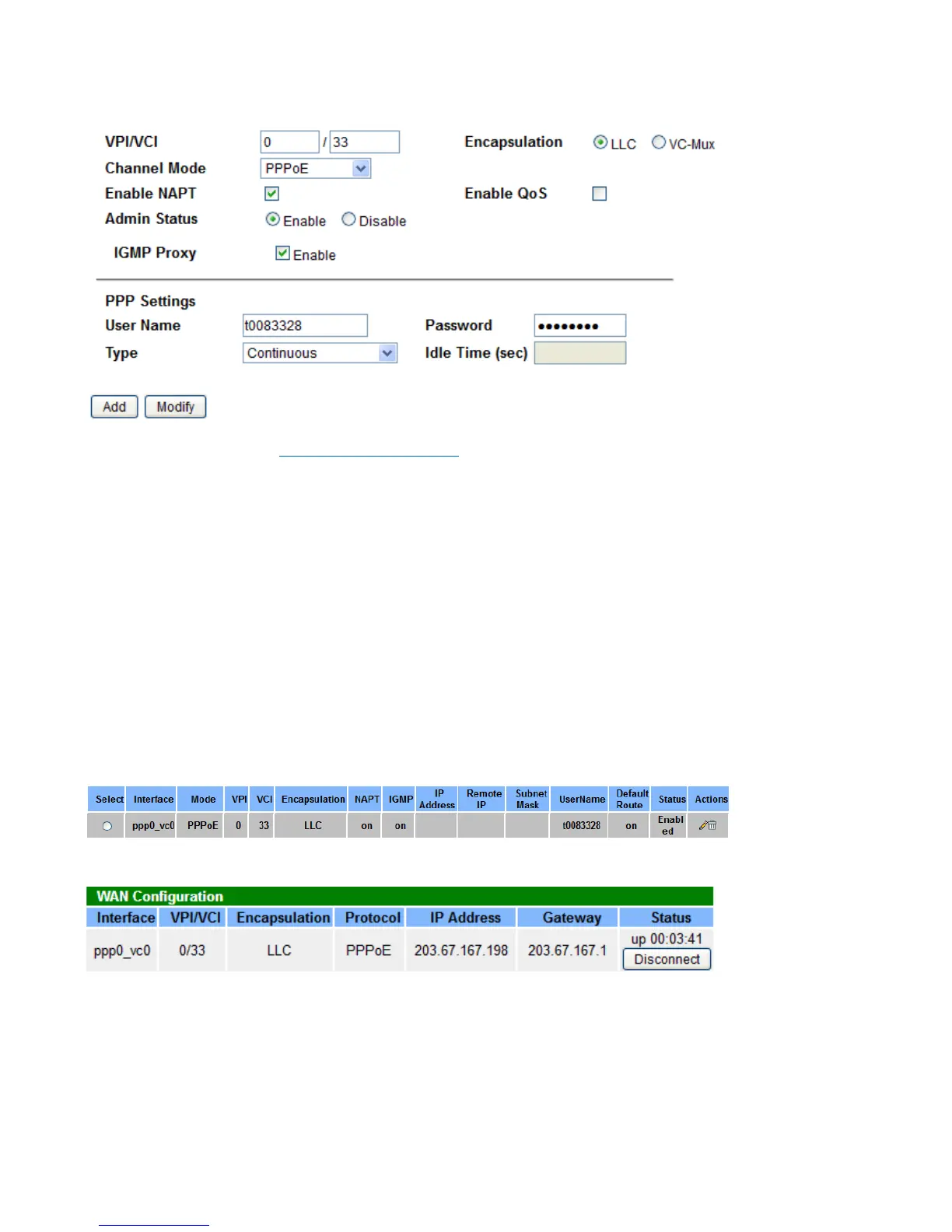
Now, let’s add a PPPoE ADSL connection.
VPI/VCI: if not sure, please Enable Auto-PVC Search.
PPP Settings:
Username/Password: Please input the PPP dial-up account.
Type: To determine the duration of a dial-up connection.
s Continuous: Select this option when you want your connection up all the time.
s Connect on Demand: Select it when you don't want the connection up all the time and specify an
idle time-out in the Max Idle Timeout field.
s Manual: Select this mode if you want to connect manually.
Idle Time(min): If set the type to Connect on Demand, you need to enter the idle timeout time. Within the
preset minutes, if the router does not detect the flow of the user, the router automatically disconnects the
PPP connection.
Click Add the put it in the Current ATM VC Table.
Check the connection status in Status > Device page.
Enable Auto-PVC Search
This feature is used to configure pvc auto detection. Here you can add/delete items in auto pvc search table.



 To Next Page