66
C-Soft Controls
C-Soft Controls
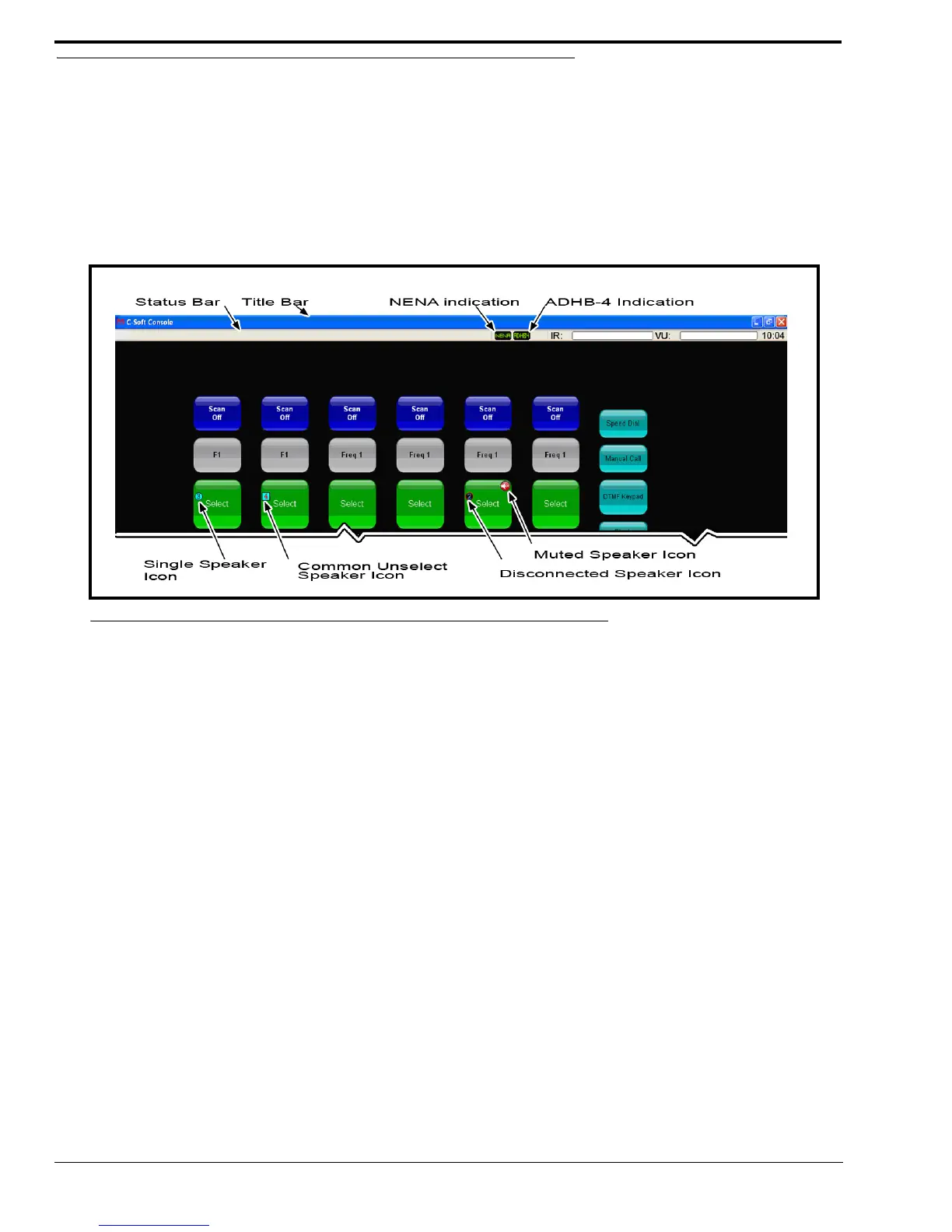
Speaker selection and volume controls are accessed from the C-Soft console. ADHB-4 connection indicators appear on the
console status bar.
C-Soft Status Bar
The C-Soft status bar displays ADHB-4 connection indicators. If a status appears, a connection to the device is established.
Available statuses are: ADHB4 and NENA.
Speaker Indications
The Speaker Indications appear on the Select, Phone, Global Call History, IRR, NENA and SIP buttons. The speaker icon,
shown in Figure 30, indicates the speaker number and speaker status.
NOTE: The location of the speaker icons depend on the line’s button size.
Single Speaker Icon
The Single Speaker icon indicates the speaker number audio is transmitting on. This speaker icon is a cyan circle with a black
speaker number in the center.
Common Unselect Speaker Icon
The Common Unselect Speaker icon indicates audio is transmitting to the speaker number shown on the icon and speaker 2
(common unselect). This icon is a cyan square with a red speaker number in the center.
Disconnected Speaker Icon
The Disconnected Speaker icon indicates the speaker configured on the button is not connected. This icon is a single speaker
icon with a red circle-backslash symbol on top.
Muted Speaker Icon
The Muted Speaker icon indicates the line’s speaker is muted. The icon is a red circle-backslash symbol with a white speaker
in the center.
FIGURE 30. Console Speaker and Status Indications



 To Next Page