5-11
5
Accessories
SOURCE
OFF
RESET
AUTORESET
SW(OPTION)
HANDLE
SW
MOTOR
SW
Xa
Xa
Xb Yb
Xa
Ya
Ya
Ya
X
M
Y
ON
A
13
2
46
5
79
8
BC DE
〜 〜
SOURCE
OFF
RESET
AUTORESET
SW(OPTION)
HANDLE
SW
MOTOR
SW
Xa
Xa
Xb Yb
Xa
Ya
Ya
Ya
X
M
Y
ON
A
13
2
46
5
79
8
BC DE
+ −
• For AC • For DC
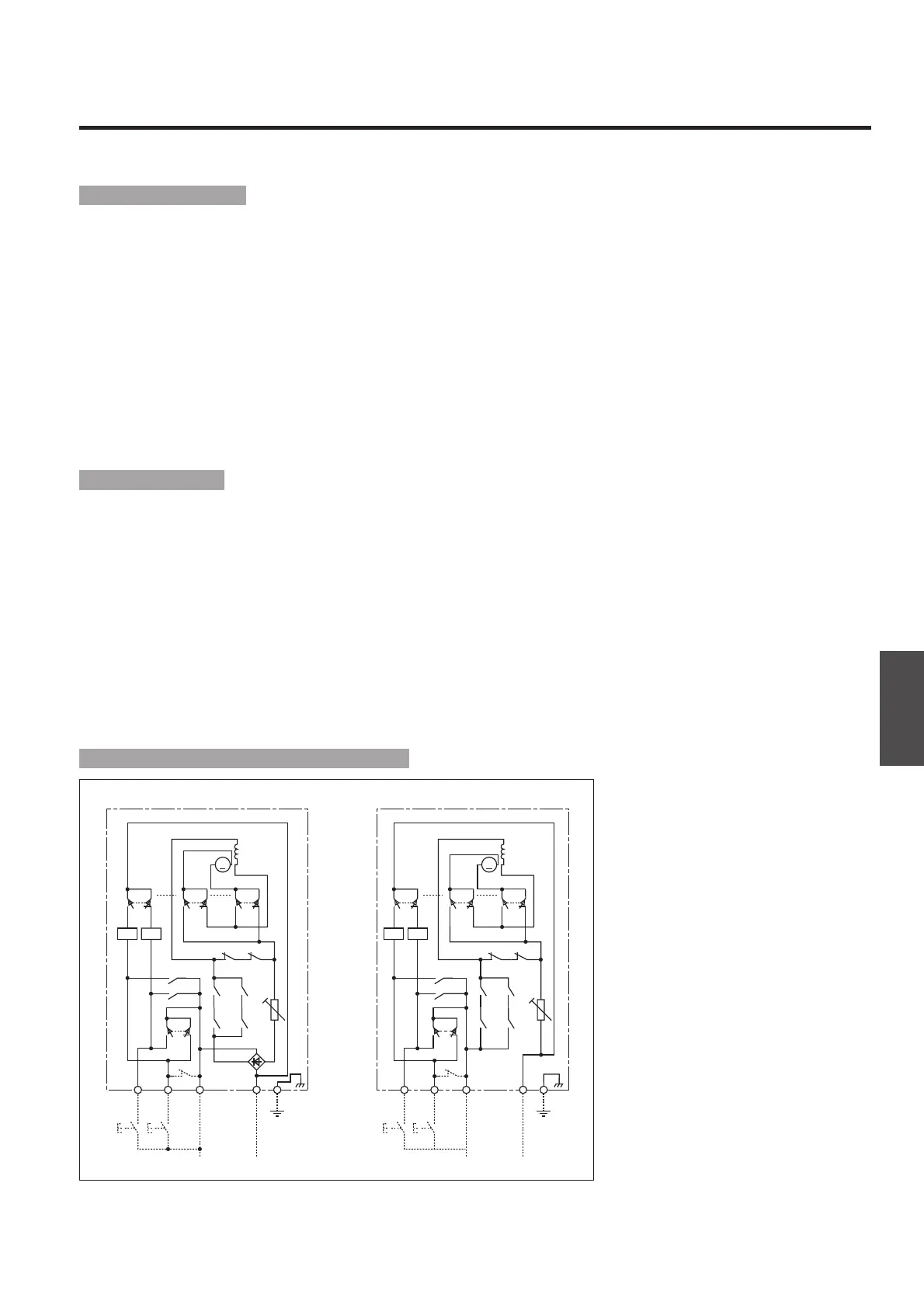
Control circuit diagrams of motor operators
Operation mechanism
Motorized operation
■Breaker ON
Closing the ON switch throws the motor switch from contact status “1-2” to “3-2”, thereby activating the X relay and energizing the motor opera-
tor to turn the breaker ON. When the breaker turns ON, the motor switch is thrown from contact status “3-2” to “1-2”, thereby releasing the X
relay to de-energize and stop the motor operator.
■Breaker OFF
Closing the OFF/RESET switch throws the motor switch from contact status “3-2” to “1-2”, thereby activating the Y relay and energizing the
motor operator to turn the breaker OFF. When the breaker turns OFF, the motor switch is thrown from contact status “1-2” to “3-2”, thereby
releasing the Y relay to de-energize and stop the motor operator.
■Breaker RESET
To reset the tripped breaker to the OFF position, close the OFF/RESET switch.
■Breaker auto-reset (optional)
Using the AUTO RESET auxiliary switch (1b) of the breaker allows resetting the breaker automatically when the breaker trips open.
Note: Do not use a normally closed switch as the ON switch. Doing so will result in “ON-TRIP-RESET-ON” cycles repeated unless the cause of tripping is removed.
Manual operation
Mount the operating handle onto the mounting shaft located on the front of the motor operator and rotate the shaft to turn the breaker ON or
OFF. Rotating the handle anti-clockwise turns ON the breaker and clockwise turns OFF or resets the breaker. When the operating handle is
mounted, the motorized operation mechanism is disengaged. Removing the handle engages the motorized operation mechanism to enable motor-
ized operation.
■Handle switch
With the addition of a handle switch, the motor operator mechanism can be automatically brought to the manually operated position (ON or
OFF) on removal of the handle, providing that the motor operator is powered up.
Operation precautions
¡When the breaker is ON and is then tripped, the ON/OFF indicator on the motor operator will indicate ON until the breaker is reset.
Note: The breaker's condition may differ.
¡Use noise filters if the control power supply of the motor operator is shared by peripheral devices. Otherwise, power supply noise may cause
malfunction of the peripheral devices.



 To Next Page