ACT6000 User Guide – January 2021 Page 21 of 52
7.1. LINE TESTS Pre-configured Single Transmissive Measurements
By the adoption of the “Advanced Software 1/II”, and with one ACT6000 c/o Central MDF,
Street Cabinet or User side, it is possible perform a single pre-configured transmissive:
Noise, Return-Loss, Longitudinal Balance-Loss and NEXT measurement for these
services: VOICE, MODEM 56k, ISDN, HDSL 1/2 P, SHDSL, E1/T1, ADSL, ADSL2+,
VDSL2-12 -17 -30 and VDSL Plus (35 MHz).
Connecting the instrument parallel to the active line, it is possible to perform the PSD
(Power Spectral Density) in high impedance (sniffer mode).
Procedure
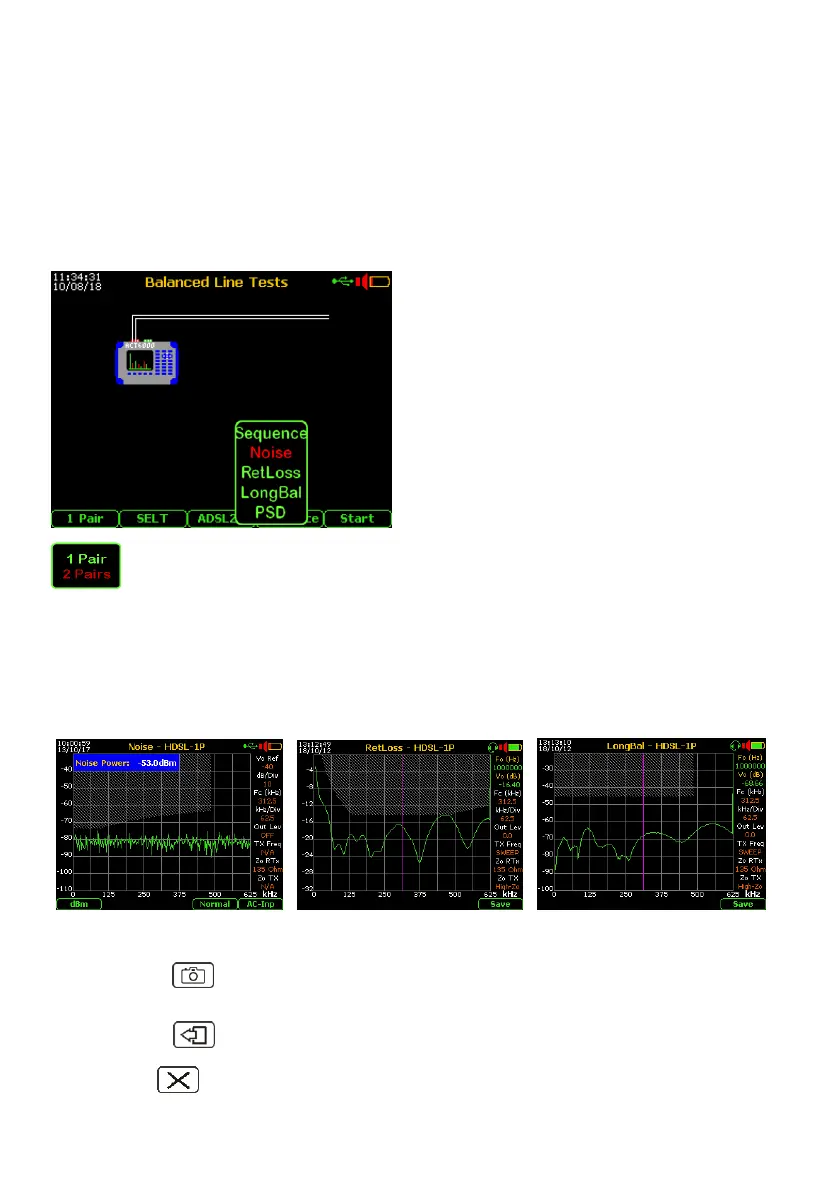
From the Main Menu, select and enter on “1.
Balanced Line Tests” menu.
- By the F3 key select the service type;
- by the F4 key select the measurements
type (excluding the “Sequence”).
To perform any test (excluding the PSD)
connect the line to the a - b point of the RTX
connector and the “earth” (Gnd) to the point
“c”.
By F1 key select the 1 Pair or 2 Pairs.
The “1 Pair” is the normal mode operation with a single line.
The “2 Pairs” allows to perform the NEXT (Near Cross-Talk) measurement, in
this case it is necessary to connect the second (disturbance) line to the a - b point of the
TX connector.
Pushing the F5 “Start” the measurement is activated and updated every second.
This test mode is very useful when a quick test is necessary to verify the quality and
cleaning of the line under test, also to select the best lines.
For the Noise test it is shown
the Noise Power Value on BW.
By pushing the “Photo” key, the measurement can be temporary frozen and a special
function-key will be enabled to save the measurement on the internal memory.
By pushing the key the measurement will be reactivated.
Pushing the (Cancel) key it is allows the immediate export of the screen shot to the
Pen-Drive or PC (image in BMP format).



 To Next Page