ACT6000 User Guide – January 2021 Page 32 of 52
11. Digital Multimeter
(by DMM optional module ACT-12 adoption)
This item allows the selection of some metallic measurements:
AC/DC Voltage, to measure extraneous voltage on the line, AC/DC Capacitance to
measure the AC capacitance and Q of the line or DC (by capacitor discharge method) the
capacitance value of the line plus the possible capacitance loads (i.e. telephones),
Resistance to measure the loop resistance, R-Bal to measure the wires balancement,
Insulation to measure the insulation resistance between the conductors and GND, the
RFL to localize the possible low insulation points of the line and Line / Load Impedance.
The occasional calibration of the DMM is allowed by pushing the F1 “DMM Cal” key.
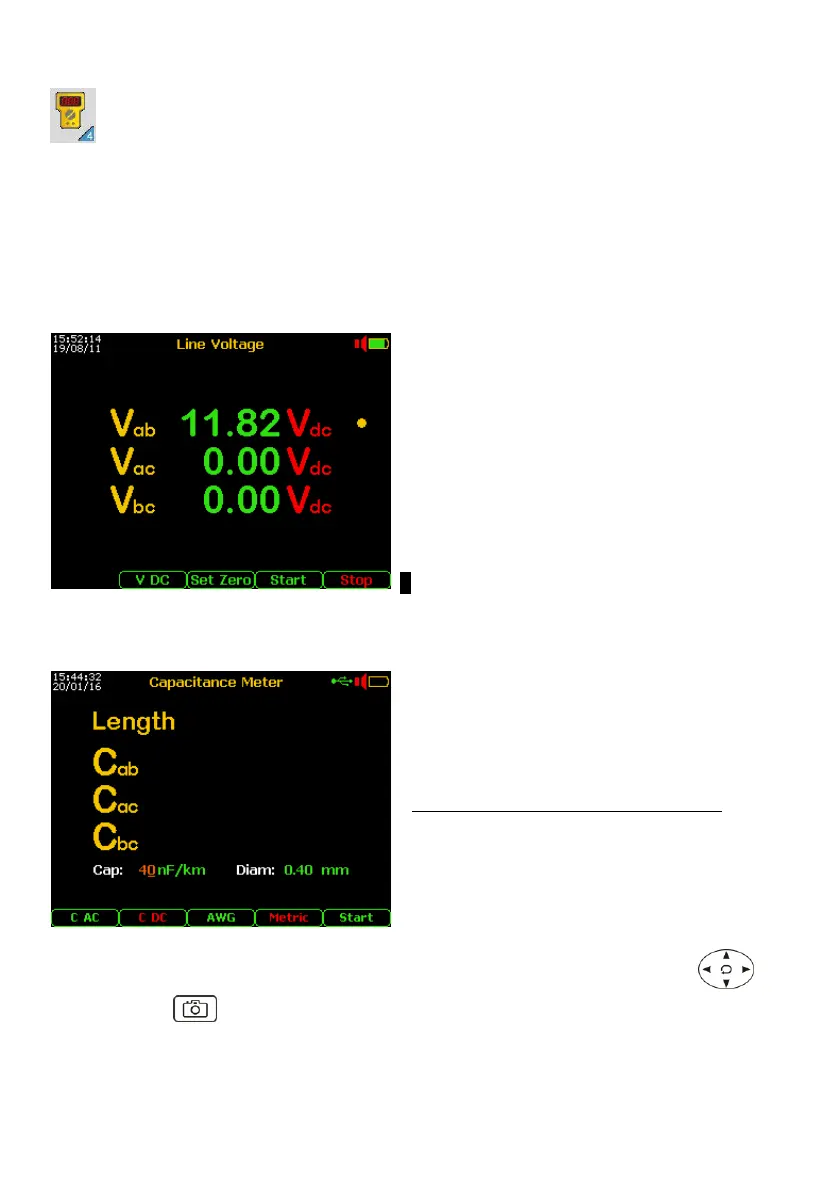
11.1. DC/AC Voltage Measurement
From the Main Menu select and enter the
Digital Multimeter function, then select item 1.
Line Voltage; on the display will appear the
menu shown to left.
- Push “Set Zero” before connecting the
test cables .
- Push the F2 key to select the
measurement mode V DC or V AC.
- Connect the line to a – b points and GND
reference to the c point of the RTX conn.
- Push the F5 “Start” key and wait for the
sequence of results to be displayed.
● Vab value still in real-time
11.2. DC/AC Capacitance Measurement
From the Main Menu select and enter the
Digital Multimeter function, select item 2.
Capacitance Meter; then select by F2 or F3
key the test modality AC or DC.
- Connect the line to a – b points and GND
reference to the c point of the RTX conn.
- Disconnect the AC/DC battery charger.
- Push the F5 “Start” key to show the
results progressively.
When the DC* capacitance value between a-b
is congruent with the typical capacitance of
copper lines, an estimation of the length
related to the capacitance value per meter is
automatically shown (see the Cable Setup menu at page 48).
To modify the Cap value nF/km and/or wires diameter use the commands group
By pushing the “Photo” key, the measurement can be temporarily frozen and the F5
key will allow to save the measurement in the internal memory.
* if found an extraneous voltage over 2.0 Volt, the test will be blocked !



 To Next Page