ACT6000 User Guide – January 2021 Page 30 of 52
10. Events Tests
This item allows the selection of some test functions oriented to line troubleshooting
such as MICROINTERRUPTIONS and IMPULSIVE NOISE .
10.1. Micro-interruptions Test
This test can be performed in three ways: End-to-End, Single-End and Tracking.
For the End-to-End mode it is necessary to use two instruments (one as Generator and
one ACT6000 as Meter, connected at opposite ends of the line under test.
For the Single-End mode a single ACT6000 is used, but it is necessary to have available a
good reference line to transport the reference signal up to the end of the line under test by
a simple loop.
For the Tracking mode a single ACT6000 is used together with the constant presence on
line of a good reference signal between 1 kHz and 6 MHz, with suitable stability (under ±10
ppm) and suitable level (> -20 dBm and < +10 dBm).
Single-End mode
After the creation of the loop between the lines, connect the reference line (good) to the TX
connector of the ACT6000 setting the Test Frequency to 2 kHz.
End-to-End mode
Set the Remote Generator (it can be another ACT6000) to 2 kHz / 600 Ohm / 0 dBm (for
the ACT6000 see the Generator & Meter instructions on this guide) and connect the line
under test to the output of this generator.
Tracking mode
Set on the ACT6000 the same Test Frequency of the reference signal already present on
the line.
Measurement setup
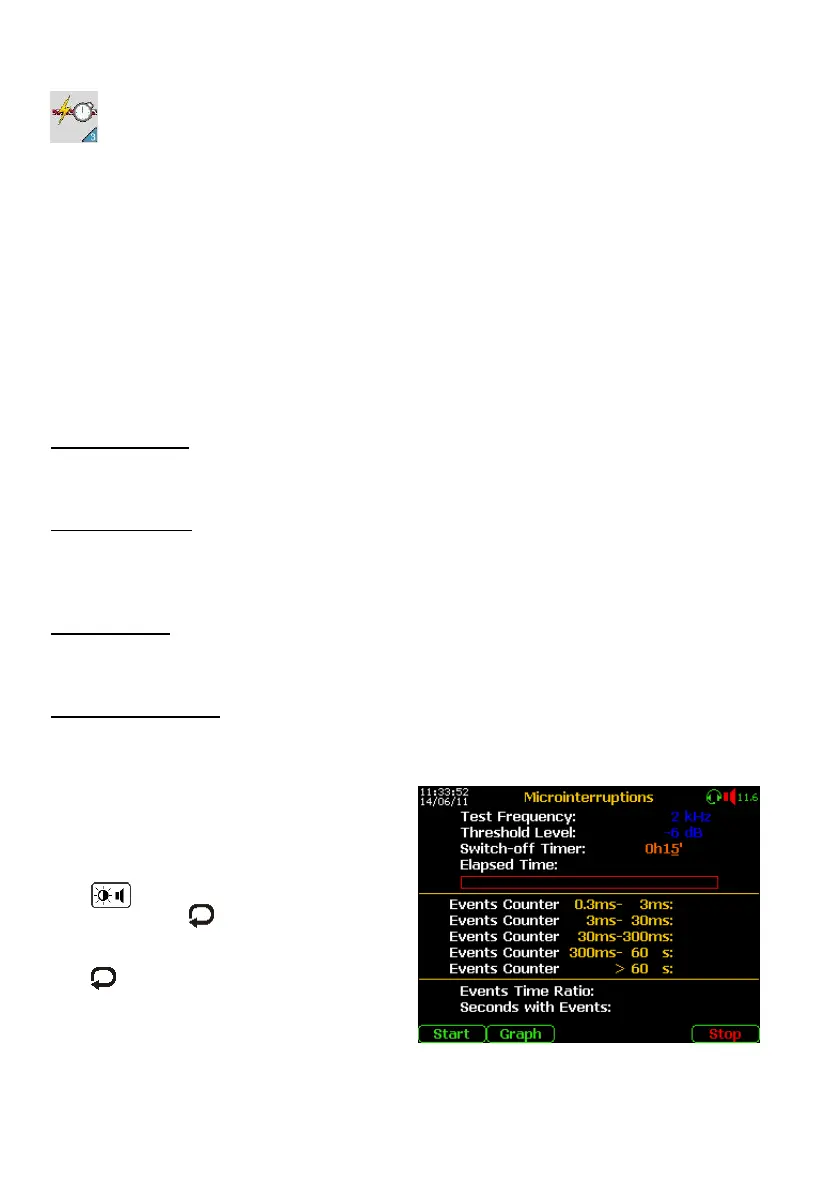
From the Main Menu select and enter on the 1 Event Tests, then select the
“2. Microinterruptions” function; the display will show the following menu.
- Connect the line under test to a – b points
of the RTX connector, if the Test Signal is
in the voice band a tone will be heard on
the internal loudspeaker (if needed it is
possible to reduce the volume by pressing
the command and the arrow).
- By pushing the key set the Threshold
Level, below which is defined the signal
interruption;
- By , “Enter” and arrows set the
Switch-off Timer (≥ 15 min. is suggested);
- Push the “Start” (F1) key.
At the end of the test, all the results will be shown on the display.



 To Next Page