ACT6000 User Guide – January 2021 Page 40 of 52
12.1. Generator & Meter
From the Main Menu select and enter the Signal Analysis item, then select and enter one
of these bands: 1. BASE BAND TESTS or 2. MEDIUM BAND TESTS.
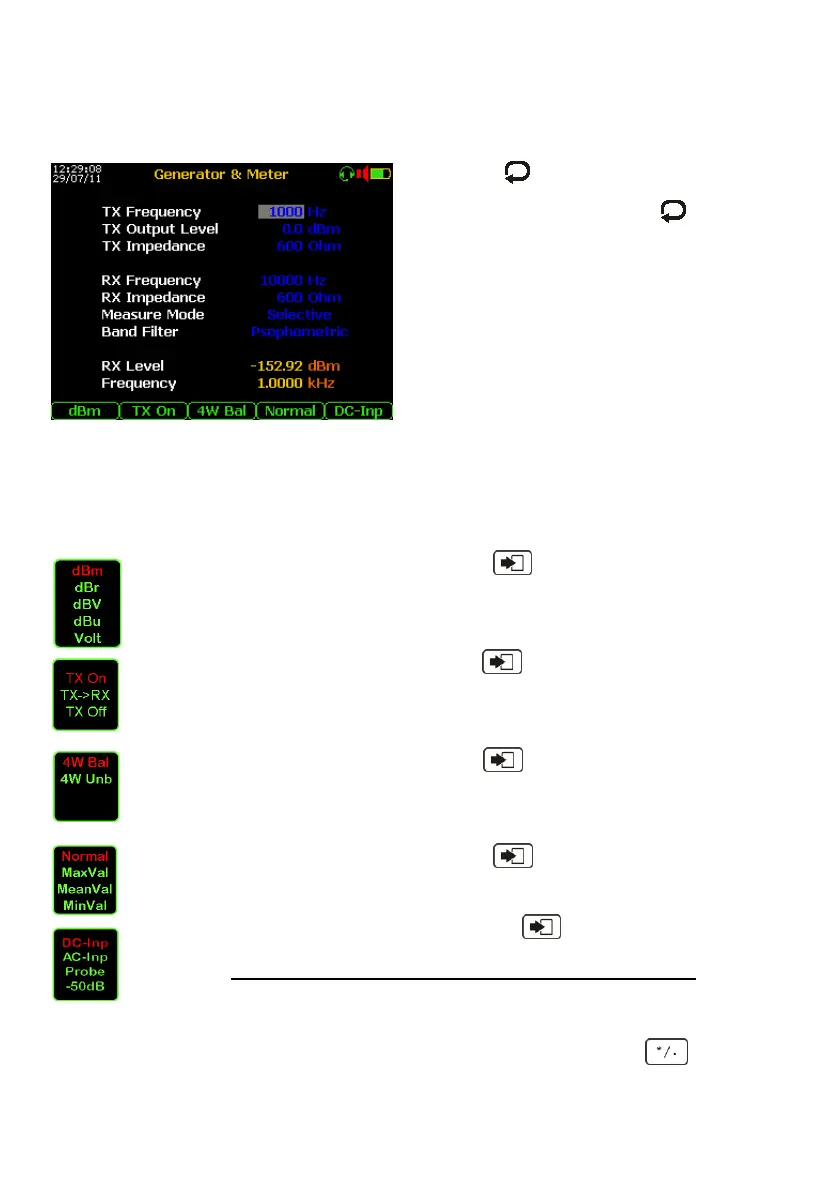
Select the item 1 GENERATOR & METER, on the display will appear this menu:
By pushing key and arrows select the
required TX and / or RX parameter, confirming
the selection by the key, then modify the
parameter by arrows.
For the RX section (only for base band), it is
possible to select the Measurement Mode:
wide band, selective, notch and S/(N+D) for
distortion measurements and narrow bands:
120, 240, 360, 400 and 480 Hz BW.
By using the Band Filter it is possible to select
various weighting bands.
In Medium / High Band the RX works only in
selective mode.
There are the selectable filters: 25, 100, 200, 400, 1740, 3100, 4000, 8000 and 16 kHz.
When selected the High Z Impedance the RX Level in dBm it is related to the reference
impedance selected on the TX section.
Other settings:
By repeated pushing of the F1 key and then “Enter” key, the following level
reading mode dBm, dBr, dBV, dBu and Volt can be selected
By repeated pushing of the F2 key and then “Enter” key, it is possible to set
the generator: TX On (on any programmable frequency), TX->RX (RX and TX on
same frequency), TX Off (to switch-off the generator, a very useful thing to
measure very low level signals.
By repeated pushing of the F3 key and then “Enter”, it is possible to set the
front-end of the instrument to: 4 Wires (separated TX and RX) on Balanced
mode for copper pairs tests or 4 Wires (separated TX and
RX) on Unbalanced mode for coaxial cables tests.
By repeated pushing of the F4 key and then “Enter”, it is possible to select
the measurement mode: Normal or highlighting in red text the Maximum or
Mean or Minimum input level.
By repeated pushing of the F5 key and then “Enter”, it is possible to
configure the front-end of the instrument to perform the measurements by AC or
DC coupling useful to increase the level accuracy of very low frequency.
Only for Medium Band is added -50 dB modality to compensate the high levels
readout if inserted the specific 50 dB Attenuator “ACT-17/B” o “ACT-17/U”.
To measure the frequency of the input signal it is necessary to push the Key.
The sensitivity threshold of the frequency-meter is about -30 dBm.



 To Next Page