ACT6000 User Guide – January 2021 Page 27 of 52
8. Subscriber Simulator
By the adoption of the POTS-SUB optional module ACT-11 (installed on the DMM
module) it is possible to perform a simple test to verify the CO signaling parameters
using the ACT6000 as POTS telephone device.
From the Main Menu select and enter on the “1. Line Tests” menu, then select and enter
on the “3. SUBSCRIBER SIMULATOR”.
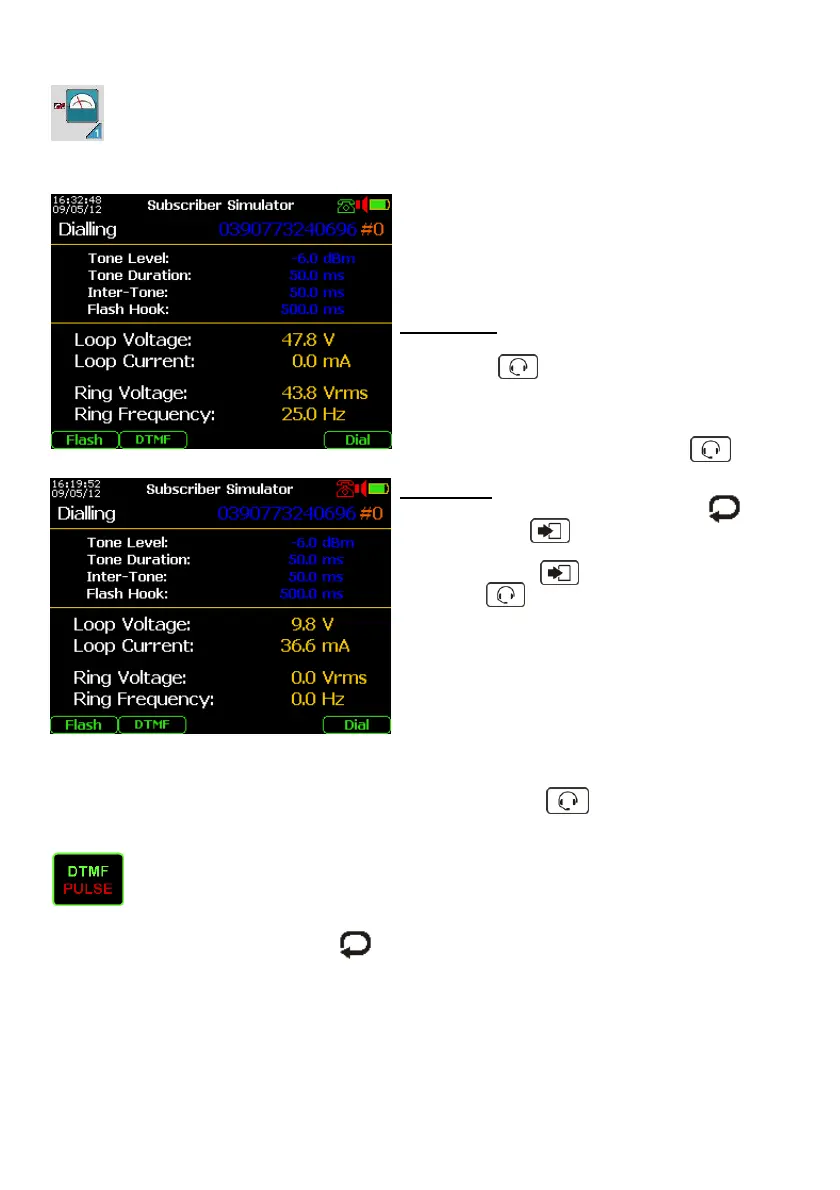
Connecting the telephone line from the CO to
the a – b points of the RTX connector, it is
possible to verify immediately the Loop Voltage
(CO line feed) in Hook-On condition.
On this condition it is possible to measure the
possible Ring Voltage and Frequency.
For answer:
Next the Ring tone detection engage the line
pushing the key.
On this condition it is possible the conversation
with the caller using the headset connected to
the instrument. When the test is finished
disengagement the line pushing the key.
For call-up:
- Select the “Dialling” line pushing the
key and press “Enter”.
- Type the Line Service telephone number
and then press “Enter”.
- Push the key to engage (Hook Off) the
telephone line.
On this condition is shown the Loop Voltage
and Current.
- Start the call-up pushing the F4 “DIAL”
function key.
During the line engagement it is allows the conversation with the responder using the
Headset connected to the instrument.
When the test is finished, disengagement the line pushing the key.
Other settings:
By pushing the F2 function key it is possible to select the DIAL mode: standard
DTMF tones or standard Pulse.
Selecting the Tone parameters by and the arrows it is possible to change the
Tone Level, Duration, Inter-Tone, but also the Flash Hook duration.
Pushing the “Flash” F1 function key it is possible to temporary disengagement and re-
engagement the line.



 To Next Page