ACT6000 User Guide – January 2021 Page 36 of 52
11.5. Fault Localization (RFL) with extraneous DC voltage
If during the Insulation test is detected an extraneous DC
voltage among the wires connected to a – b points and /or
to c (GND reference), this advise will appears.
In this case is not possible any Insulation test !
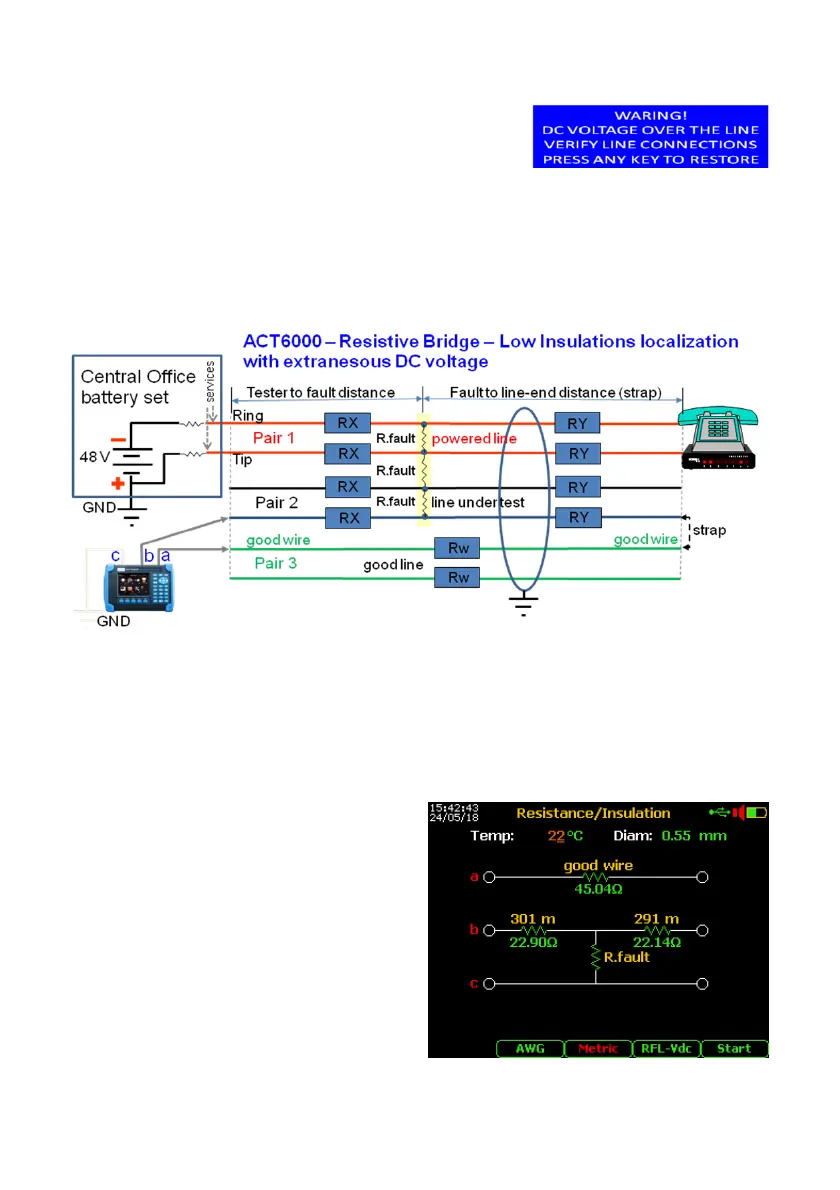
To localize the possible fault it is possible to select a special test among the functions of
the “Resistance/Insulation” menu. The typical situation is a low insulation for water/oxide
presence between the line under test (e.g. Pair 2) and one powered lines (e.g. Pair 1) as
represented on the scheme below.
First of all, it is necessary to find on the cable a “good wire” among the pairs (with same
length). The method is to measure the DC Voltage (see 11.1) connecting one of the free
lines to a – b points and c point to the GND reference of the RTX connector.
Found the “good wire” (i.e. of the Pair 3) it is possible to proceed as following.
By the Cable Setup menu (see page 48) select the presumed cable under test.
Select and enter the “RFL-Vdc” test among the functions of the “Resistance/Insulation”
menu.
Connect one wire of the line under test
“faulted pair” to the b point, connect the “good
wire” of the free good line to the a point,
connect the GND reference to the c point.
Press the F5 “Start”, short the “good wire”
connected to a point to the “faulted pair”
connected to b point, press again F5 “Start”.
Finished the test it is possible to read the
distance from the test point to fault and from
fault to line-end.
By this test is not possible to measure the
value of the fault resistance.



 To Next Page