ACT6000 User Guide – January 2021 Page 37 of 52
Multi-section Setup
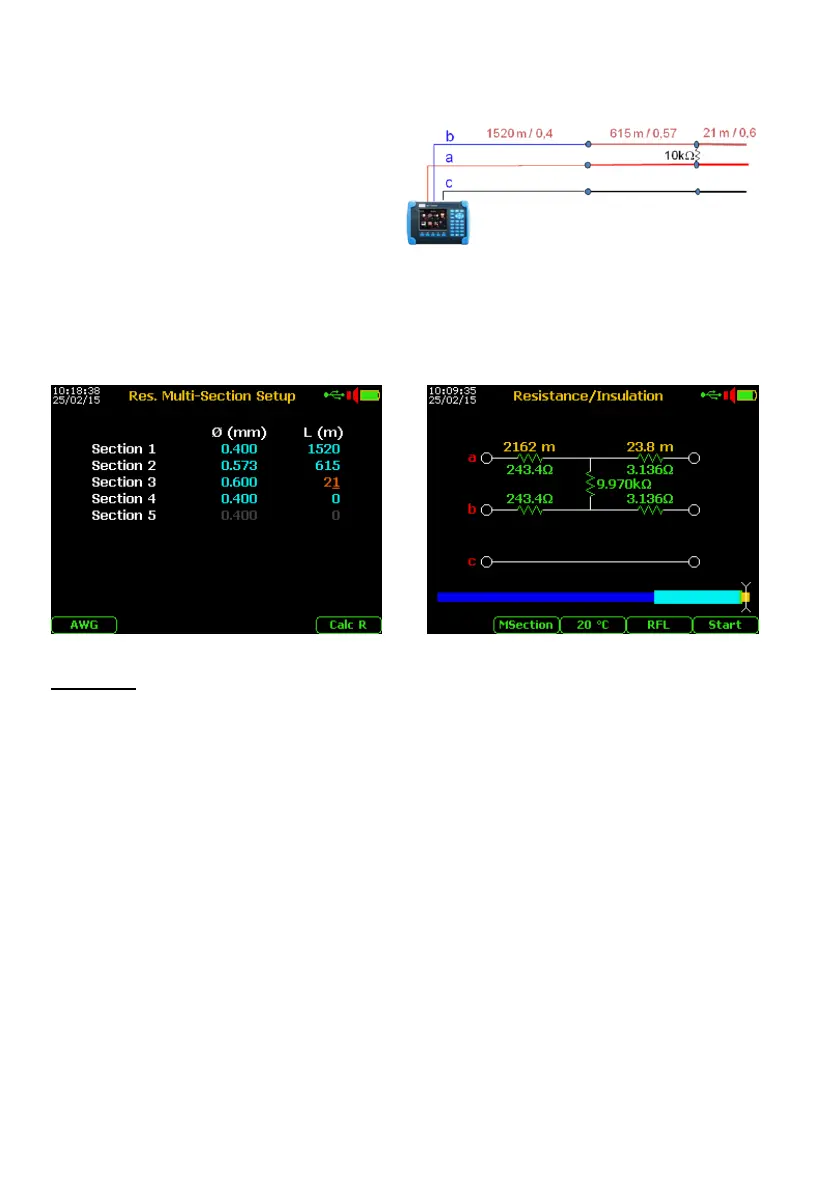
If the line is realized by different cables type, (as the following example) using the detailed
plant map, it is suggested to perform this test following these instructions:
From the Multimeter menu select and enter
on the “4. RES. MULTI-SECTION SETUP”.
Type the right diameter (Ø mm) (or AWG
type) and set the right length (L m) of
each section.
Then, exit from this menu and select the Insulation test as describer on previous page.
Finished the Insulation test, select and perform the RFL test as already described.
Finished the fault localization, under the diagram will be shown a color bar that highlights
the different cable sections.
>>>
Attention!
This multi-section setup will stay even after the switch-off of the instrument !
To avoid errors on other possible fault localizations, restore the default condition pushing
the F1 key “Default” from the Config & Utility menu.



 To Next Page