ACT6000 User Guide – January 2021 Page 14 of 52
5. Commands and Connections description
5.1. Front panel Commands description
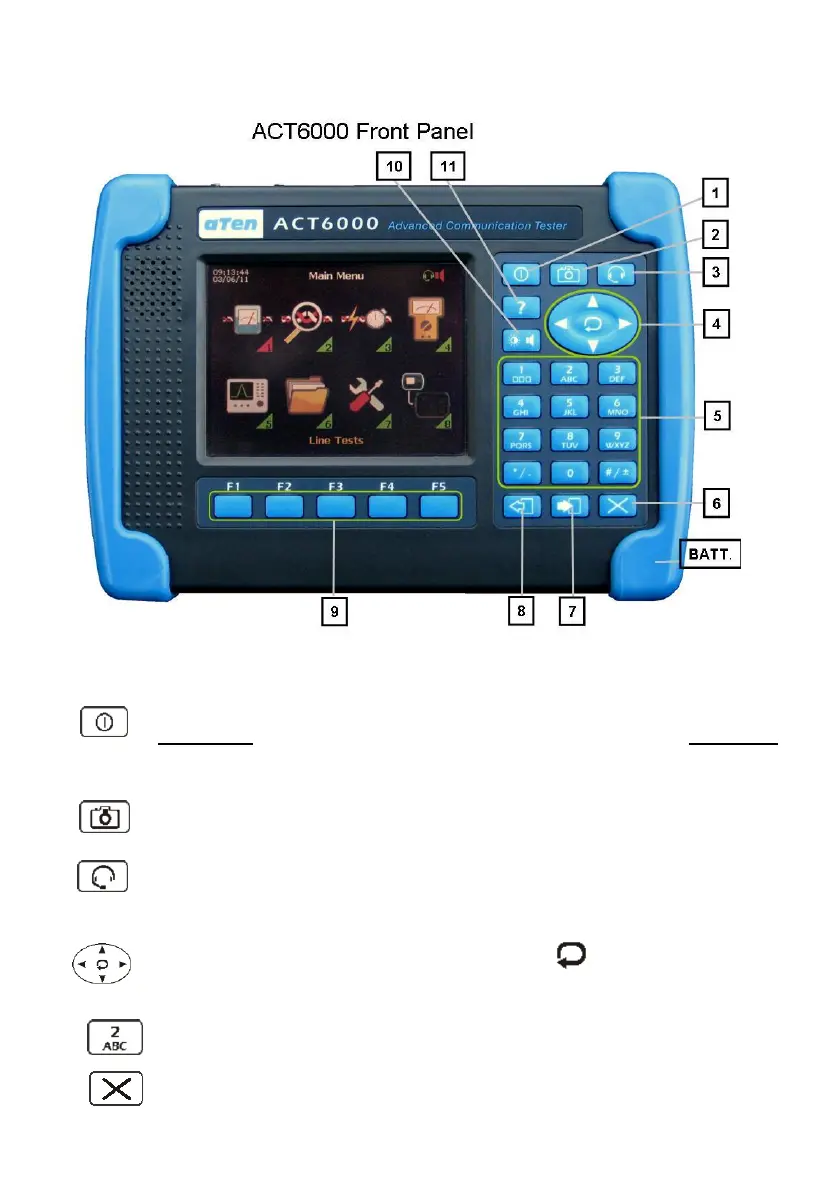
1- (Power) Key for switching On/Off.
A short press of this key switches ON the instrument, while a long press
switches Off.
2- (Hold) Key for the temporary freezing of the measurement. This command
allows access to a “Save” function to store and/or export the file measurement.
3- (Talk) Key for enabling the intercom circuit; this command enables only the
microphone, as the headphone is always enabled. This command switch the
Line Hook-Off / Hook-On when the POTS Subscriber Simulator is activated.
4- Commands group plus selection function (as “Enter”), for menu
selection and parameters setting.
5- Keys group for the setting of alpha-numerical parameters.
6- (Clear) Key for cancellation, it enables the ability to export the screen shot
In BMT format to the USB Pen-Drive.



 To Next Page