Chapter 7: Statistical Analyses
147
7307ENG.DOC CH 7, Statistical Analyses, English Julie Hewlett Revised: 07/29/98 12:07 PM Printed: 05/19/99
9:00 AM Page 147 of 22
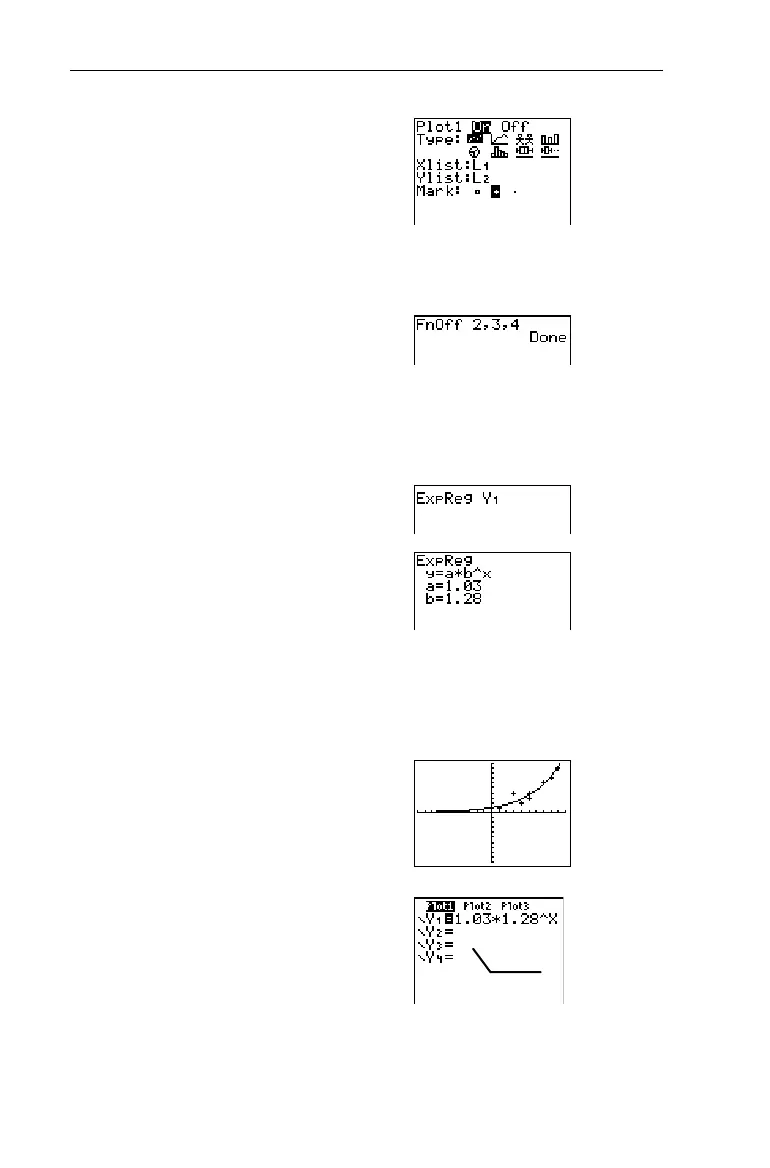
2. After entering the lists,
define
Plot1
as a scatter plot
using
L
1
and
L
2
, as shown to
the right.
-e
For more information on defining stat
zplots, see Chapter 6: Statistical Plots.
3. Turn off
Y
2
,
Y
3
, and
Y
4
, if
they have been previously
defined and selected.
-l:
-}
2
6
2
¡
3
¡
4
b
4. Find the
ExpReg
curve, and
store the results to
Y
1
.
-l:-
v!
7
-}
2
1
b
Specifying
¨
1
and
¨
2
is optional since
they are the default
list names
.
However, if you were using other list
names, you would have to enter them
before the
Yn
variable.
5. View the curve on the
Graph screen.
(
6
6. View the equation stored to
Y
1
, if desired.
&
Y
2
,
Y
3
, and
Y
4
may vary.


 To Next Page
 Loading...














