Chapter 11: Trigonometry
215
7311ENG.DOC CH 11 Trigonometry, English Julie Hewlett Revised: 05/26/98 11:12 AM Printed: 05/19/99 9:02
AM Page 215 of 12
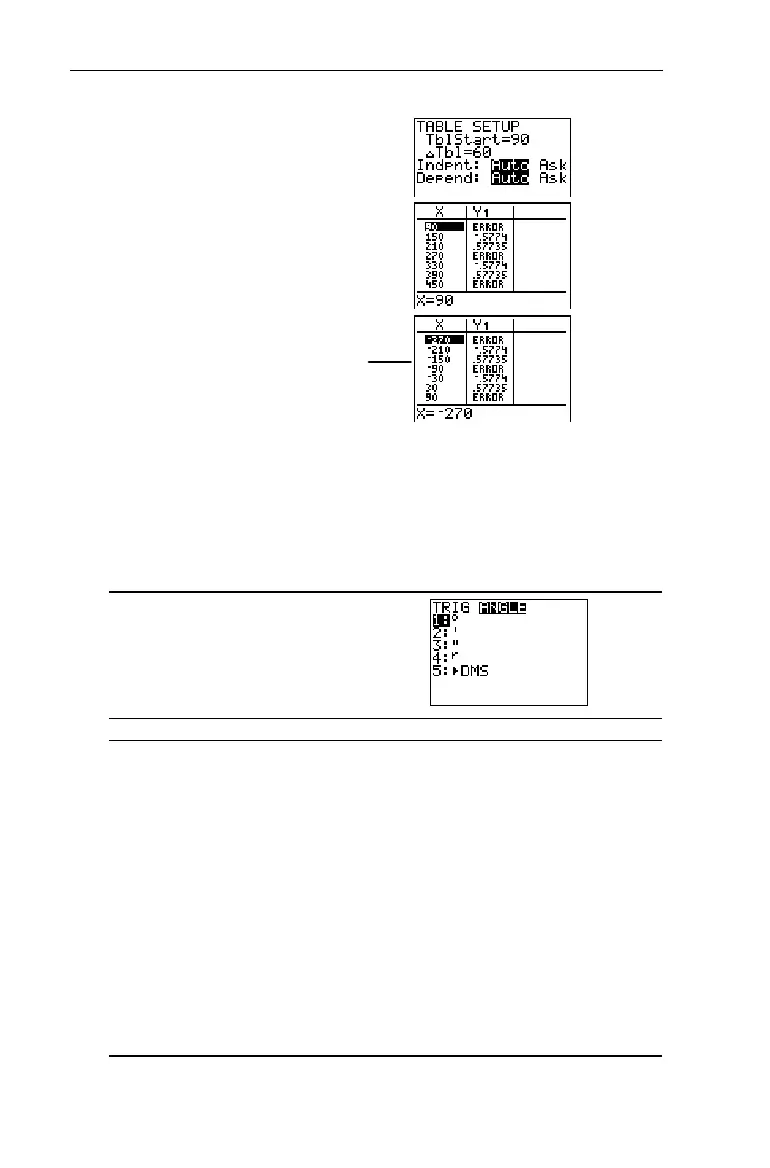
6. Use the table to check your
result. Set
TblStart=90
,
@Tbl=60
,
Indpnt=Auto
and
Depend=Auto
.
-f
90
#
60
-i
$ or # , as necessary
The -
u
ANGLE Menu
The
ANGLE
menu lets you specify the unit (degrees, radians, or
DMS) of an angle, and it lets you convert an angle from one
unit to another.
-u"
1:
¡ Designates an angle as degrees, regardless of the
current Angle mode setting or DMS notation.
2:'
In DMS (degrees¡ minutes
'
seconds
"
) notation,
specifies the minutes.
3:"
In DMS (degrees¡ minutes
'
seconds
"
) notation,
specifies the seconds.
4:
r
Specifies an angle as radians, regardless of the
current Angle mode setting.
5:8DMS
Converts an angle to DMS (degrees¡ minutes
'
seconds
"
) notation.
From these two screens, you
know that
tan(X)
is undefined at
X
=
M
270,
M
90, 90, 270, 450.


 To Next Page
 Loading...














