Chapter 10: Drawing
191
7310ENG.DOC Draw Texas Instruments Revised: 05/29/98 6:43 PM Printed: 05/19/99 9:01 AM Page 191 of 22
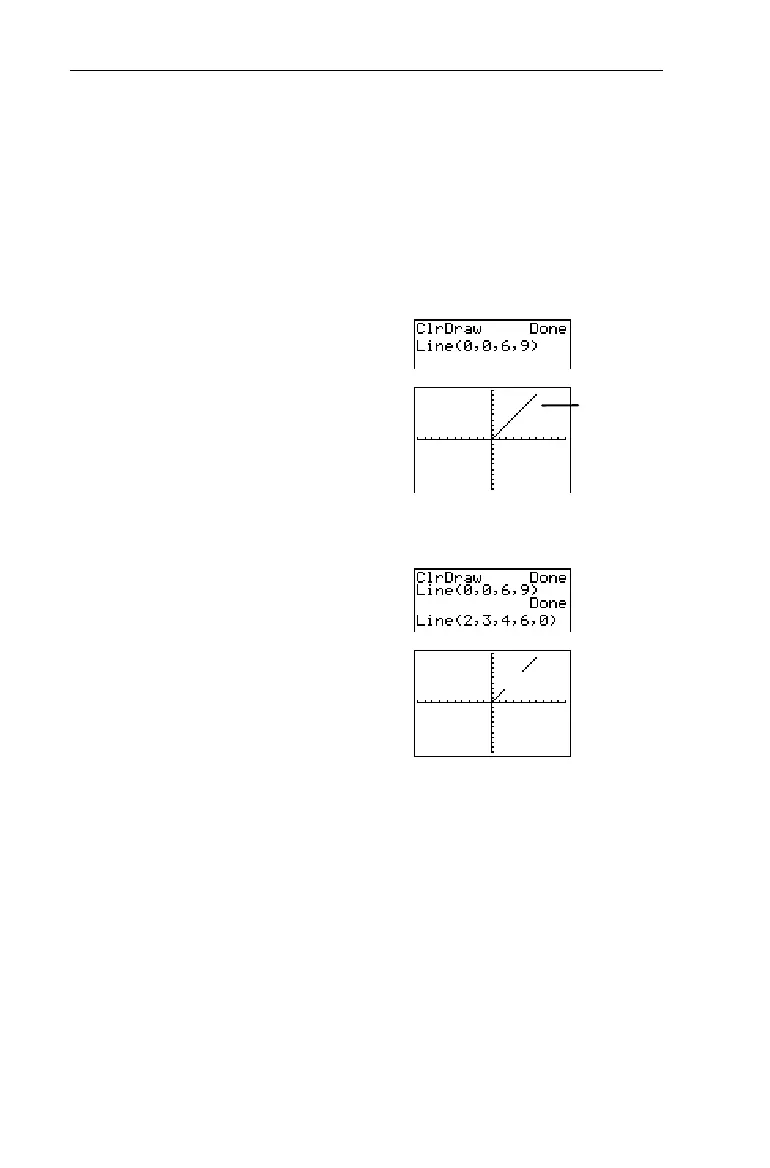
From the Home screen, draw a line segment from (0,0) to
(6,9).
1. From the Home screen,
clear the Graph screen.
-l:
2
1
b
2. Specify the (X,Y)
coordinates and draw the
line segment.
2
2
0
¡
0
¡
6
¡
9
Eb
Erase the portion of the line from (2,3) to (4,6).
-l2
2
2
¡
3
¡
4
¡
6
¡
0
E
b
Horizontal and Vertical Horizontal and Vertical
2
3 and 4 3 and 4
Horizontal
and
Vertical
draw a horizontal or vertical line on the
Graph screen. You can execute both instructions from the
Graph screen, Home screen or the Program editor.
³
³
'
is set to
standard default
values.


 To Next Page
 Loading...














