160
Chapter 8: Tables
7308ENG.DOC CH 8 Tables, English Julie Hewlett Revised: 07/29/98 12:08 PM Printed: 05/19/99 9:01 AM
Page 160 of 14
Editing Editing
YY
n
from the Table Screen from the Table Screen
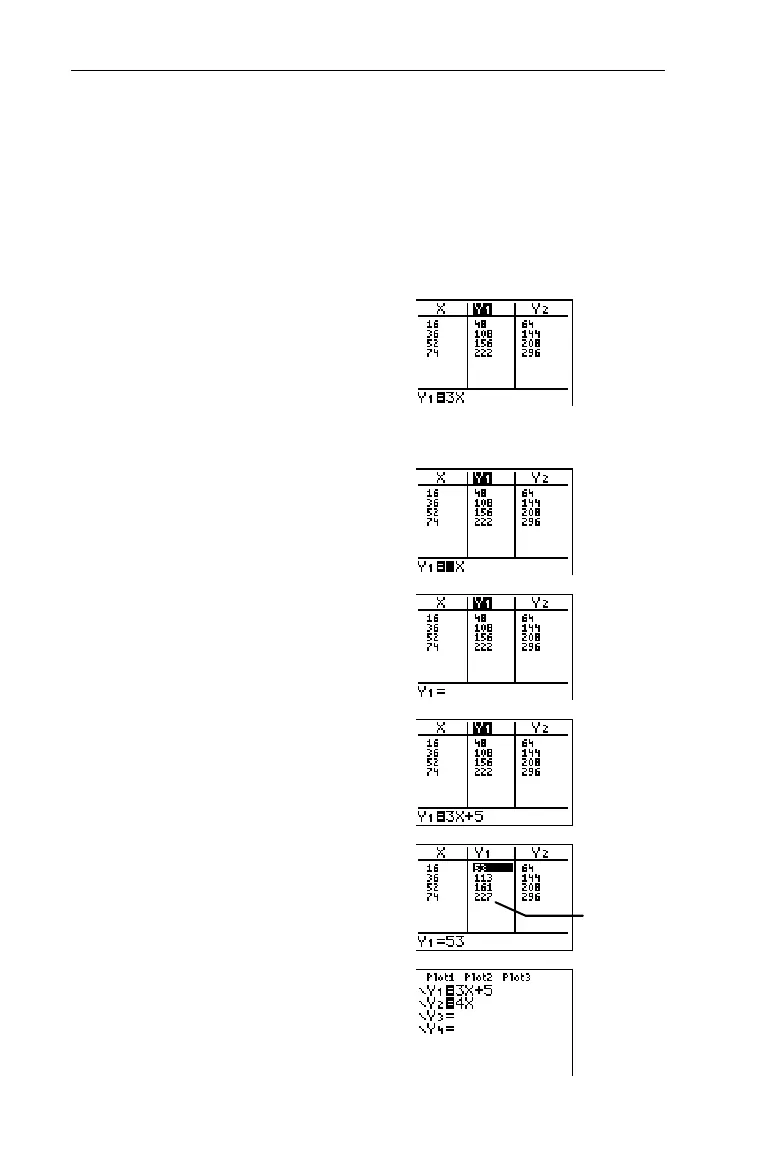
At any time you can edit
Y
n
from the Table screen without
returning to the Y= editor.
Change Y
1
=3x to Y
1
=3x+5. (Refer to the previous example, if
necessary.)
1. Display the Table screen,
and highlight
Y
1
with the
cursor.
-i
"a nd $ (as
necessary)
2. Move the cursor to the
entry line.
b
3. Clear the entry line.
:
4. Enter
3X+5
.
3
I\
5
5. Insert the equation back
into the table.
b
6. If desired, display the
Y= editor to confirm that
Y
1
has indeed been changed.
&
³
Table values
are adjusted.


 To Next Page
 Loading...














