EasyManua.ls Logo

Texas Instruments TI-73 Explorer - Page 178

Texas Instruments TI-73 Explorer
364 pages
Print Icon
To Next Page IconTo Next Page
To Previous Page IconTo Previous Page
Loading...
172
Chapter 9: Function Graphing
7309ENG.DOC CH 9 Function Graphing, English Julie Hewlett Revised: 07/29/98 12:14 PM Printed: 05/19/99
9:01 AM Page 172 of 24
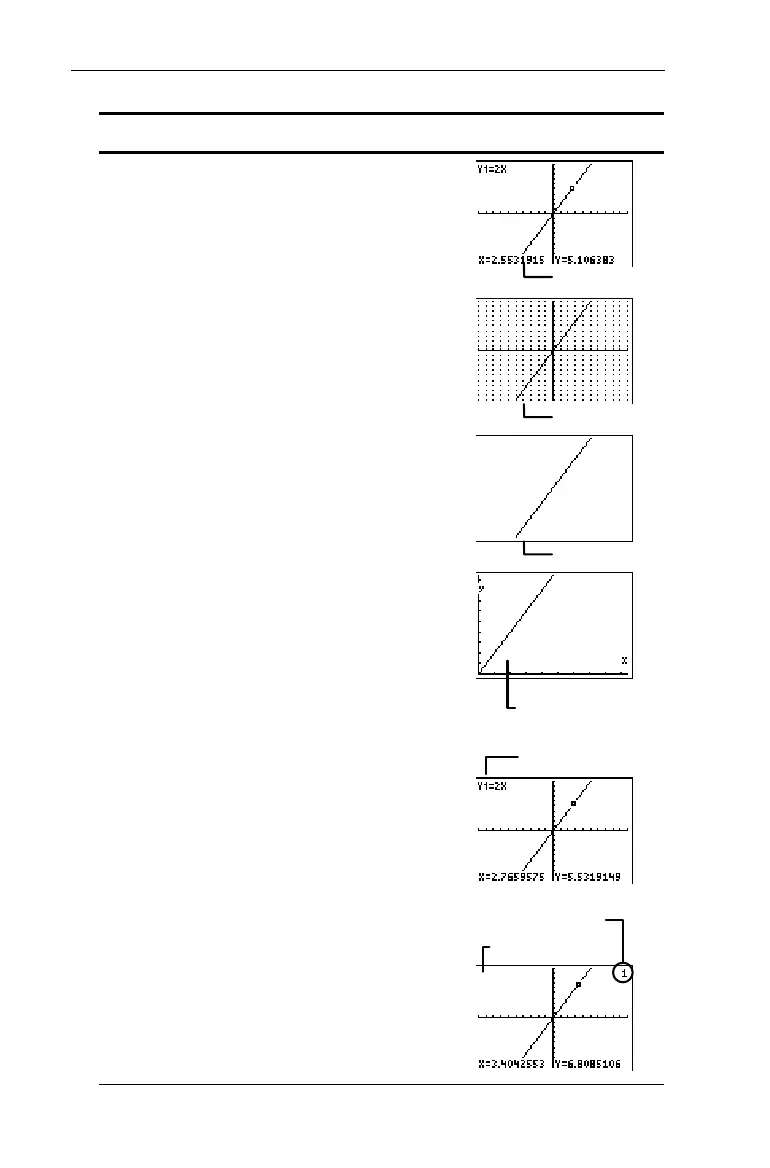
Setting Turns these on or off: Example:
CoordOn/
CoordOff
X- and Y-coordinates of
the cursor at the bottom
of the screen. Useful
when tracing a graph.
GridOff/
GridOn
Grid lines that
correspond to the axes
tick marks.
AxesOn/
AxesOff
X- and Y-axes.
LabelOff/
LabelOn
Labels for the X- and Y-
axes. These settings are
disregarded when
AxesOff
is selected.
LabelOn
is especially
helpful when displaying
Quadrant I ((
4
)
graphs.
ExprOn/
ExprOff
Expression which is
currently being traced.
The expression is shown
in the top left corner of a
graph.
When
CoordOn
and
ExprOff
are both selected,
the number in the top-
right corner specifies
which function is being
traced.
CoordOn
GridOn
AxesOff
A Quadrant I graph with
LabelOn
selected
ExprOn
ExprOff
Y
1
is being traced.

Table of Contents

Other manuals for Texas Instruments TI-73 Explorer

Related product manuals