Chapter 3: Fractions
63
7303ENG.DOC Ch 3 Fractions, English Julie Hewlett Revised: 07/29/98 12:00 PM Printed: 05/19/99 8:59 AM
Page 63 of 10
Choosing the Simplification Factor
After getting an unsimplified result from any fractional
calculation, press B simplification_factor b, where
simplification_factor is a positive integer that you choose.
The Display Format mode settings affect whether a result is
displayed as a mixed number or as a simple fraction.
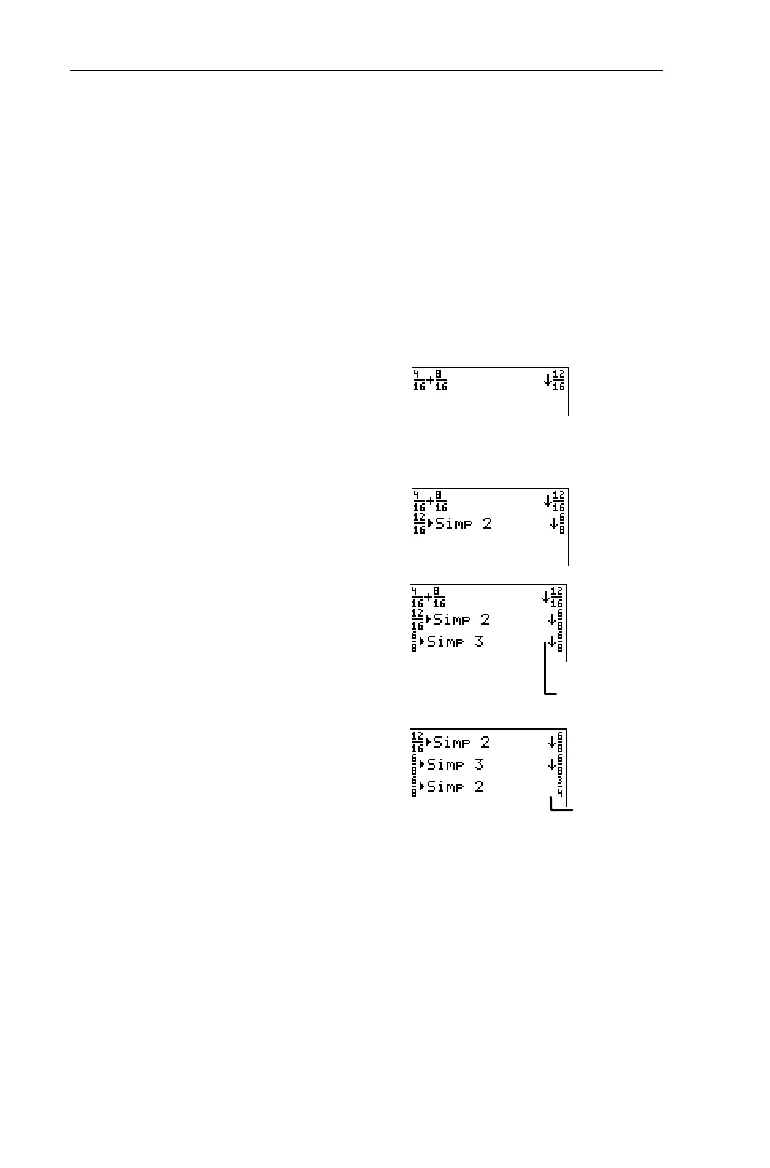
Add
4
/
16
+
8
/
16
and choose the simplification factor to reduce
the sum to lowest terms.
1. Enter
4
/
16
+
8
/
16
.
-l:
4
=
16
"\
8
=
16
b
2. Simplify by 2.
B
2
b
3. Simplify by 3.
B
3
b
4. Simplify by 2.
B
2
b
Recalling the Factor
-
}
6:Factor
If you execute a fractional calculation in
Mansimp
mode and
then the user or the calculator simplifies the result, you can
recall the simplification factor at a later time by selecting
- }
6:Factor
.
Since
Factor
is a variable, you can use
Factor
in expressions or
on any screen that accepts whole numbers (Y= editor, List
editor, Home screen, etc.).
³
The result did not
change. Try again
with another factor.
Simplification is
complete.


 To Next Page
 Loading...














