80
Chapter 5: Lists
7305ENG.DOC CH 5 Lists, English Julie Hewlett Revised: 07/29/98 12:04 PM Printed: 05/19/99 8:59 AM Page
80 of 30
If you do not want to use
L
1
-
L
6
(you cannot rename them), you
can create a new list and name it anything you want. A list
name can be one to five characters long. The first character
must be a letter from A to Z. The second through fifth
characters can be any combination of letters and numbers.
Access letters from the Text editor (- t). A list accepts
elements only after it is named.
Note: You cannot rename a user-named list, but you can copy
its elements to a list with a different name. See the section
entitled, Copying One List to Another on page 103.
In this guidebook, when a list name is referred to, its name is
always preceded by the
¨
symbol; however, you dont type the
¨
when naming a list in the List editor.
If a defined list name is highlighted, the list elements or the
attached formula are displayed on the entry line.
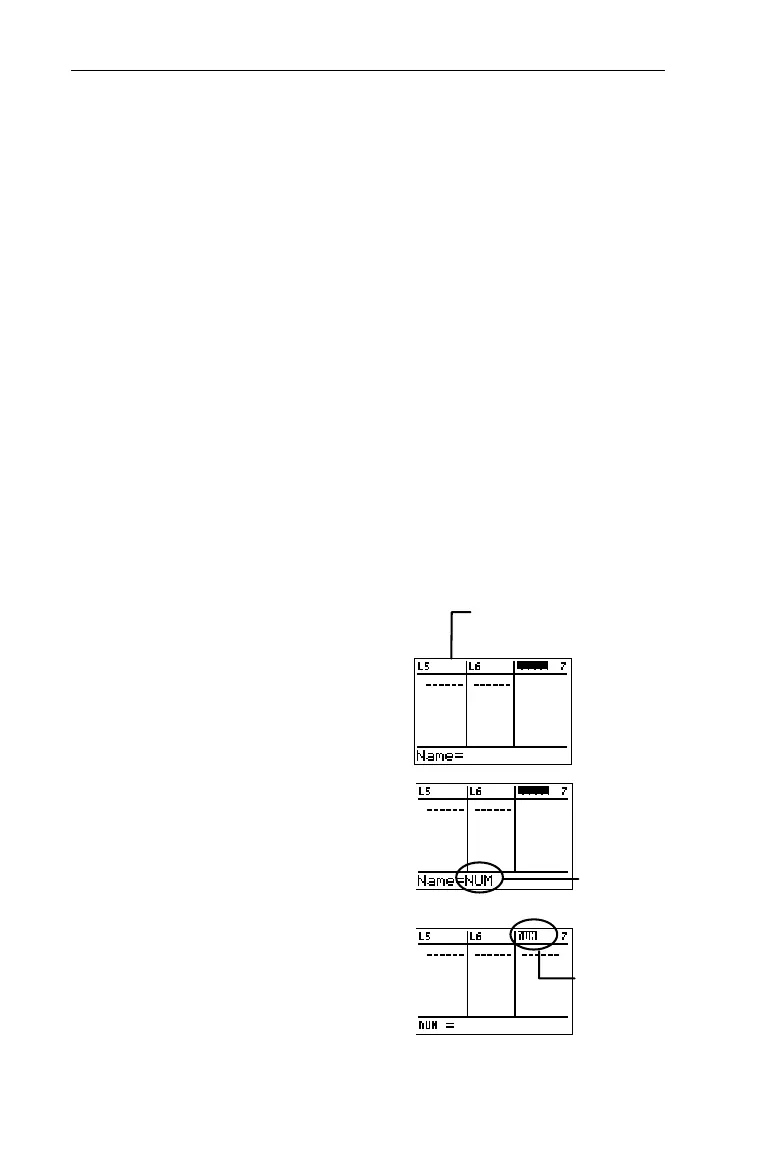
Create a list named
NUM
.
1. Display the List editor.
3
2. Scroll to the blank,
unnamed list to the far right
of the List editor.
" or !
3. Use the Text editor to name
the list
NUM.
-t
N
b
U
b
M
b
Done
b
4. Move
NUM
from the entry
line to the list name line.
b
³
Or, insert a blank list. Highlight
a list name and press
-
m
.
NUM
appears on
the entry line.
¨
NUM
now
accepts
elements.


 To Next Page
 Loading...














