8
3. CONFIGURING & OPERATING THE FLOWMETER
3.1 The Keypad & Display
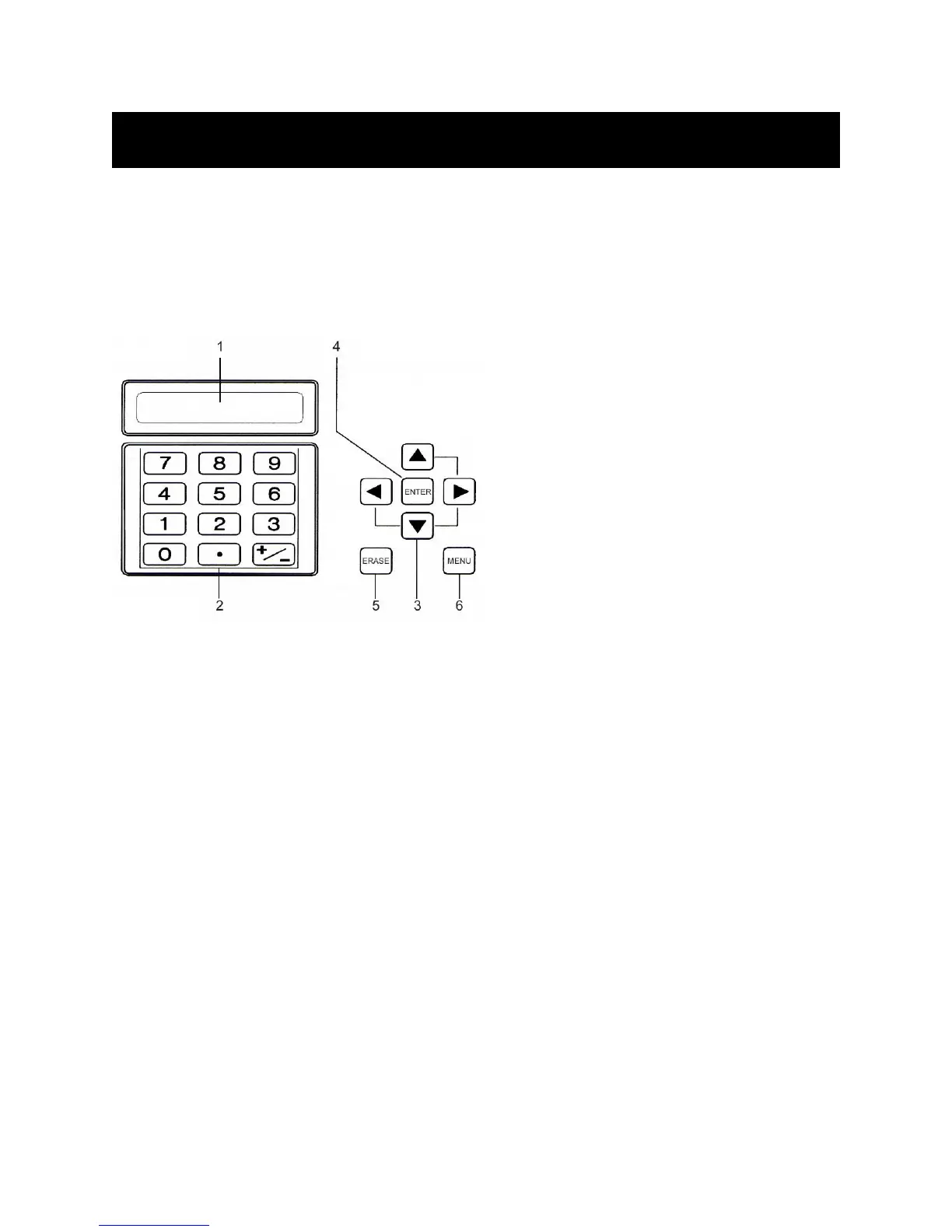
The keypad provides access to the microprocessor for flowmeter configuration. During operation, the
instrument’s 40-character LCD indicates flow rate and totalizer values.
3.1.1 Components
Components
# Description
1 LCD
2 Numeric keys: 0 through 9 and decimal (.).
3 Arrow keys: For scrolling up, down, left, right.
4 ENTER key: Operates like the Return (Enter)
key on a computer.
5 ERASE key: Deletes last value entered. In most
setup and diagnostic menus, accesses main
menu. Accesses Menu 00 (flow rate and net
totalizer display) if pressed twice.
6 MENU key: Provides access to setup and
diagnostic menus.
F
IGURE 3: KEYPAD & DISPLAY FEATURES
3.1.2 Display Contrast & Backlight
The display is backlit for ease of viewing in low-light conditions. In order to save battery life, the backlight
shuts off automatically after several minutes have passed without a keypad entry. The display has a
variable contrast setting, and you may need to adjust the contrast on the display as ambient temperature
changes:
1. Press MENU followed by the ± (plus/minus) key.
2. LCD CONTRAST appears on the display with a bar indicating current contrast setting.
3. Press LEFT or RIGHT ARROW keys to adjust the contrast.
4. Press ENTER when complete.
3.2 Direct Menu Access
The unique 2-digit address (reference Table 2, page 9) for each setup and diagnostic menu allows the
user to directly access the desired menu:
1. Press MENU, and the letter M appears in the lower right corner of the display.
2. Enter the desired menu’s 2-digit address.











 To Next Page