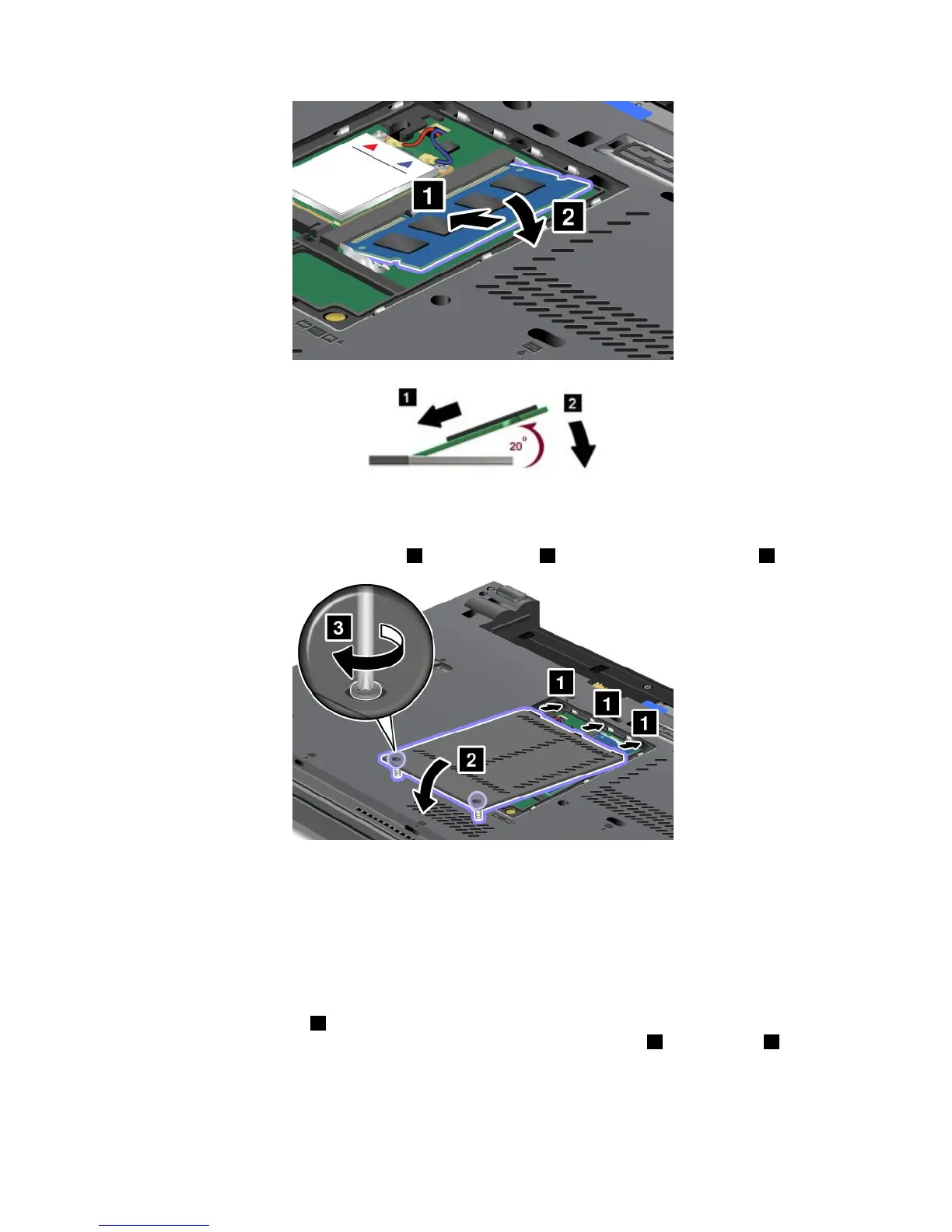
7.Pivotthememorymoduledownwarduntilitsnapsintoplace.
8.Makesurethatthememorymoduleisrmlyxedintheslotandcannotbemovedeasily.
9.Putthememoryslotcoverbackinplace1,closethecover2,andthentightenthescrews3.
10.Reinstallthebattery.See“Replacingthebattery”onpage69.
Replacingmemoryintheslotunderthekeyboard
1.Turnoffthecomputer;thendisconnecttheacpoweradapterandallcablesfromthecomputer.
2.Closethecomputerdisplay,andturnitover.
3.Removethebattery.See“Replacingthebattery”onpage69.
4.Removethekeyboard.See“Replacingthekeyboard”onpage76.
5.Liftuptheinsulationsheet1torevealthememoryslot.Ifamemorymoduleisalreadyinthememory
slot,pressoutonthelatchesonbothedgesofthesocketatthesametime2andremoveit3tomake
roomforthenewone.Besuretosaveitforfutureuse.
82UserGuide



 To Next Page