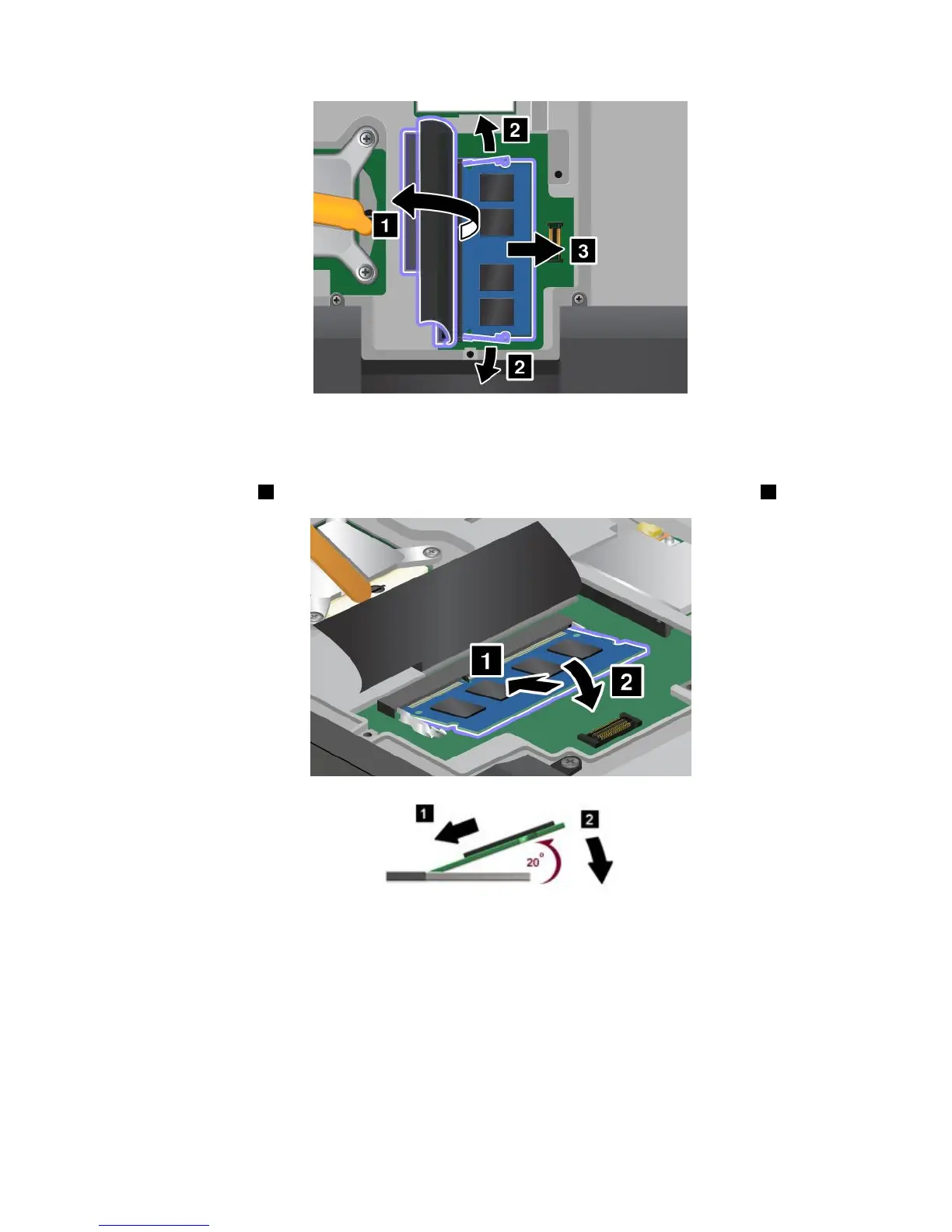
6.Findthenotchonthecontactedgesideofthememorymoduleyouareinstalling.
Attention:Toavoiddamagingthememorymodule,donottouchitscontactedge.
7.Withthenotchedendofthememorymoduletowardthecontactedgesideofthesocket,insertthe
memorymodule1intothesocketatanangleofabout20degrees;thenpressitinrmly2.
Note:Ifyouinstallamemorymoduleinonlyoneofthetwomemoryslots,installitintheslotlocated
underthekeyboard.
8.Pivotthememorymoduledownwarduntilitsnapsintoplace.
9.Makesurethatthememorymoduleisrmlyxedintheslotandcannotbemovedeasily.
10.Reinstallthekeyboard.See“Replacingthekeyboard”onpage76.
11.Reinstallthebattery.See“Replacingthebattery”onpage69.
Tomakesurethatthememorymoduleisinstalledcorrectly,dothefollowing:
1.Turnthecomputeron.
Chapter6.Replacingdevices83



 To Next Page