© 2016 Thorlabs20
ITC8000
immediately and remains switched off until the interlock circuit is closed again and the laser
current is switched on again.
Status display
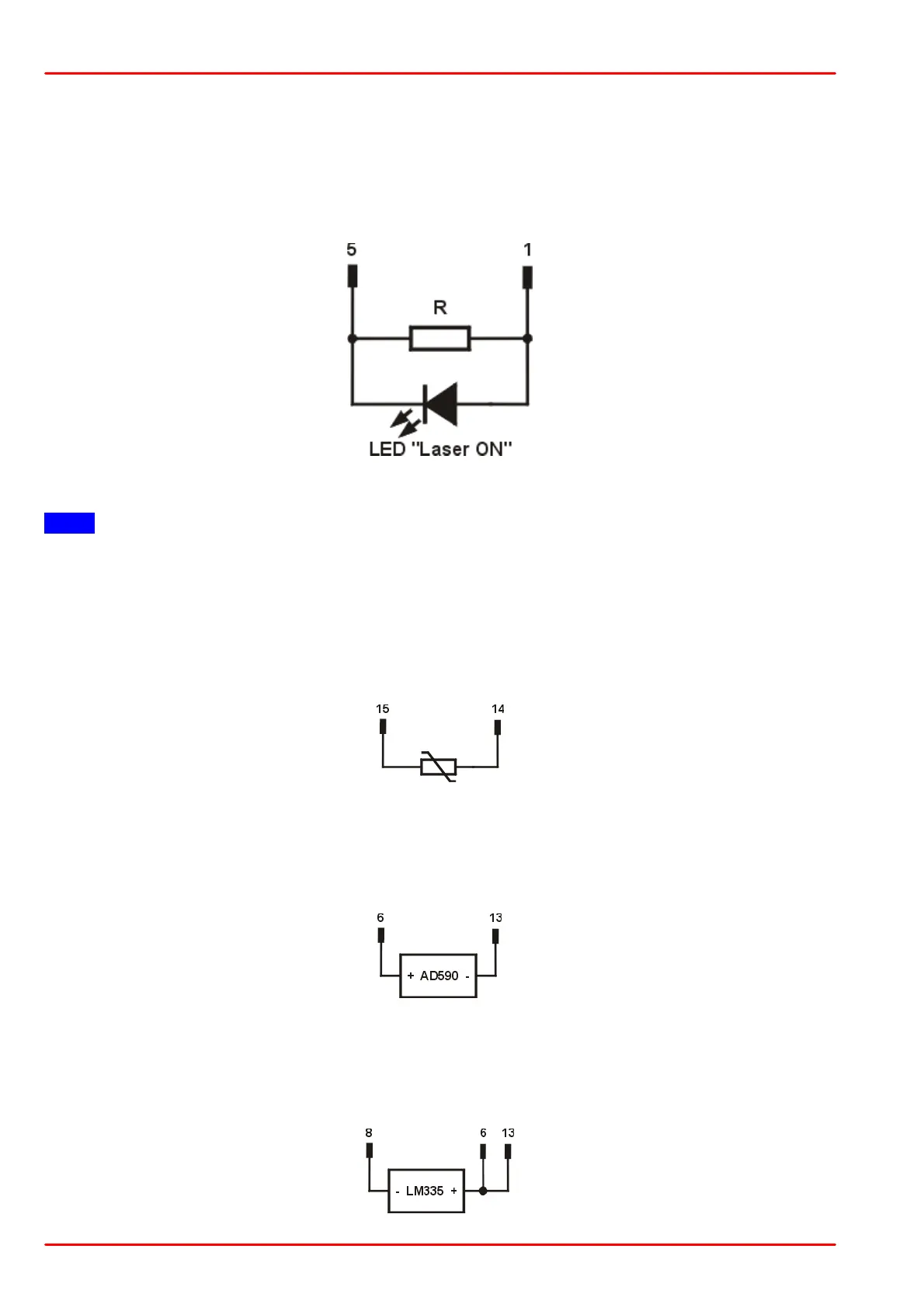
For Laser On/Off status indication, a LED with a 470 W resistor in parallel can be connected
between the two interlock pins. The LED will light up when the laser output is switched on.
Note
Mispoling the LED may lead to a malfunction as the status of the interlock is then in an undefined
range.
4.3 Connecting a Thermistor - ITC8000DS15
The thermistor is connected between pin 14 and pin 15:
4.4 Connecting an AD590 - ITC8000DS15
The IC-temperature sensor AD590 is connected between pin 6 (+) and pin 13 (-).
4.5 Connecting a LM335 - ITC8000DS15
The IC-temperature sensor LM335 is connected between pin 6, 10 (+) and pin 8 (-).



 To Next Page