19
10.2.3. PAD ON/OFF setting
The PAD ON or OFF can be set to Monaural inputs
1 through 8.
When the input level is high, turn on the PAD.
The attenuation circuit of the input level is activated
by turning on the PAD, eliminating the input clip.
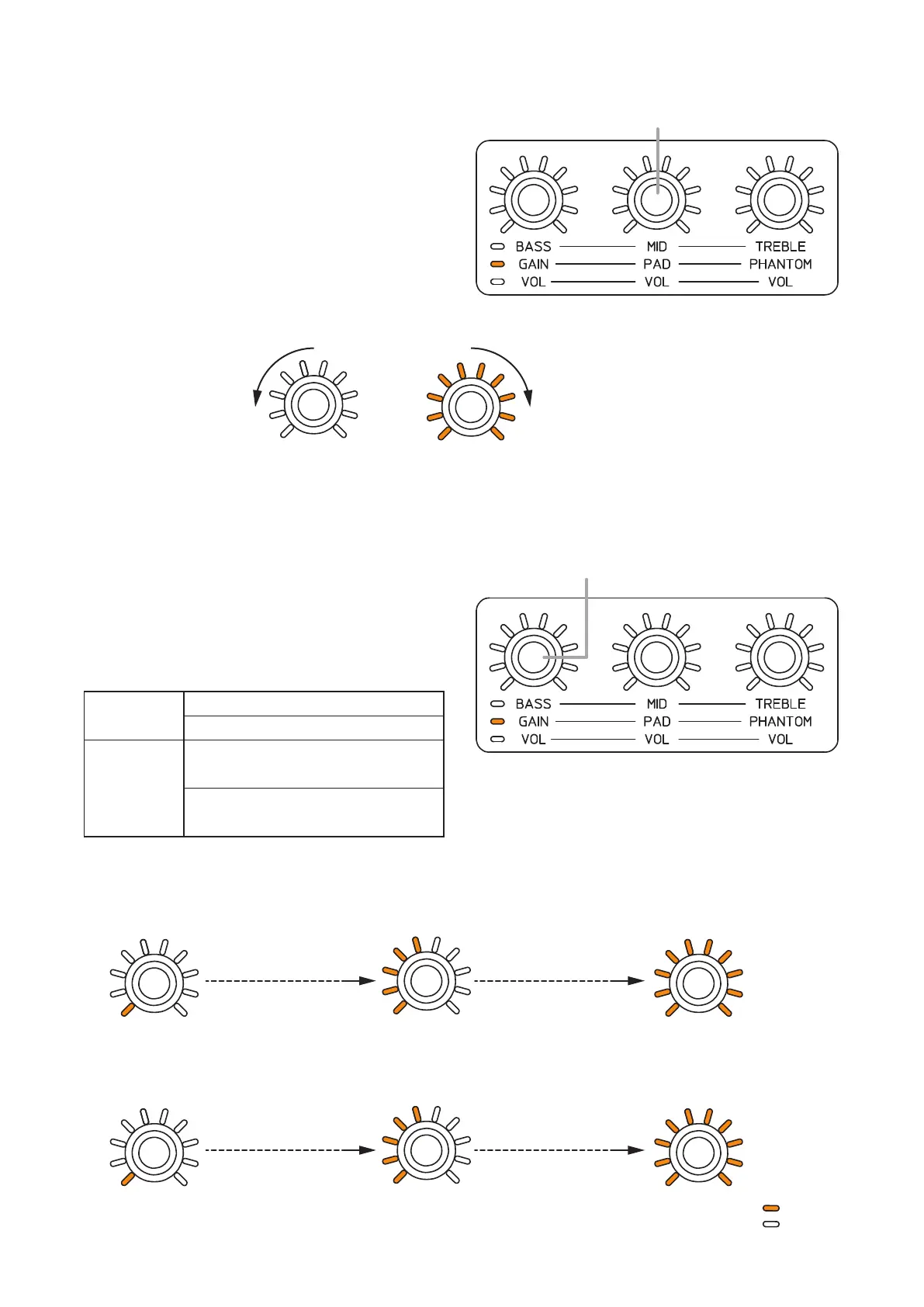
Rotating the PAD ON/OFF setting knob clockwise
turns the PAD ON, and counterclockwise turns it OFF
for the channel of which Tone/Gain control mode
indicator is lighting orange. (Default setting: ON)
When the PAD is ON, all the setting value indicators
around the control knob light, and when OFF, they
go off.
10.2.4. Adjusting the Gain
It is possible to adjust gains of the Monaural inputs
1 through 8.
Rotating the Gaincontrol knob clockwise amplies
the gainof thechannelof which Tone/Gain control
mode indicator is lighting orange.
(For the default value and setting range, refer to the
next page.)
Default value
When PAD set to ON: 0 dB
When PAD set to OFF: +15dB
Setting range
When PAD set to ON: 0to+18dB
in 1 dB steps
When PAD set to OFF:
+15to+60dB
in 1 dB steps
Theguresbelowshowtherelationshipbetweenthesettingvalueindicatorsaroundthecontrolknobandthe
gain.
[When PAD set to ON]
PAD ON/OFF setting knob
All indicators go off.
Rotate Counterclockwise. Rotate clockwise.
PAD OFF
All indicators light.
PAD ON (Default setting)
Gain control knob
1 indicator lights.
0 dB
One scale advances
in 2 dB steps.
One scale advances
in 2 dB steps.
5 indicators light.
+8 dB
All indicators light.
+18 dB
[When PAD set to OFF]
: Lit
: Unlit
1 indicator lights.
+15 dB
1 scale advances
in 5 dB steps.
1 scale advances
in 5 dB steps.
5 indicators light.
+35 dB
All indicators light.
+60 dB



 To Next Page