27
[Adjusting the volume level]
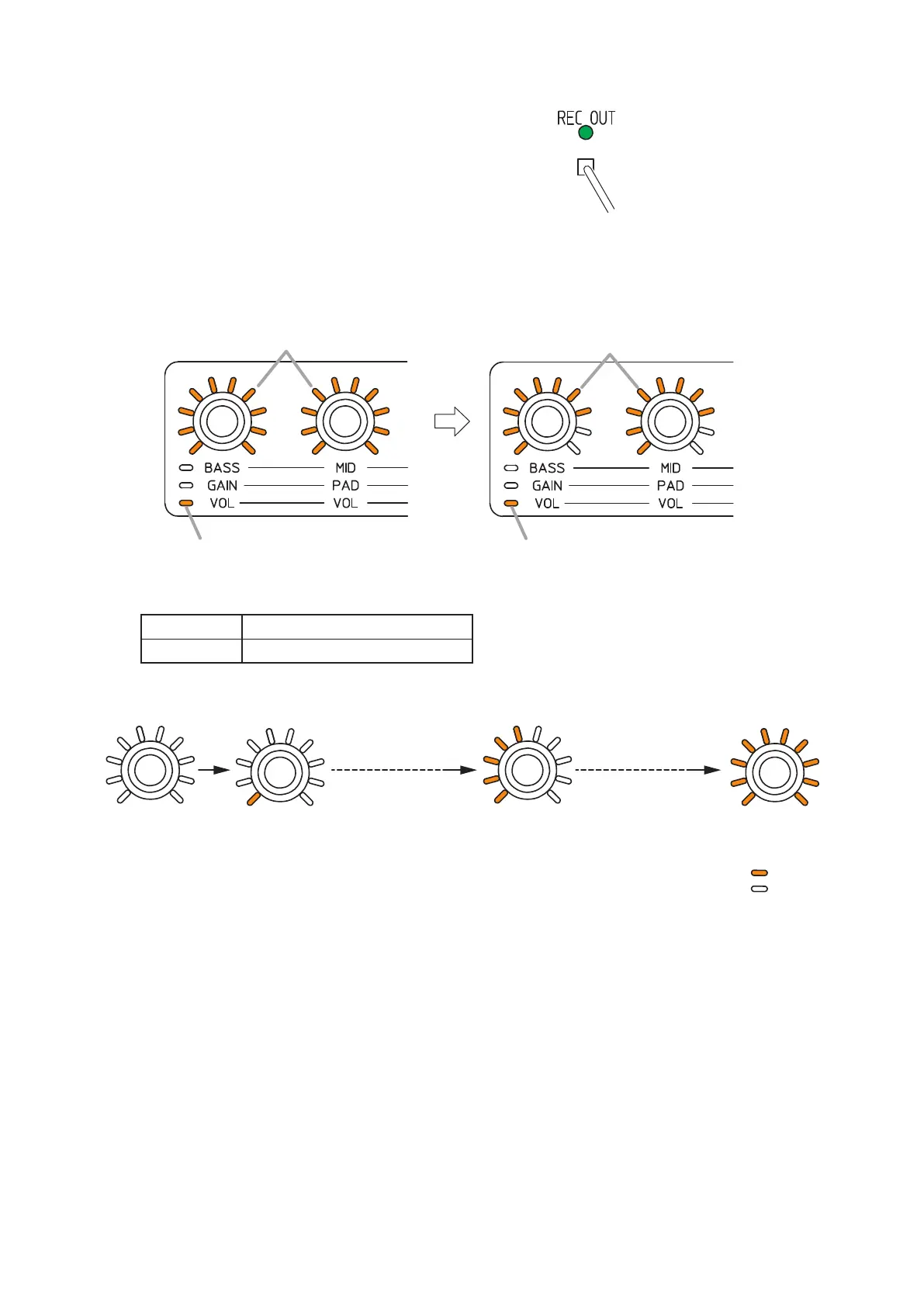
Step 1. Press the Recording output switch (REC OUT).
Note: Useane-tippedobjecttopressintheswitch.
Each indicator status changes as follows.
•Recordingoutputindicator: Lightsgreen.
•Trimcontrolmodeindicator:Lightsorange.
•Settingvalueindicatorsaroundthecontrolknob:
Allindicatorsashestwice,thentheindicatorsaroundtheLandRchannelsknobsindicateeach
corresponding output level.
Lit
Lit
Flashes twice
Lit
(Example)
Lit
Step 2. Adjust the recording output volume level with the control knob.
Default value 0 dB
Setting range –∞,–44to+10dB(in1dBsteps)
Theguresbelowshowtherelationshipbetweenthesettingvalueindicatorsaroundthecontrolknob
and the recording output level.
All indicators go off.
–∞
1 indicator lights.
–44 dB
1 scale advances
in 6 dB steps
1 scale advances
in 6 dB steps
5 indicators light.
–20 dB
All indicators light.
+10 dB
: Lit
: Unlit



 To Next Page