23
4, 6
3, 7
1, 5
2
3, 7
MX-6224D
4, 6
8
RC-03
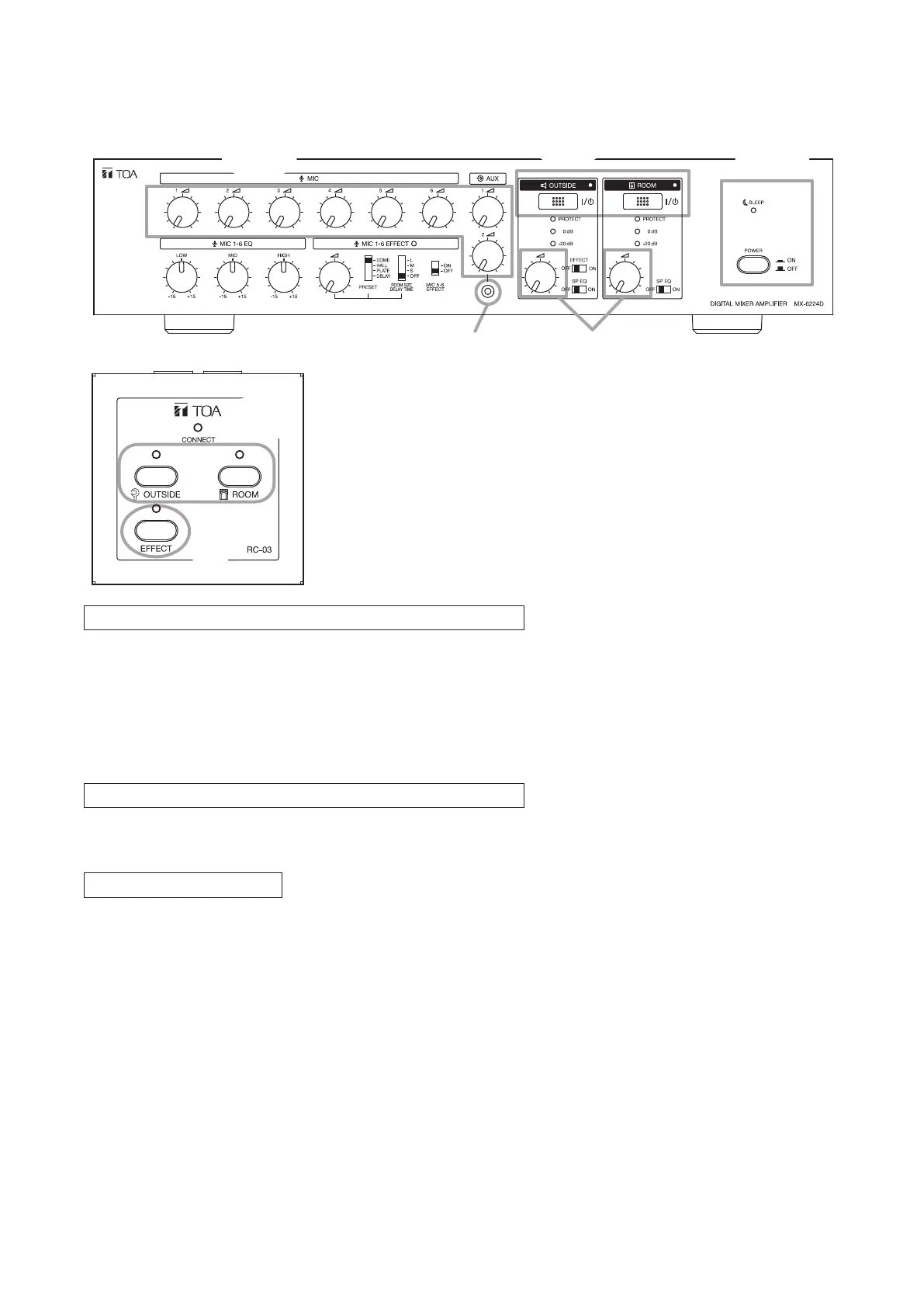
11.1.2. When using the MX-6224D amplifier in conjunction with the RC-03 Remote Controller (1 – 3 units)
for broadcasting
Safety Measures to Prevent Abrupt Loud Sound Output
Step 1. Ensure that the power switch is in the OFF position.
Step 2. When using a sound player or other external sound source, connect it to AUX 2 input jack located on
the front panel.
Step 3. Ensure that all volume controls have been fully rotated counterclockwise.
Step 4. Ensure that both the OUTSIDE and ROOM Zone output switches on both the amplier and Remote
Controller are set to OFF.
Switch ON the Power after Completing Safety Measures.
Step 5. Press the Power switch.
AC main power is turned on and the Sleep indicator lights.
Select Broadcast Zones.
Step 6.
Press the Zone
output
switch(es) on either the amplier or the Remote Controller for the desired broadcast
zone(s).
The Sleep indicator extinguishes and the Zone output indicator for the selected zone(s) will light.
Tip
The relevant zone output indicator for the amplier or Remote Controller, other than that actually being
operated, also lights.



 To Next Page