15
9.2. External Auxiliary Equipment Connections
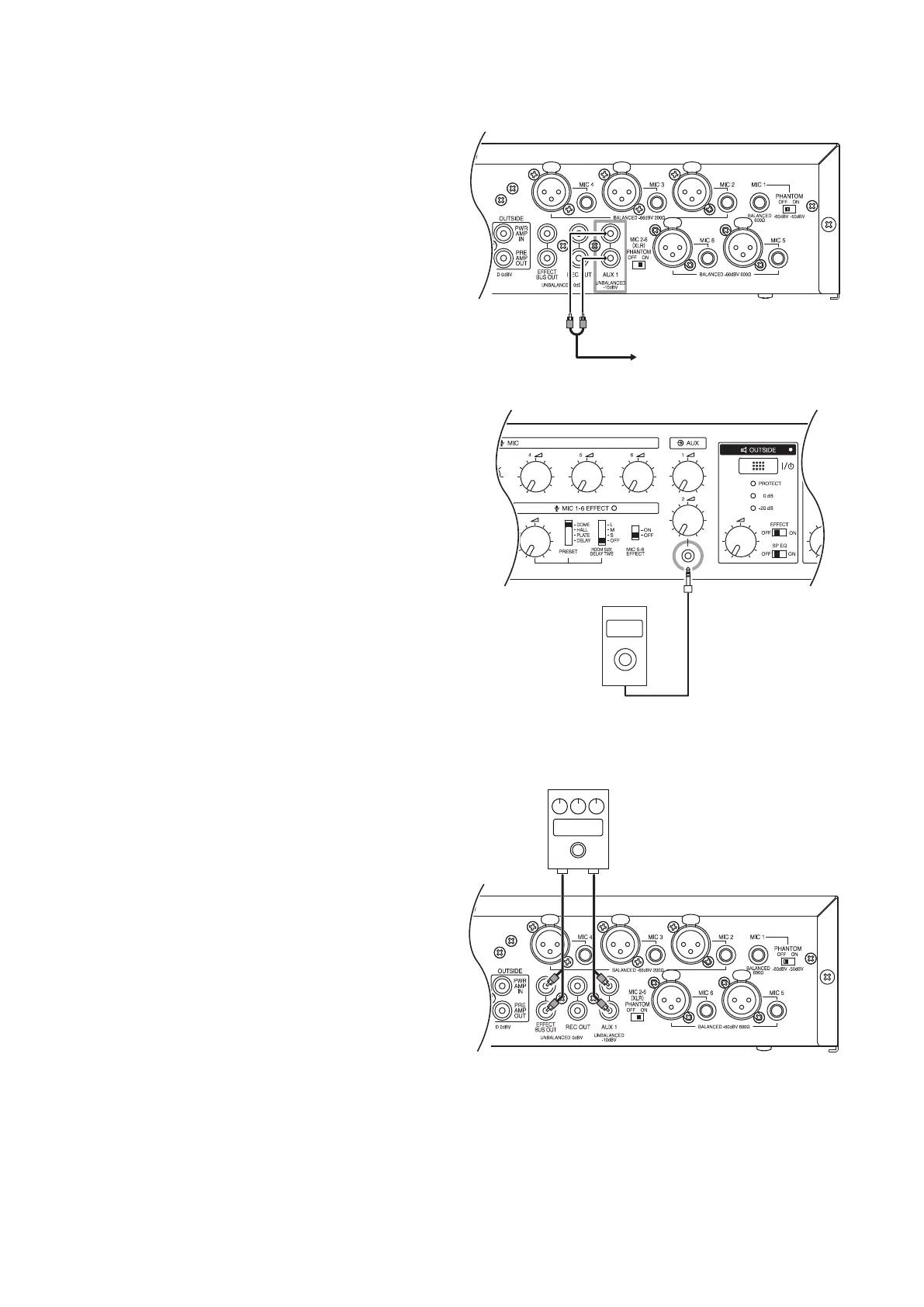
9.2.1. AUX 1 input jack connections
Two input signals can be mixed within the unit. For
stereo sound source wiring, connect to both RCA pin
jacks. For monaural sound source wiring, connect to
either jack.
9.2.2. AUX 2 input jack connections
Signal inputs to the stereo mini jacks are mixed
within the unit. For stereo sound source wiring, use
a stereo mini plug for connection. For connection to
a monaural sound source, use either a monaural or
stereo mini plug.
To external auxiliary equipment
Music player, etc
9.3. External Effector Connections
An external effector can be connected without using
the unit's internal effector function (see p. 19). If
the Effect Room Size/Delay Time Selection Switch
is switched OFF, the internal effector is disabled, but
external effectors can still be used. Even when using
an external effector, the effect on MIC 5 and 6 can be
cut off with the MIC 5 and 6 effect switches.
Tips
• For information on effector use, see the instruction
manual enclosed with the effector.
• The internal effector can also be used while the
external effector is connected. Using both effectors
at the same time will result in both effects being
mixed.
In Out
Effector



 To Next Page