26
12. RACK MOUNTING
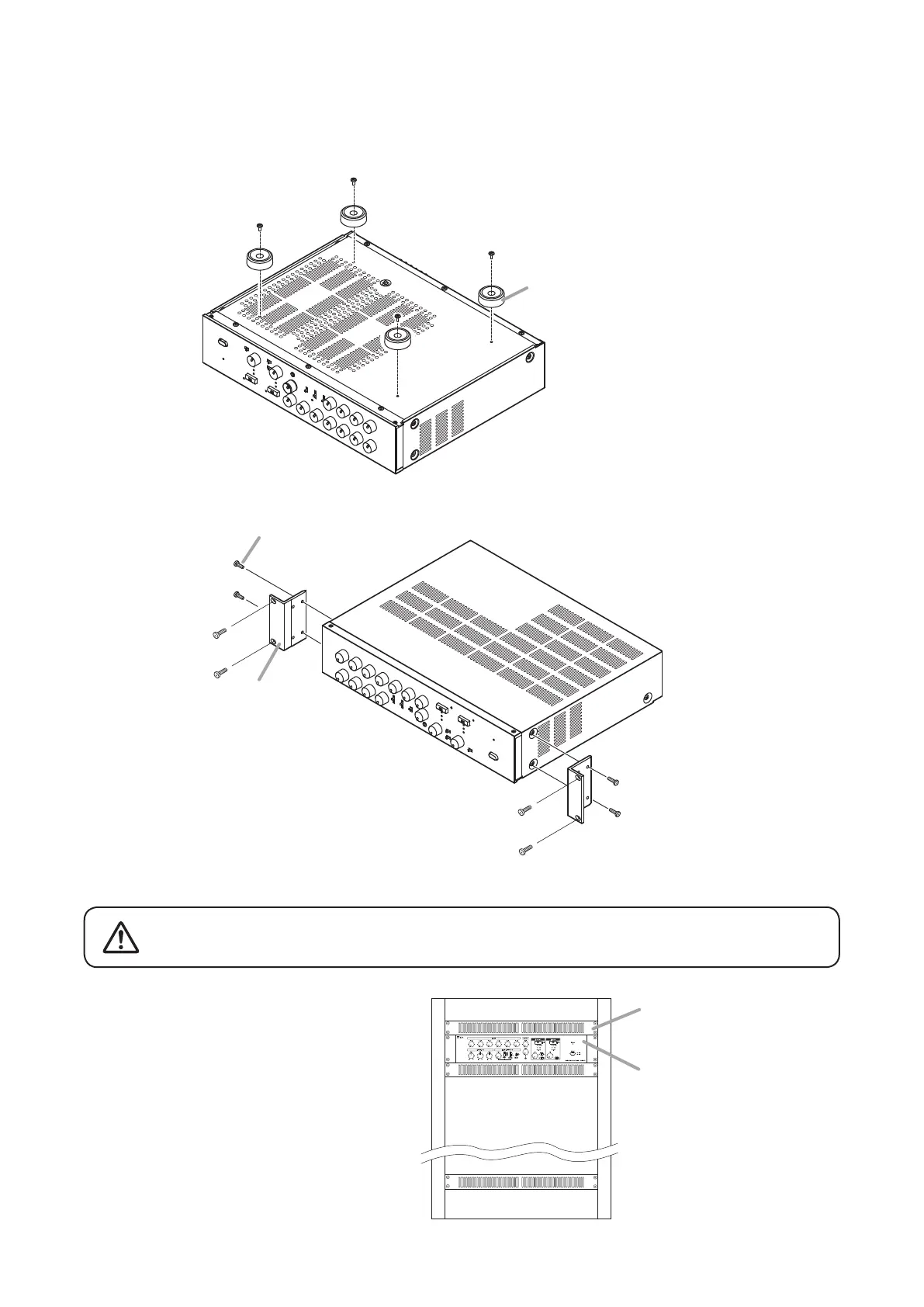
To mount the unit in an equipment rack, use the optional MB-25B Rack mounting bracket.
Step 1. Remove the 4 plastic feet attached to the bottom surface of the unit.
Plastic foot
MB-25B
M4 x 16 Machine screw (supplied with the MB-25B)
2
3
MX-6224D unit
(panel with ventilation openings)
Perforated panel
Note
To improve ventilation, ensure that a perforated
panel (panel with air openings) of 1-unit size or
greater is mounted over and under the unit, as
well as on the top and at the bottom of the rack.
Step 2. Attach the MB-25B to the unit using the supplied 4 screws.
Step 3. Mount the unit on the equipment rack.
Rack-mounting screws are not supplied with the unit.
Prepare them that are appropriate for the equipment rack.
CAUTION
Note: Be sure to use the supplied
screws.



 To Next Page