13
9.1. Microphone Connections
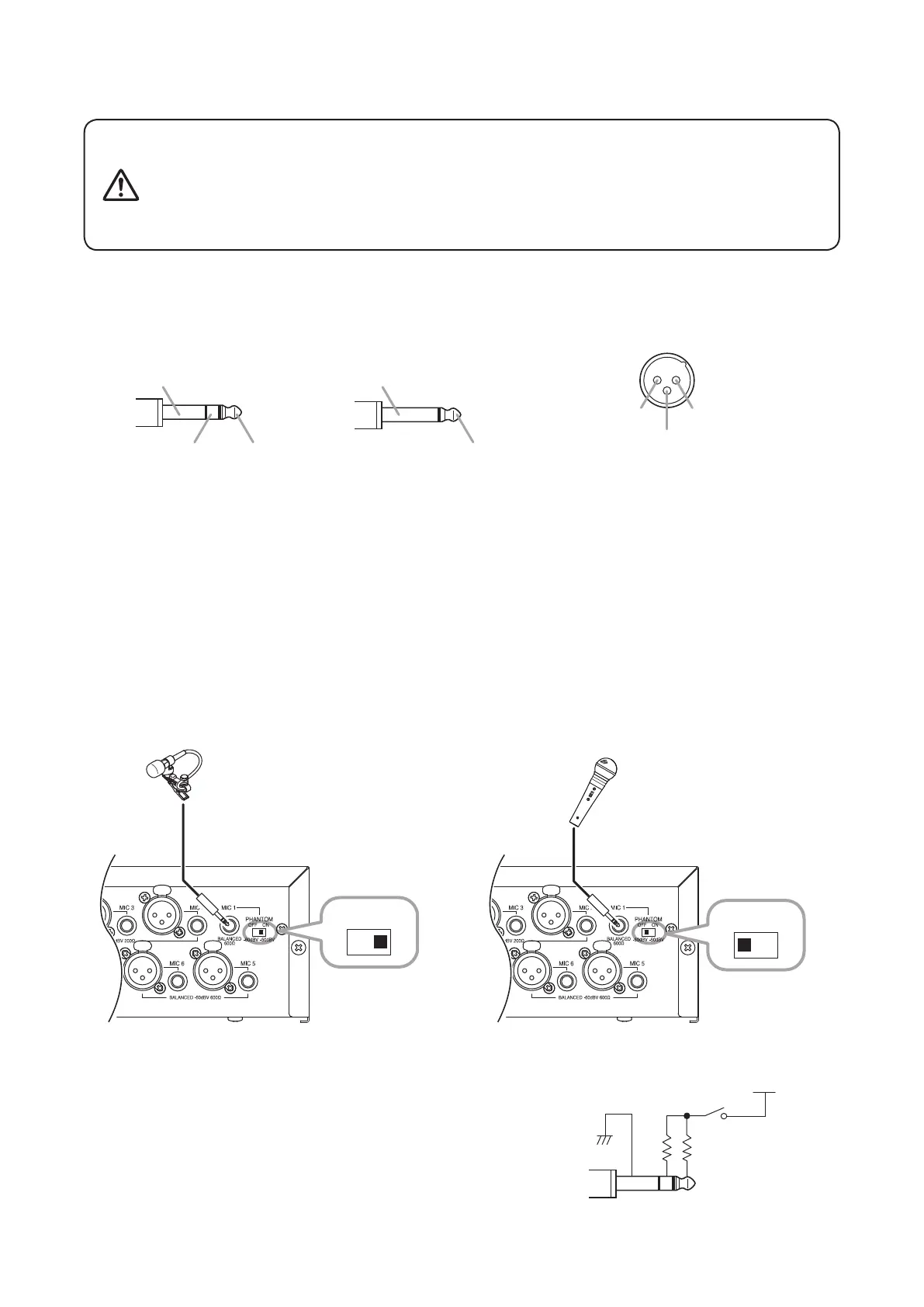
9.1.1. About the pin arrangement of the microphone input jack
Refer to the gure below when connecting the microphone input plug and connector:
• Switch OFF the unit's power before turning the phantom power switch
ON or OFF. Operating the switch without switching OFF the main
power could result in a large transient noise through the speakers,
potentially resulting in speaker failure.
• Avoid using phantom power when connecting an unbalanced
microphone to the MIC 1 input, as the microphone fails.
CAUTION
• Unbalanced type• Balanced type
[Phone plug] [XLR type connector (male)]
Pin 1: Ground Pin 2: Hot
Pin 3: Cold
Sleeve: Ground
Ring: Cold Tip: HotTip: Hot
Sleeve: Ground
9.1.2. MIC 1 connections
Microphones equipped with a phone plug can be connected to the MIC 1 input jack.
• Both balanced and unbalanced microphones can be used.
• Turning the phantom power switch ON causes a 24 V voltage to be applied to the phone plug's tip and ring.
• When using a lavalier microphone, it is recommended that TOA's EM-410 Lavalier Microphone be used.
Microphone sensitivity when phantom power is used or unused is as follows:
When used: −50 dB*
When not used: −60 dB*
*
0 dB = 1 V
[When phantom power is used] [When phantom power is not used]
Note
Use only balanced phone plugs when connecting a condenser
microphone that requires phantom power to MIC 1.
EM-410
Electret condenser microphone
OFF ON
DM-1300
Dynamic microphone
OFF ON
– ++
MIC 1
phantom switch
phantom power



 To Next Page