27
13. TROUBLE SHOOTING
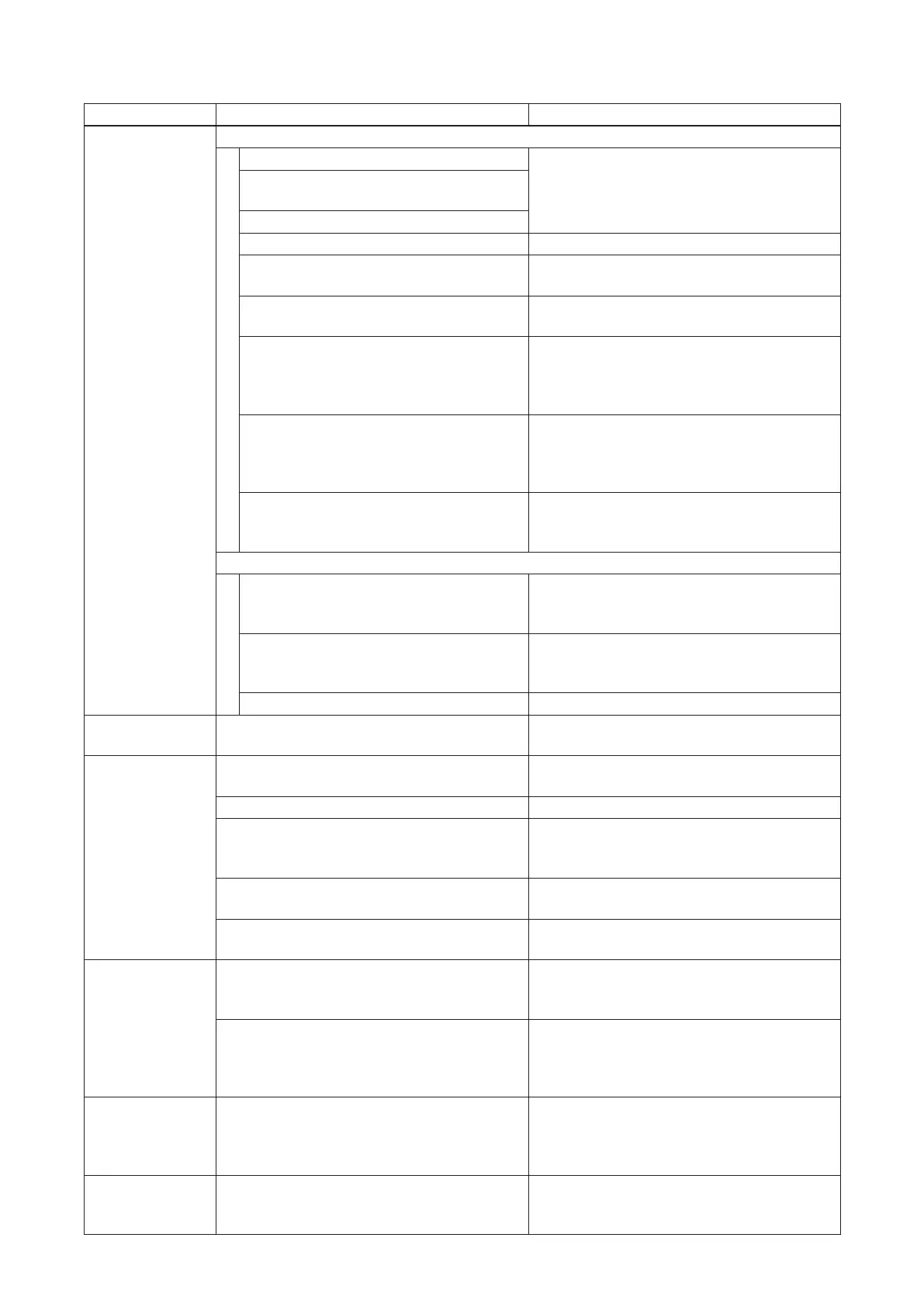
Symptom Possible Cause Remedy
No sound output. When protection indicator is unlit
AC power supply cord is not connected. Check connections.
Microphone and other sound source
are not connected.
Speakers are not connected.
Power switch is set to OFF. Set power switch to ON.
Both Outside Zone and Room Zone
output switches are set to OFF.
Set either of the output switches to ON.
All volume controls are set to minimum
position.
Set volume controls to appropriate level.
[When MIC 1 is in use]
Microphone requiring phantom power is
in use, but phantom power switch is set
to OFF.
Set phantom switch to ON.
Note
Do not use unbalanced type microphones.
[When MIC 2 – 6 inputs are in use]
Microphone requiring phantom power is
in use, but phantom power switch is set
to OFF.
Set phantom switch to ON.
[When MIC 2 – 6 inputs are in use]
Microphone requiring phantom power is
connected to phone jack.
Connect microphone to XLR jack. Note that
phantom power is not supplied to phone
jack.
When protection indicator is lit
Vent is blocked, causing heat buildup. Remove objects blocking the vent. Sound
will begin to be output when temperature
falls.
Excessively loud speaker sound output
causes heat buildup.
Adjust amplier volume controls. Sound
will begin to be output when temperature
falls.
Speaker wires shorted. Find and x speaker wire short circuit.
Intermittent
sound output.
Low-impedance speaker connected to
speaker terminals.
Connect speaker with higher impedance
than specied rating.
Cannot use
effector.
Effect Room Size/Delay time selection
switch is set to OFF.
Select mode other than OFF.
Effect control is set to minimum position. Set effect control to appropriate level.
Audio is input to AUX 1 and 2, or PWR
AMP IN.
Correct operation.
(Effector function is disabled for AUX 1 and
2, and PWR AMP IN.)
In-use remote controller effect switch is set
to OFF.
Set the remote controller effect switch to
ON.
Outside Zone output effect switch is set to
OFF.
To apply sound effect to outside zone, set
Outside Zone output effect switch to ON.
Cannot turn unit
ON/OFF using
remote controller.
[When remote controller's connection
indicator is unlit]
Cable is not correctly connected.
Check cable connections.
[When remote controller's connection
indicator is lit]
The unit's Outside Zone and Room Zone
output switches are both set to ON.
Correct operation.
(When the unit is ON, it cannot be turned
OFF using the remote controller.)
Cannot turn unit
OFF using the
remote controller.
The unit's Outside Zone and Room Zone
output switches are both set to ON.
Set both Outside Zone and Room Zone
output switches to OFF.
(When the unit is ON, it cannot be turned
OFF using the remote controller.)
MIC 1 − 6 EQ
does not work.
Audio is input to AUX 1 and 2, or PWR
AMP IN.
Correct operation.
(Equalization is disabled for AUX 1 and 2,
and PWR AMP IN.)



 To Next Page