Maintenance Procedures - Electronics Quantium 310 Maintenance Manual
Page 5-24 Document Ref 941113-001 Rev 2
5.13 Changing the EPSI
Before starting the maintenance procedure, please refer to section 2.
Ensure the dispenser is isolated and all power is turned off.
The EPSI Board are accessed from side A of the calculator head (see section 2.3 for the
identification of the dispenser sides).
Tools required
•Replacement EPSI Board (refer to the Parts Manual for exact part identification)
•Long nose pliers
Description of Parts
INSTRUCTIONS
1) Follow the instructions given in section 2.5 to gain access to the calculator head on side A
of the dispenser.
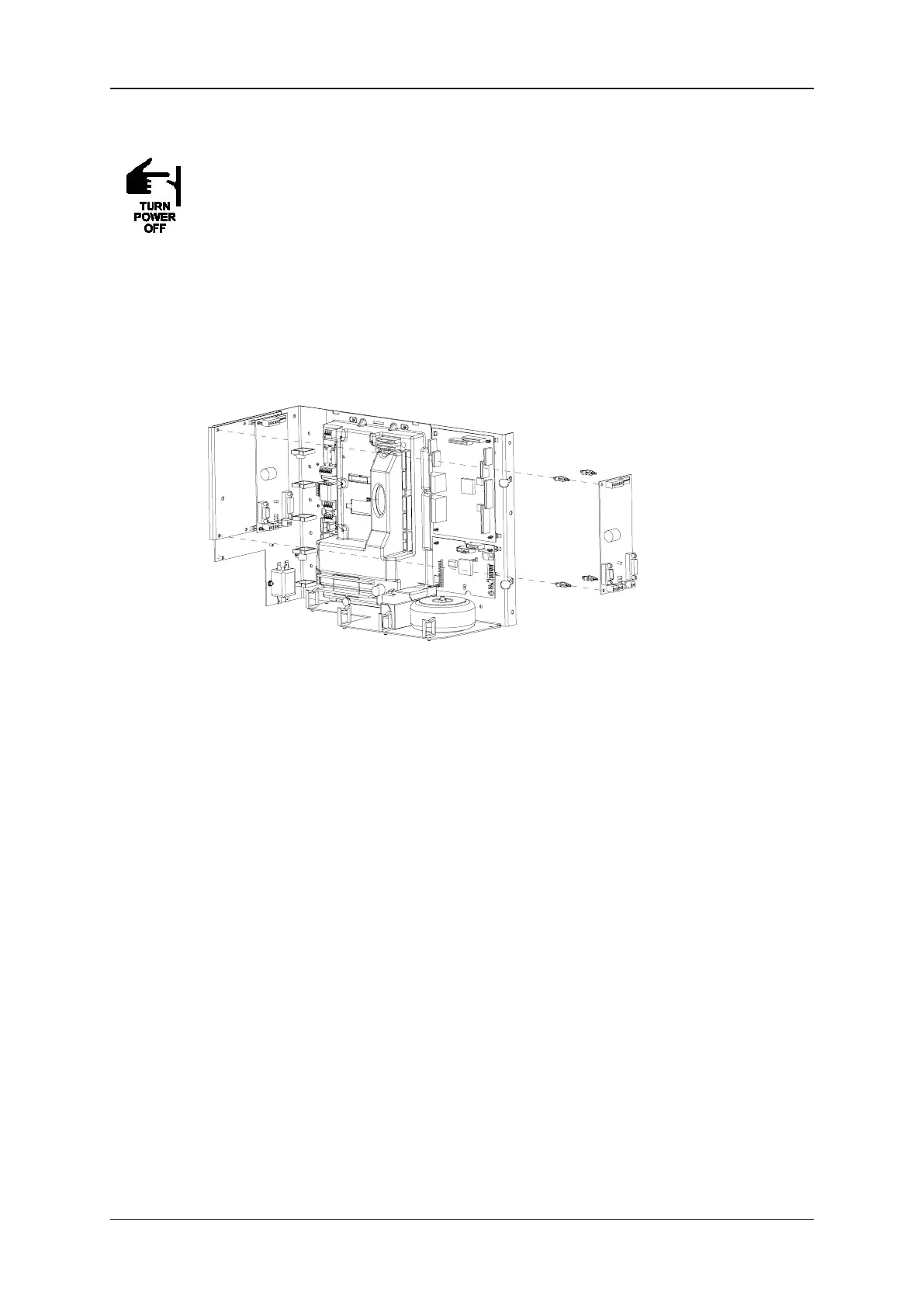
2) Locate the EPSI Board on the WWC Centreplate on side A of the dispenser.
3) Disconnect all connectors on the EPSI Board.
4) Use the pliers to squeeze together the standoffs in order to release the EPSI Board from
the centreplate.
5) Fit the new EPSI Board onto the standoffs on the centreplate ans secure in position.
6) Replace all connectors on the board.
7) Ensure that all tools and unused materials are removed.
8) Close the calculator head door and lock.
9) Re-instate power to the dispenser and test its operation.
10) Dispose of all waste accordingly.
EPSI
BOARD


 To Next Page