Shenzhen Topwisdom Technology Co., Ltd
61
1. Knife: go into rotaty cuting control interface.
2. Manual: manually preset the heads and record the presetting position. Select "Knife /
Toolsetting Test", open the interface of testing head presetting position.
3. Automation: execute the automatic tool setting.
4. Record Docking Position: record the stop position.
5. Toolsetting Test: do testing head presetting position.
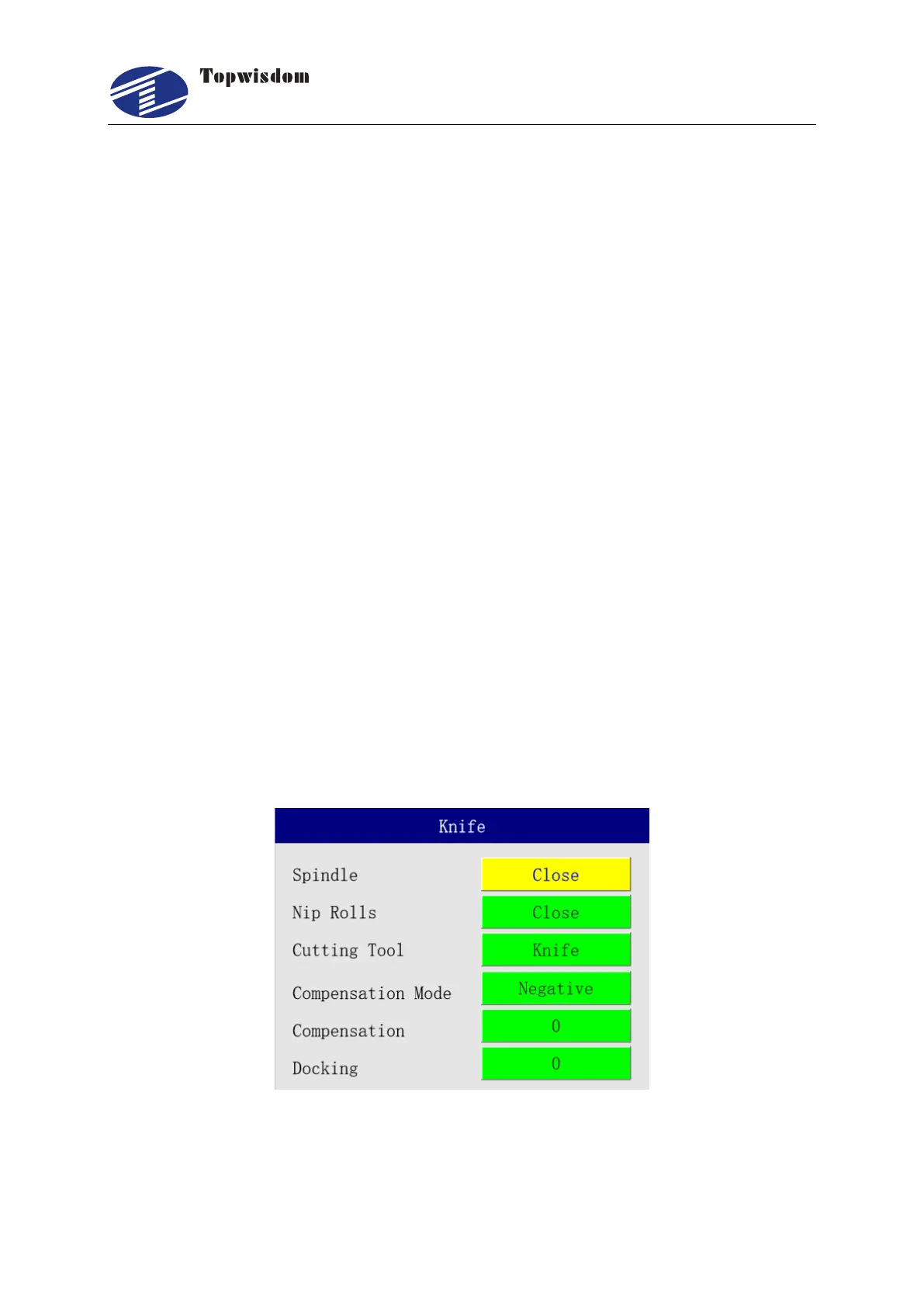
Select "Knife/Knife” to enter the control interface.
1. Spindle: if "Open" is selected, the spindle is started, and if "Close" is selected, the spindle
is stopped;
2. Nip Rolls (Pressure Feeding Roller): if "Open" is selected, the feeding roller is lowered,
and if "Close" is selected, the feeding roller is lifted;
3. Cutting Tool: if "Knife" is selected, it is on rotary cutting mode, if require laser cutting,
select Laser;
4. Tool Height Compensation (Compensation Mode): if positive is selected, it indicates
the head presetting position plus the compensation value, is the real head presetting
position, otherwise, minus the compensation value.
5. Compensation Value: the compensation value of the tool height in mm. If the tool is
re-aligned, the compensation value is cleared.
6. Docking Position: the position where the cutting head stops after completion of the work,
in unit of mm.



 To Next Page