EN-57
4.8.3 Menu2: Light function for the hand transmitter
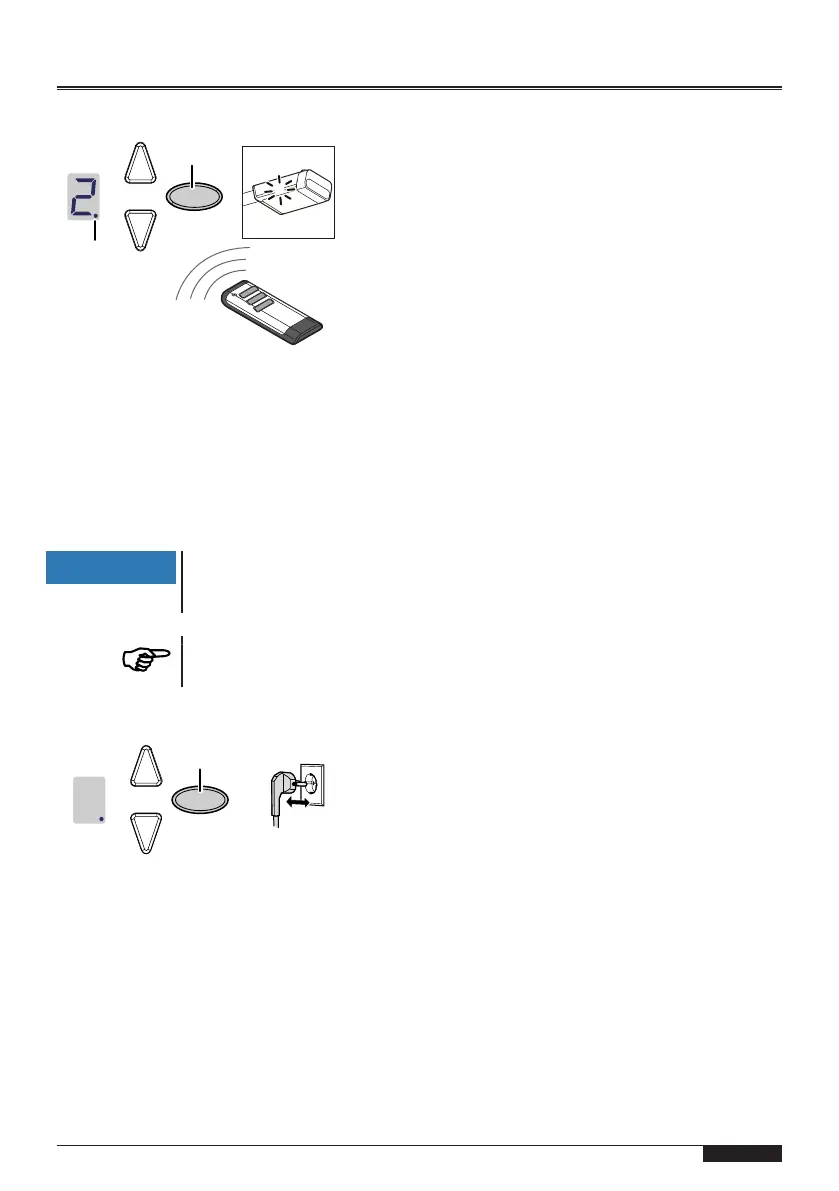
Fig.10: Programming the light function for the hand transmitter
1. Briefly press the programming button (PROG button)(D) twice.
ð The display shows"2".
2. Press the button on the hand-held transmitter to control the light until the di-
gital point(A1) in the display flashes 4times.
3. As soon as the light goes out, you can set the next hand transmitter (see
Step1).
NOTICE
Up to 30 codes can be learned.
(Example: 15xstart and 15xlight).
For programming the ventilation position and partial opening, see
menu9.
4.8.4 Deleting all hand transmitters programmed for the drive
Fig.11: Deleting all hand transmitters programmed for the drive
1. Pull out the mains plug of the drive head.
2. Press and hold the oval programming button (PROG button)D.
3. Plug the mains plug into the mains socket while keeping the programming
button (PROGbutton)(D) pressed.
ð The point displayA1 flashes quickly.
ð All hand transmitters programmed for the drive are deleted.


 To Next Page