62-EN
4.9.3 Menu7: Adjusting the light phases
1. Select menu item"7".
ð After approximately 2seconds, the display flashes and the set value for
light time appears. The factory setting is"0".
2. If desired, adjust the setting with the aid of the OPEN(B) and CLOSE(C) but-
tons.
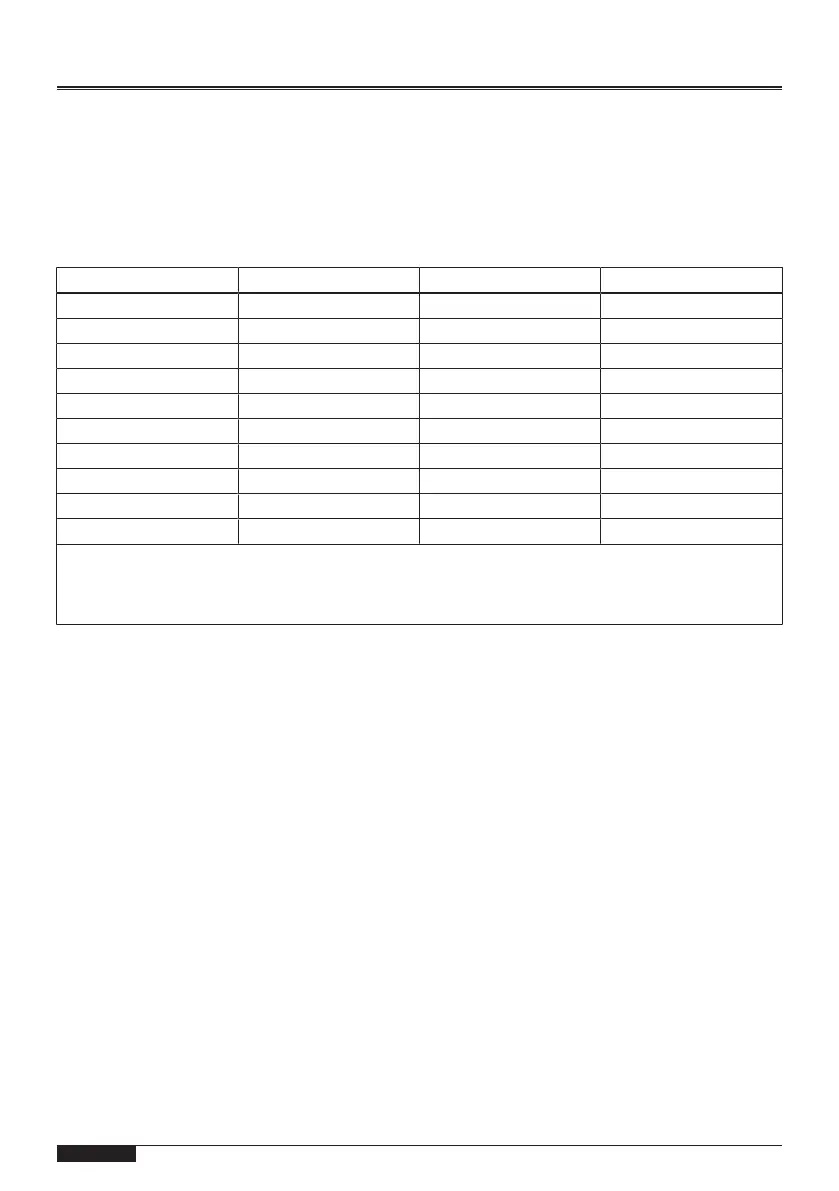
Value Light time Warning time Flashing function
0 60 s 0 s no
1 120 s 0 s no
2 240 s 0 s no
3 0 s 0 s yes
4 0 s 3 s no
5 0 s 0 s no
6 0 s 3 s yes
7 90 s 3 s no
8 90 s 3 s yes
9 0 s 8 s yes
Remarks:
If a warning time is set, the light relayK is energised prior to the drive starting up and during opening
and closing.
WARNINGUse a self-flashing signal light.
3. Press the programming button (PROG button)(D).
ð The display shows"8".


 To Next Page