58-EN
4.8.5 Menu3 + Menu4: Setting the end positions
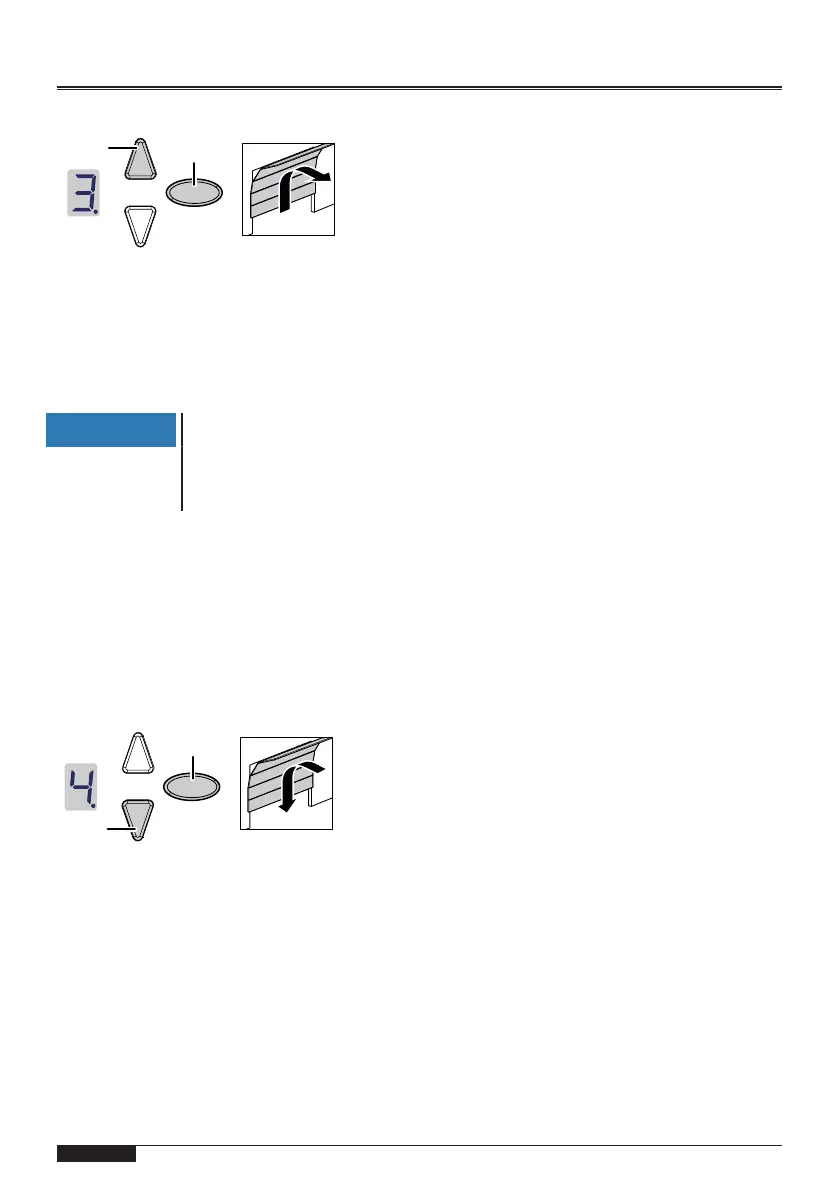
Fig.12: Setting the end position to "OPEN"
1. Keep the programming button (PROG button) (D) pressed in for approxim-
ately 3seconds.
ð The display shows"3".
2. Press the OPEN button and check if the garage door moves to the OPEN po-
sition.
NOTICE
If the garage door moves in the wrong direction, initiate a change
of direction by keeping the programming button (PROG button)(D)
pressed in for approximately 5seconds until a chaser light ap-
pears.
3. Keep the OPEN button pressed until the garage door is at the desired end
position OPEN. If needed, press the CLOSE button(C) to adjust the position.
4. Once the garage door is at the desired end position OPEN, press the pro-
gramming button (PROG button)(D).
ð The display shows"4".
5. When the display flashes, press the CLOSE button(C).
6. Keep the CLOSE button pressed until the garage door is at the desired end
position CLOSE. If needed, press the OPEN button(B) to adjust the position.
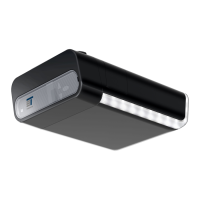
Fig.13: Setting the end position to "CLOSE"
7. Once the garage door is at the desired end position CLOSE, press the pro-
gramming button (PROG button)(D).
ð The display shows"0".
8. Continue with the force learning cycle.


 To Next Page