15
tonal shaper (voicing, range)
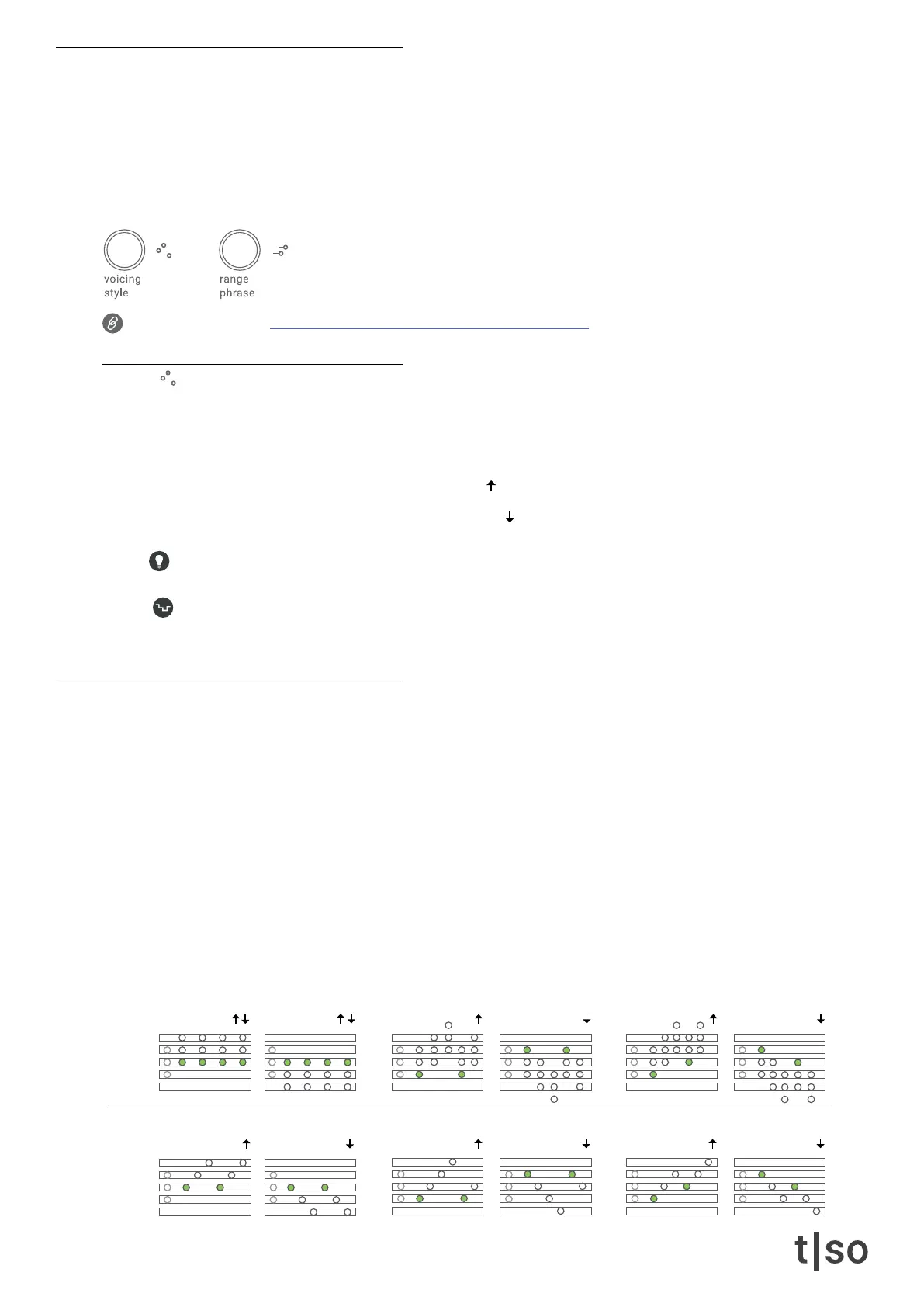
• Voicing Changes the order of the inserted notes in the pitch menu.
• Style Lets you select different arpeggiator styles.
• Range Controls the range of deterministic pitch modulation based on LFOs and other types of shapes.
• Phrase Lets you select the shape used for pitch modulation.
Link to tutorial video: torsoelectronics.com/t-1-tutorials/tonal-shaper
voicing
The voicing parameter changes the order of the inserted notes in the pitch menu. This happens in different
ways according to the selected style.
The two modier buttons in RED lets you change the direction of the style:
• The upper button sets the style direction to up
• The lower button sets the styledirection to down
The voicing styles work well when multiple notes have been inserted in the ( PITCH ) menu.
Random affects the amount of voicing variation per step.
Press ( RANDOM ) + turn ( VOICING )
style
The style knob lets you select 3 different voicing styles in polyphonic and monophonic modes.
Each style creates inversions of the chord up or down across the octaves:
• Fixed Moves the chord statically.
• Ramp Adds notes to the chord in a sequence similar to the up/down modes of classic arpeggiators.
• Climb Adds notes in a stepwise motion, one step at a time.
The two rows represent whether the inserted notes in the ( PITCH ) menu should be played polyphonically
or monophonically:
• Poly Notes will play simultaneously.
• Mono Notes will play one at a time, similar to a classic arpeggiator.
Poly
Mono
[ VALUE 1 ]
Fixed
[ VALUE 9 ]
Fixed
[ VALUE 10 ]
Ramp
[ VALUE 11 ]
Climb
[ VALUE 2 ]
Ramp
[ VALUE 3 ]
Climb



 To Next Page