2
FIRST STEPS WITH T-1
getting started
Power up by connecting the T-1 to a computer with the supplied USB-C cable or connecting it to a standard USB
power supply. All buttons light up ORANGE while T-1 is powering up, after which it is ready to use.
Start by simply using the T-1 with your computer or connect it to your hardware instruments by using the MIDI
and CV ports on the back panel. Use the included TRS to DIN adapter to connect to external MIDI devices with the
classic 5-pin DIN port.
Be sure to visit: torsoelectronics.com/resources for the video tutorials, guides, and other downloads.
setting up T-1
With the T-1 Cong software, you can make various MIDI and CV/Gate settings.
The T-1 can also connect to your WiFi and synchronize with your computer, smartphone, and other devices via
Ableton Link.
To do so, visit: torsoelectronics.com/resources and download the T-1 Cong software.
structure of T-1
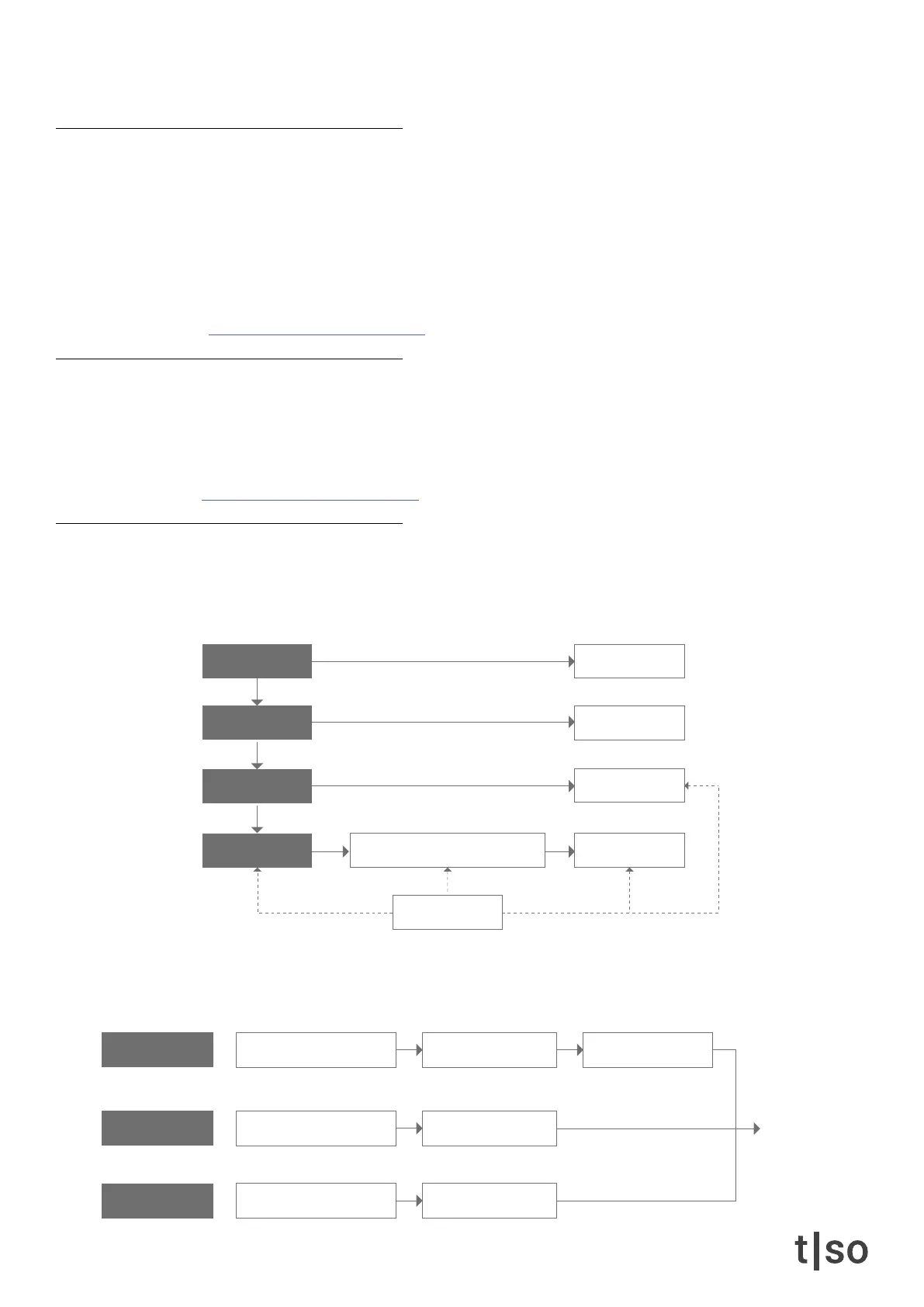
The table below outlines the data hierarchy of the T-1.
A project contains 16 banks. For each bank, 16 patterns are available, meaning 256 patterns are always at hand.
A pattern consists of 16 tracks with up to 16 cycles (parameter automations) per track.
The sequencer engine consists of different algorithms to control gate/triggers, pitches and velocities. These algo-
rithms generate the output sequence.
random modulation
quantize
tempo
sequencer engine setup section
length
16 banks
16 cycles
16 tracks
16 patterns
steps, pulses, rotate, division repeats, time, pace
euclidean rhythm generator note repeater
pitch, harmony, scale voicing, range
tonal base tonal shaper
offset
note repeater
sustain, timing, delay
groove
sequence
velocity, accent
groove
gate/trigger
pitch
velocity



 To Next Page