3
PANEL LAYOUT AND REAR CONNECTIONS
panel layout
1
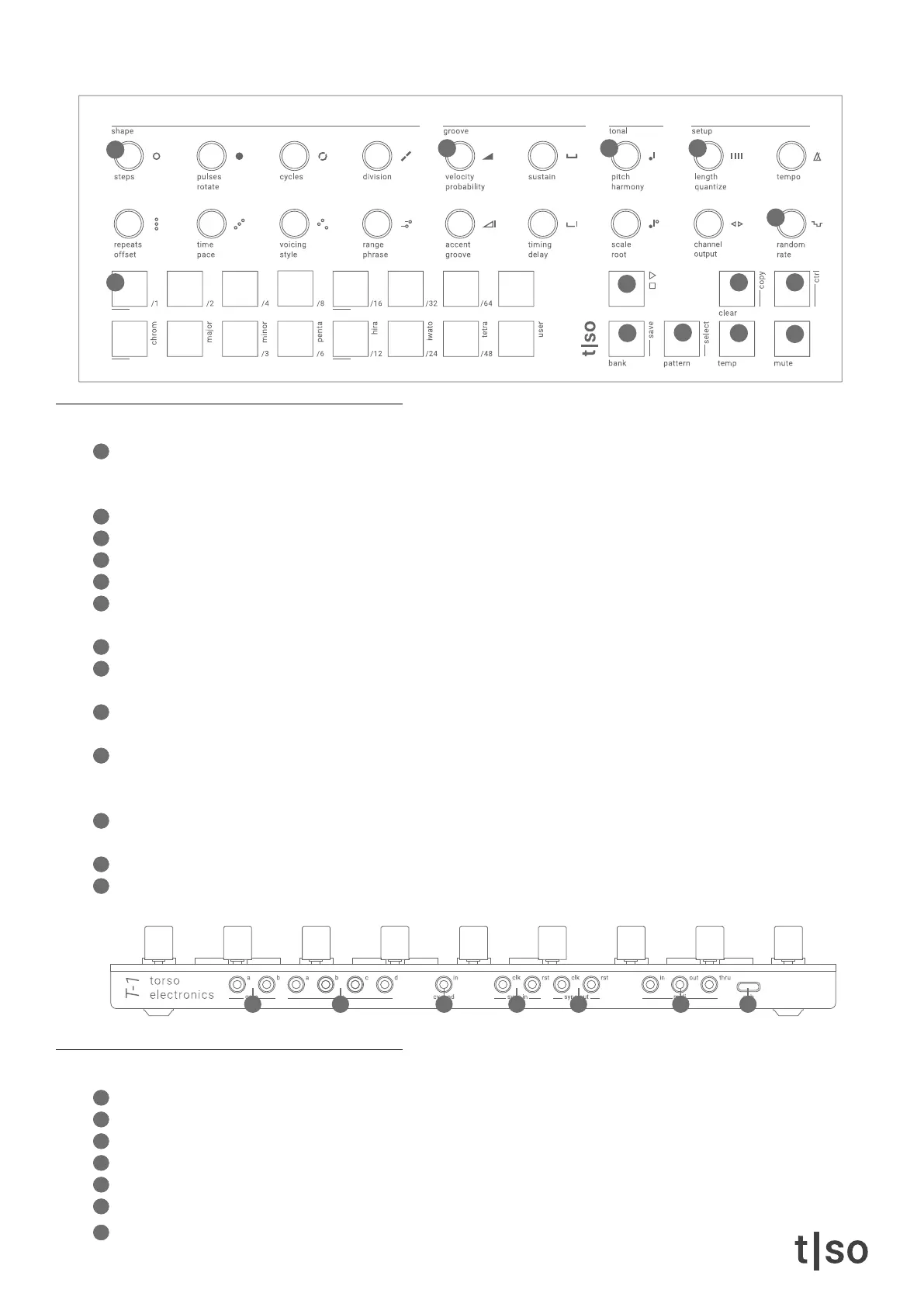
SHAPE section offers a variety of knobs for shaping the composition.The rst row of knobs lets you build
multiple Euclidean cycles that play one after another. The second row adds echo notes to the Euclidean puls-
es, adjusts chord voicing, and applies melodic movements.
2
GROOVE section offers four knobs to adjust the behavior of the timing, groove, and “feel” of the composition
3
TONAL section offers knobs for adjusting the pitch and set the musical scale.
4
SETUP section offers MIDI settings and track length + pattern quantize settings.
5
( RANDOM ) knob makes random modulations to every parameter on the unit.
6
[ VALUE ] buttons represent 16 tracks in default mode. The [ VALUE ] buttons also work as a display showing
parameter values when a knob is pressed.
7
[ PLAY / STOP ] button starts and stops the playback.
8
[ CLEAR ] button is for clearing tracks, patterns, and parameters. The secondary function is the [ COPY ]
operation.
9
[ CTRL ] gives access to secondary functions of knobs and buttons. The secondary functions are written in
gray on the front panel.
10
[ BANK ] button opens bank view, where [ VALUE ] buttons represent banks. The secondary function lets you
[ SAVE ] the state of the [ BANK ]. The [ BANK ] button also works as a home button that let’s you return to
the default mode.
11
[ PATTERN ] button opens pattern view, where [ VALUE ] buttons represent patterns. The secondary function
lets you [ SELECT ] a pattern without playing it.
12
[ TEMP ] button is used for making temporary changes to the pattern.
13
[ MUTE ] button is used for muting the 16 tracks in the pattern.
rear connections
14
2x Gate outputs
15
4x CV outputs
16
CV input
17
Analog sync input, clock + reset
18
Analog sync output, clock + reset
19
MIDI IN, MIDI OUT, MIDI THRU. 1/8” TRS jack with MIDI Type A connection
20
USB C port
1
2
3 4
5
7
8
9
10
11
12
13
6
20191817161514



 To Next Page