Communications iTherm
®
280 Programmer’s Guide
28-04430 Rev K Page 277
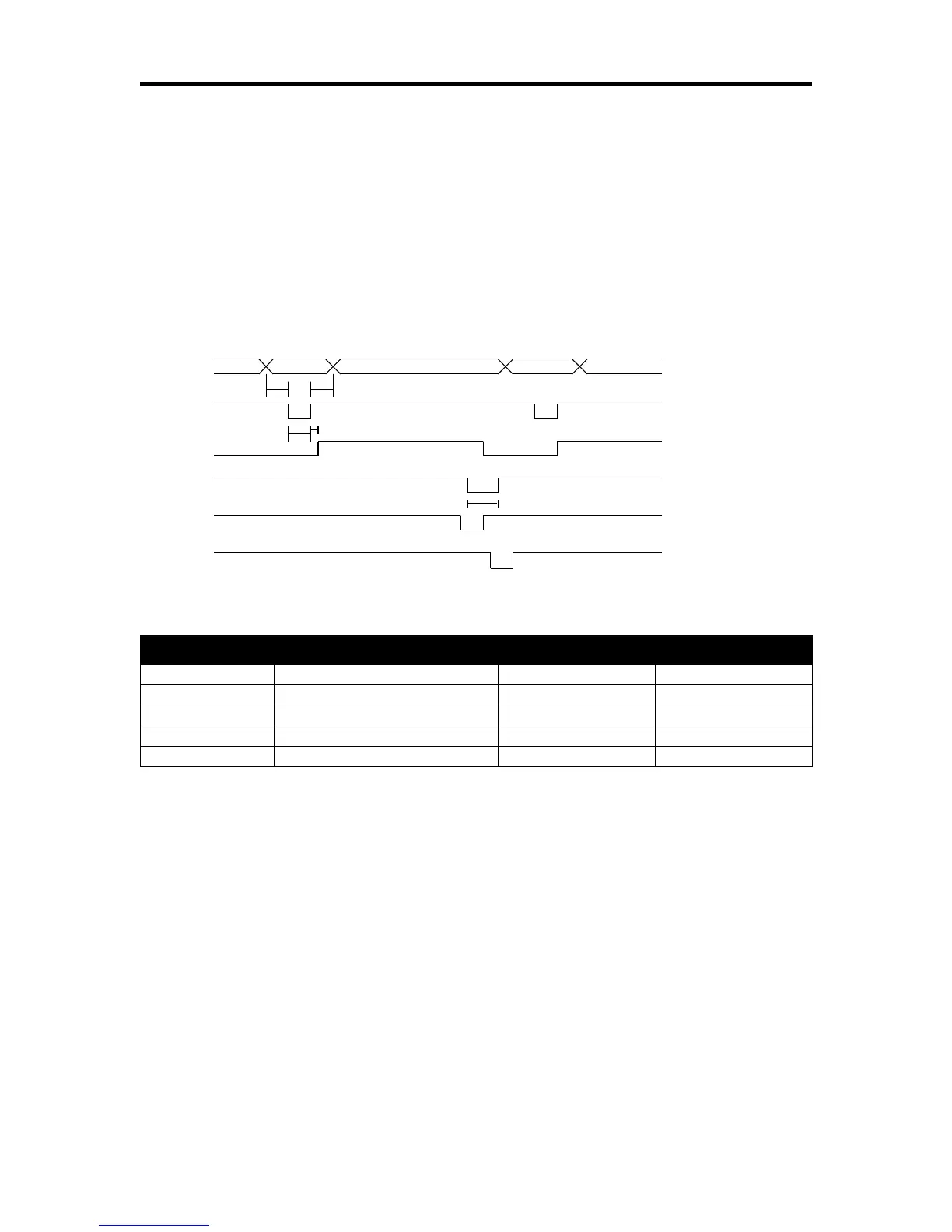
Some systems may wish to change the details of how the strobe, busy, and
acknowledged signals interact. The parallel-port option features define how the strobe,
busy, and acknowledged signals operate. In normal mode, the printer follows the
standard (Centronics) parallel-port conventions. With Options 1 and 3, the
acknowledged and busy signals change simultaneously, which is sometimes referred to
as ack-after-busy. Options 2 and 3 force busy high on the rising edge of the strobe,
which is sometimes referred to as busy-while-strobe timing. In all cases, the data is
latched on the rising edge of the strobe. In most cases, the normal timing mode gives
the best results.
Figure 18 Parallel Port ACK Timing Options
Table 56 Parallel-port Timing
Note: Altered STB timing to take data on the falling edge of STB can be generated as a
factory option.
Printer Buffer Size
The iTherm
®
280 printer has a configurable buffer size. It can be set from 40 to 8192
bytes. The configurable buffer allows an application to control how far ahead the buffer
gets from the printer. The smaller the buffer, the tighter the control will be. It is up to the
application developer to select the optimal buffer size.
Parallel Port Inquire and IEEE 1284
The iTherm
®
280 printer supports the IEEE 1284 bidirectional parallel peripheral
interface standard. The IEEE 1284 standard provides for a bidirectional link on the
parallel port. The iTherm
®
280 Printer only supports Modes 0 and 4, which provide a
nibble mode reverse channel for printer identification and status inquire commands. It is
Data
STB
BUSY
ACK
ACK
ACK
ACK-while-BUSY
ACK-in-BUSY
ACK-after-BUSY
t1
t2
t3
t4
t5



 To Next Page