AU-OPR-400Ser-EN,
Rev D
13
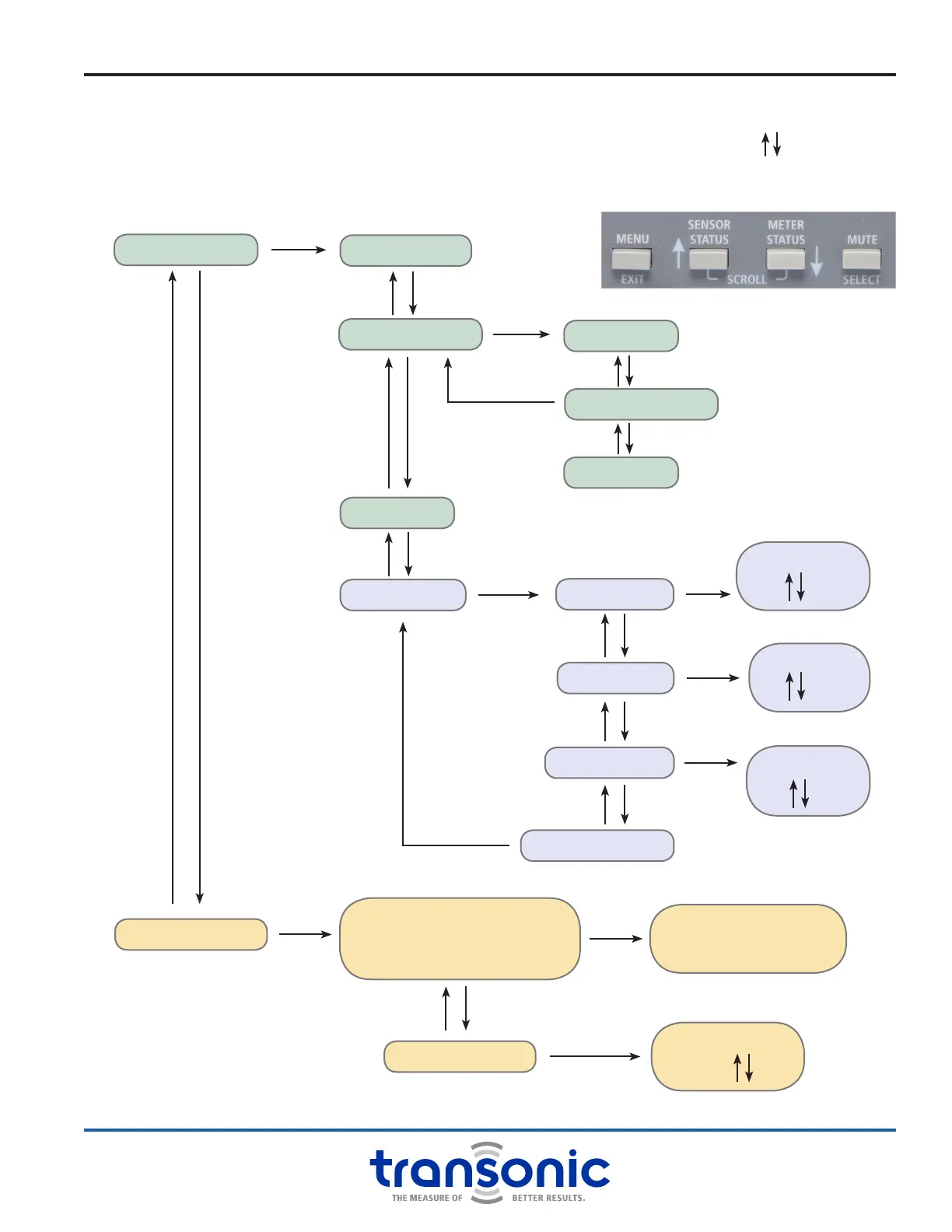
METER CONTROLS
SENSOR CONTROLS
1/4 FLOW SCALE
CALIBRATE SCALE
INVERT FLOW
ALARMS MENU
“CALIBRATION CHOICES”
(Up to 4 factory programmed)
USER ADJ. GAIN
Display selection
& select as active
calibration
SENSOR GAIN
100%
0 VOLT SCALE
1 VOLT SCALE
TO METER OPTIONS
LOFLO ALARM
LO FLOW
min
HIFLO ALARM
HI FLOW
max
REC SIG ALARM
THRESHOLD
%
TO METER OPTIONS
A. Program Menu
Press [Menu] to enter the program, this makes the blue button labels active. Use arrows to [Scroll]
through menus and to set values for alarms and gain (pressing and holding scrolls faster). Press [Select]
to enter menus or toggle settings on and off. A star (*) indicates that a selection is made/active. Return to
Measure mode at any point using the [Exit] button.
iv. TS410 Module: Directions For Use
[Select] on*
[Select] on*
[Select] on*
[Select] on*
[Select] on*
[Select] on*
[Select] on*
[Select] on*



 To Next Page