18 AU-OPR-400Ser-EN,
Rev D
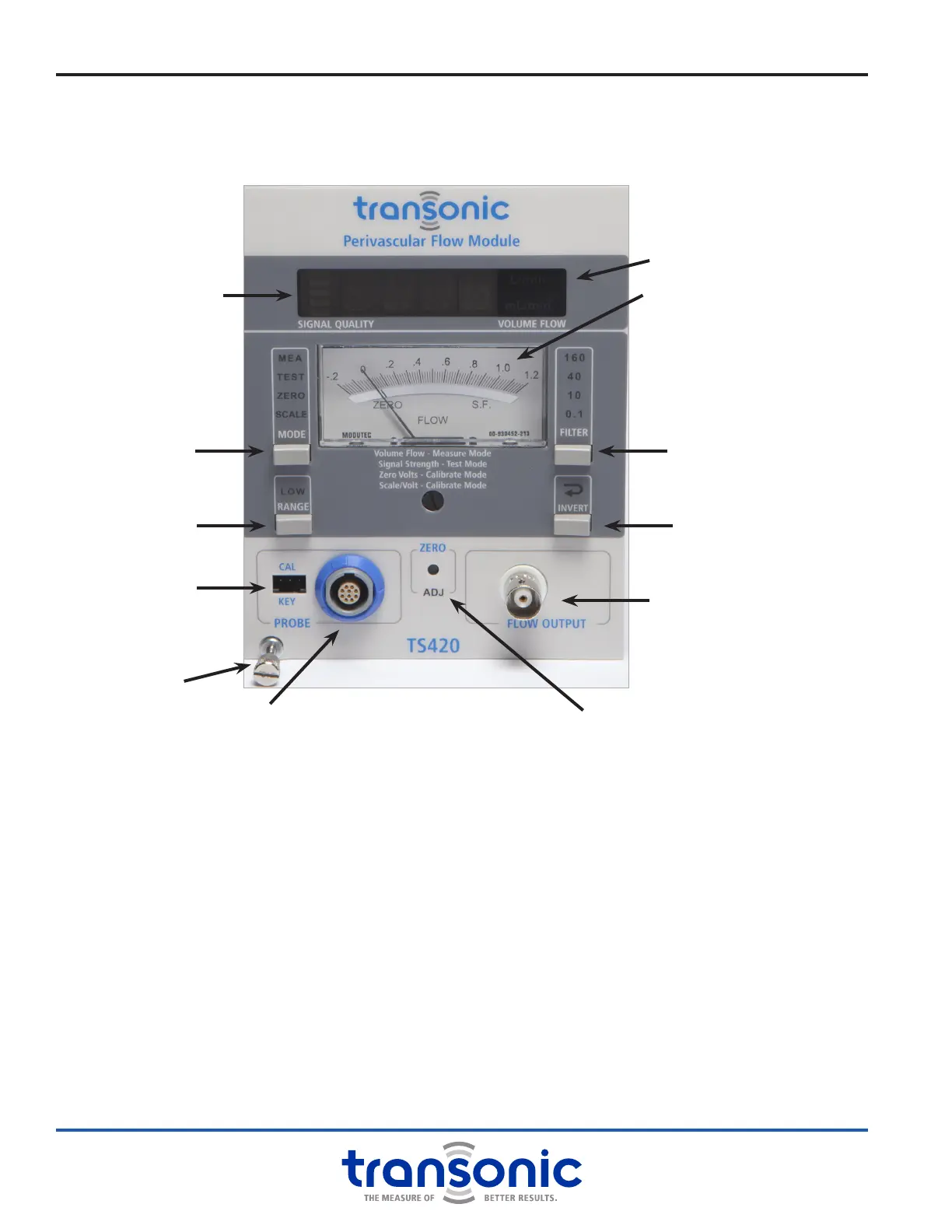
i. TS420 Module: Functions & Controls
A. Front Panel
MODE SELECTION BUTTON
Changes Module between Measure (MEA), Test,
Zero and Scale modes
LOW FLOW RANGE BUTTON
Switches between low (1/4) ow and standard ow
ranges (changing scale factor & sensitivity)
FILTER SELECTION BUTTON
Sets output lter to 0.1, 10, 40 or 160 Hz
INVERT BUTTON
Changes ow polarity of front panel display and
analog outputs
ZERO ADJUST
Adjusts Module to read zero when ow is stopped
PROBE CONNECTION
Connects Flowprobe or extension cable
CALIBRATION KEY PORT
Connects calibration key for use with 4-pin Probes
FLOW OUTPUT
BNC analog output for mean & pulsatile ow
LED DIGITAL DISPLAY
● Signal quality indicator
● Mean volume ow (mL/min or L/min)
● Error messages
ANALOG DISPLAY
Instantaneous ow as a voltage (ow x scale factor)
Signal Quality
Indicator
LED Digital Display
Analog Display
Filter Selection Button
Invert Button
BNC Flow Output
Zero Adjust
Calibration Key
Port
Probe Connection
Low Flow Range
Button
Mode Selection
Button
Attachment screw
Fig. 4.8: TS420 Front Panel



 To Next Page