AU-OPR-400Ser-EN,
Rev D
3
i. Consoles: Functions & Controls
B. Back Panel
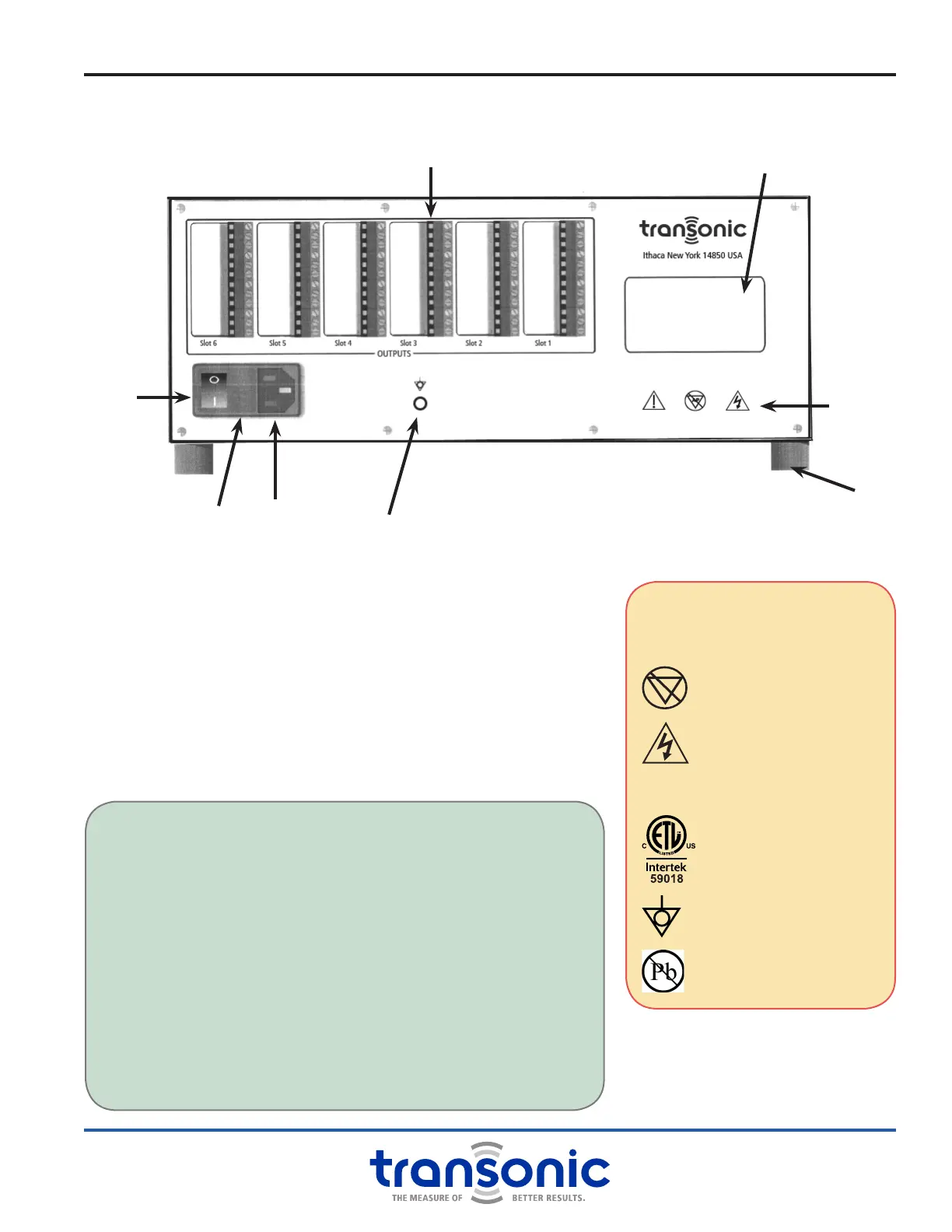
POWER ON/OFF SWITCH
Switch power On & Off for the Console and all connected Modules
FUSES
Two user replaceable fuses are located under a protective cover
SCREW TERMINAL BLOCK ANALOG OUTPUTS
12-screw terminal blocks. Outputs dependent on connected
Module. Use general purpose stranded hookup wire to connect
terminals with a data acquisition system.
NOTE: Double-bay wide Modules only use odd numbered slots.
Fig. 2.2: T403 Back Panel
Serial Number and Product
Information Location
Screw Terminal Block Analog Outputs
Power
On/Off
Switch
Fuse
Location
Universal
Power Supply
Ground Pin
Foot
Legend
WARNINGS/ LABELS
Y
Attention: Consult
accompanying documents
AP
Not category AP equipment
Dangerous Voltage: Service by
trained technicians only
C
CE Conformity Mark
ETL Testing Mark: Electrical
Safety Compliance Certication
Equipotentiality pin: Instrument
ground
RoHS Compliant
CHANGING FUSES
The Universal Power Supply is protected from power surges by
two replaceable fuses. These are located on the rear panel of the
Console. Should the Console fail to power on, the fuses may need
to be replaced.
● With the power cord unplugged, gently pry open the tab side of
the black plastic frame to the left of the power switch with a at
screwdriver.
● The cover will open exposing two tabs with arrows. Lift up under
the arrow tabs and pull out the fuse holder.
● If the fuses are blown, replace with 0.8 Amp fast blo fuses
(Bussman # GMA0.8, 250 VAC).
● If the Console still does not power on, contact your local
Transonic
®
representative.



 To Next Page