EasyManua.ls Logo

TRENDnet 14dBi - User Manual

TRENDnet 14dBi
97 pages
Print Icon
To Next Page IconTo Next Page
Loading...

Table of Contents

Question and Answer IconNeed help?

Do you have a question about the TRENDnet 14dBi and is the answer not in the manual?

Summary

Chapter 1. System Overview

1.1 Introduction of TEW-455 APBO

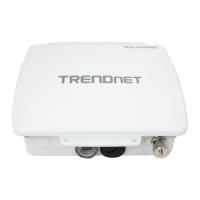
Overview of the TEW-455APBO, its weatherproof design, and capabilities.

1.2 System Concept

Explains the dual-purpose design for traditional AP and WISP applications.

1.5 Specification

Outlines technical specifications for wireless modes and networking features.

1.6 Wireless Performance Considerations

Discusses factors affecting wireless range, such as obstructions and interference.

Chapter 2. Basic Installation

2.1 Hardware Installation

Covers package contents and panel function descriptions for physical setup.

2.2 Web Management Interface Instructions

Guides on accessing and logging into the device's web-based configuration interface.

Chapter 3. AP Mode Configuration

3.1 External Network Connection

Explains how the device connects to a wired LAN for wireless access.

3.1.2 Configure LAN IP

Instructions for setting the device's IP address and subnet mask.

3.2 Wireless LAN Network Creation

Covers general wireless setup, including band, channel, and transmit rate.

3.2.2 Wireless Advanced Setup

Allows tweaking of advanced wireless performance settings.

3.2.3 Create Virtual AP (VAP)

Guides on broadcasting multiple SSIDs and creating Virtual Access Points.

3.3 Wireless Network Expansion

Explains creating WDS links to expand the wireless network.

3.4 System Management

Covers system settings like name, passwords, time, UPnP, SNMP, backup, upgrade, utility, and reboot.

3.5 System Status

Provides an overview of the system's current operational status.

Chapter 4. WDS Mode Configuration

4.1 External Network Connection

Explains device connection to wired LAN and wireless bridging via WDS.

4.1.2 WDS Setup

Guides on configuring WDS links, including peer MAC and security.

4.2 System Status

Provides an overview of the system's status in WDS mode.

Chapter 5. CPE Mode Configuration

5.1 External Network Connection

Explains device role as CPE for wireless broadband.

5.1.2 Configure WAN Setup

Guides on configuring WAN connection types (Static IP, Dynamic IP, PPPoE).

5.1.4 Site Survey

Tool to scan for and associate with WISP Access Points.

5.2 Access Control List

Allows creation of IP and MAC filter rules for network access control.

5.3 Resource Sharing

Covers DMZ and Virtual Server for exposing internal resources.

Chapter 6. Command Line Interface(CLI)

6.1 Accessing the CLI with Telnet

Provides steps to access the Command Line Interface using Telnet.

6.2 Accessing the CLI with SSH Utility

Provides steps to access the Command Line Interface using SSH.

6.3 Using the CLI

Explains how to use basic CLI commands.

Summary

Chapter 1. System Overview

1.1 Introduction of TEW-455 APBO

Overview of the TEW-455APBO, its weatherproof design, and capabilities.

1.2 System Concept

Explains the dual-purpose design for traditional AP and WISP applications.

1.5 Specification

Outlines technical specifications for wireless modes and networking features.

1.6 Wireless Performance Considerations

Discusses factors affecting wireless range, such as obstructions and interference.

Chapter 2. Basic Installation

2.1 Hardware Installation

Covers package contents and panel function descriptions for physical setup.

2.2 Web Management Interface Instructions

Guides on accessing and logging into the device's web-based configuration interface.

Chapter 3. AP Mode Configuration

3.1 External Network Connection

Explains how the device connects to a wired LAN for wireless access.

3.1.2 Configure LAN IP

Instructions for setting the device's IP address and subnet mask.

3.2 Wireless LAN Network Creation

Covers general wireless setup, including band, channel, and transmit rate.

3.2.2 Wireless Advanced Setup

Allows tweaking of advanced wireless performance settings.

3.2.3 Create Virtual AP (VAP)

Guides on broadcasting multiple SSIDs and creating Virtual Access Points.

3.3 Wireless Network Expansion

Explains creating WDS links to expand the wireless network.

3.4 System Management

Covers system settings like name, passwords, time, UPnP, SNMP, backup, upgrade, utility, and reboot.

3.5 System Status

Provides an overview of the system's current operational status.

Chapter 4. WDS Mode Configuration

4.1 External Network Connection

Explains device connection to wired LAN and wireless bridging via WDS.

4.1.2 WDS Setup

Guides on configuring WDS links, including peer MAC and security.

4.2 System Status

Provides an overview of the system's status in WDS mode.

Chapter 5. CPE Mode Configuration

5.1 External Network Connection

Explains device role as CPE for wireless broadband.

5.1.2 Configure WAN Setup

Guides on configuring WAN connection types (Static IP, Dynamic IP, PPPoE).

5.1.4 Site Survey

Tool to scan for and associate with WISP Access Points.

5.2 Access Control List

Allows creation of IP and MAC filter rules for network access control.

5.3 Resource Sharing

Covers DMZ and Virtual Server for exposing internal resources.

Chapter 6. Command Line Interface(CLI)

6.1 Accessing the CLI with Telnet

Provides steps to access the Command Line Interface using Telnet.

6.2 Accessing the CLI with SSH Utility

Provides steps to access the Command Line Interface using SSH.

6.3 Using the CLI

Explains how to use basic CLI commands.

TRENDnet 14dBi Specifications

General IconGeneral
BrandTRENDnet
Model14dBi
CategoryWireless Access Point
LanguageEnglish

Related product manuals