©Copyright2017TRENDnet.AllRightsReserved.
TRENDnetUser’sGuide
TEW‐825DAP
41
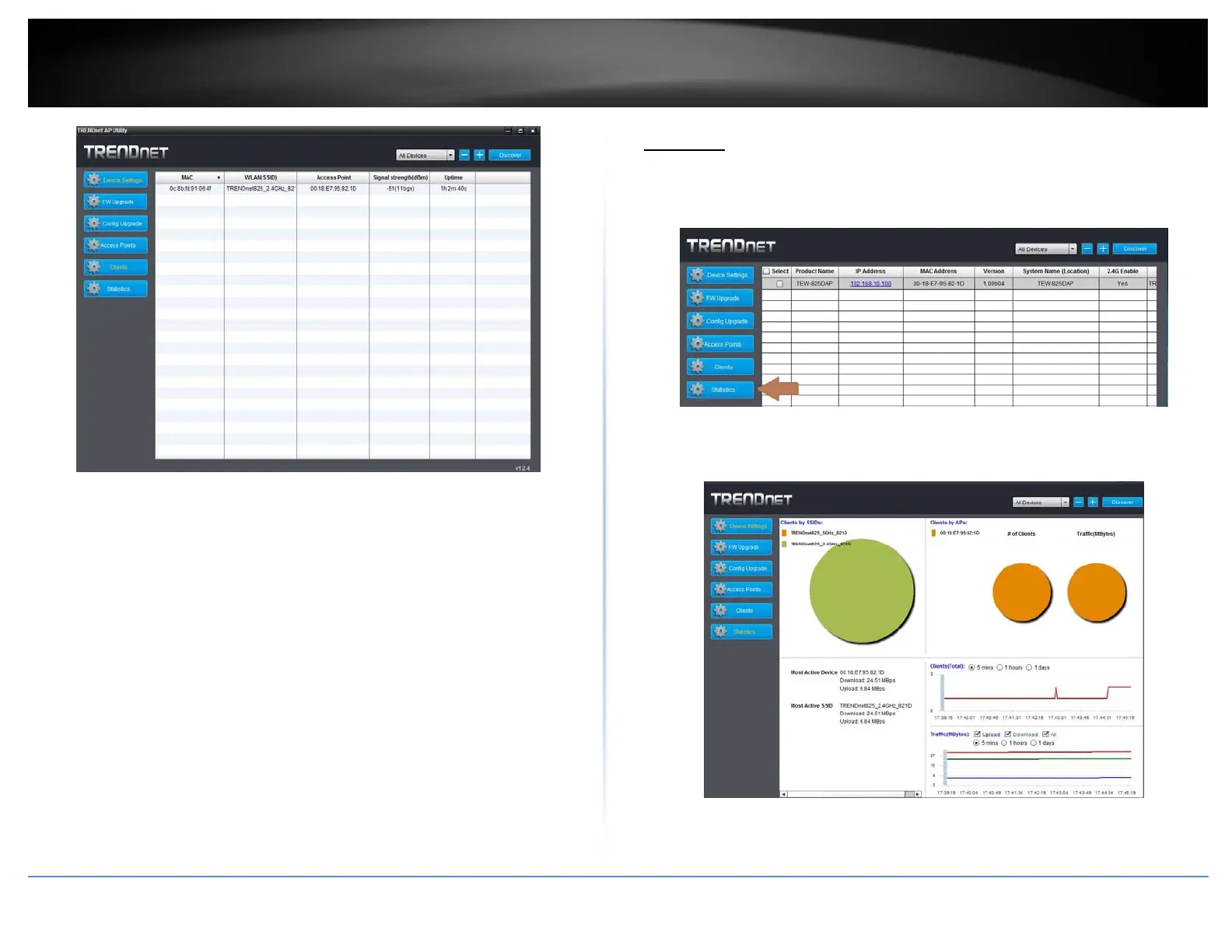
MAC:DisplaystheMACaddressthatisconnectedtotheaccesspoint
WLAN(SSID):DisplaystheSSID(wirelessnetworkname)oftheaccesspointthedevice
isconnectedto
AccessPoint:DisplaysthewirelessMACaddressoftheaccesspointsonthenetwork
thatthedeviceisconnectedto
Signalstrength(dBm):Displaysthesignalstrengthbetweentheaccesspointandthe
client.ie:‐40isastrongersignalthan‐50.
Uptime:Displaysthedurationtheclienthasbeenconnectedtotheaccesspoint
Statistics
1.Toviewstatisticaldataaboutyouraccesspoint,clickontheStatisticstab.
2.Reviewthestatisticsinformationbelow.
ClientsbySSIDs:Displaysthenumberofclientsconnectedtotheaccesspoint
incomparisonbetweenthedifferentSSIDs(wirelessnetworkname).Mouse









 To Next Page