49
Model Three - Operation Manual
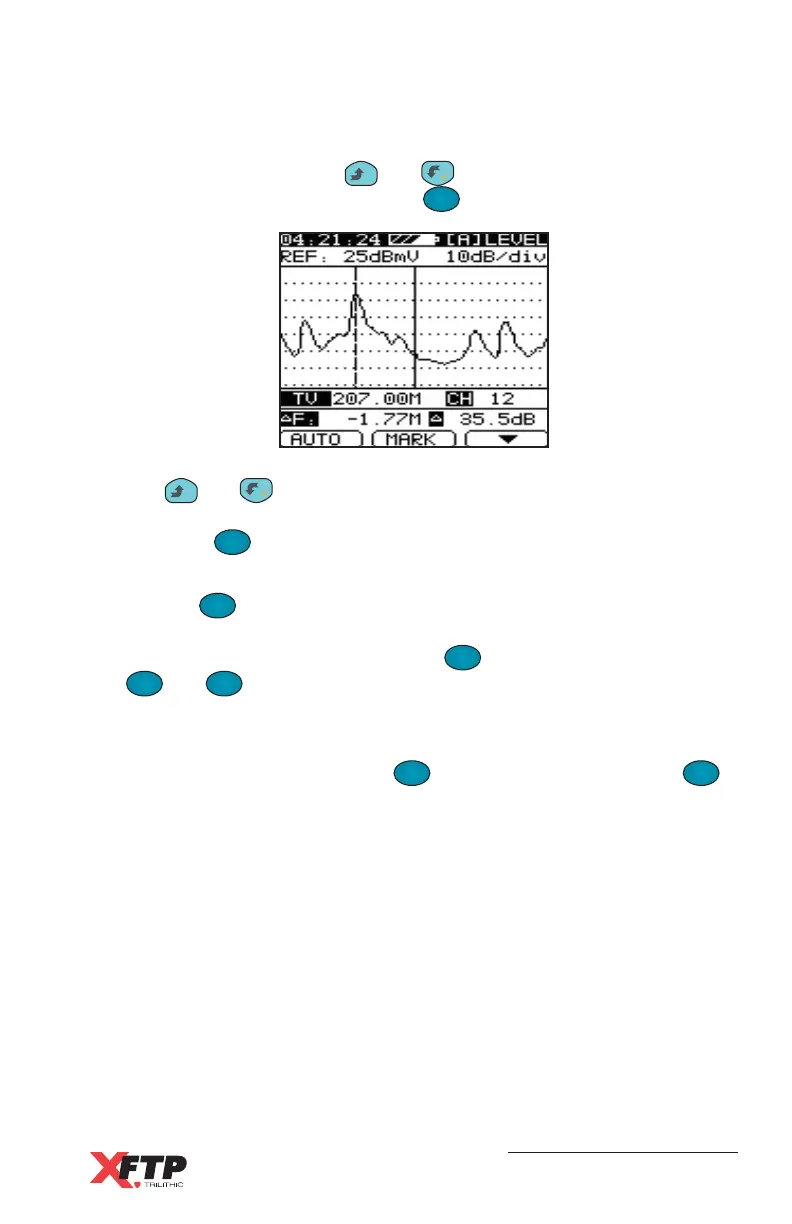
A Δ Marker function can also be used to check the distance (in MHz)
and amplitude difference between any two points in the displayed
spectrum. First, use the
__
and keys to move the marker to a
reference position, then press the
F
2
(
Δ
MKR) key.
The
__
and keys now move the second marker from the
reference position, and the Δ Frequency and Δ Level are displayed.
Press the
F
2
(MARK) key to return to the normal single-marker
spectrum display.
Use the
F
1
F
1
(AUTO) key to automatically set a scale and reference
for the displayed spectrum graph. You may set the Scale and
Reference manually by pressing the
F
3
(DOWN) key and using the
F
1
F
1
and
F
2
keys for Scale and Reference as described for the
preceding Level display mode.
The spectrum display can also use an Average detector instead of
Peak detector by pressing the
F
3
(DOWN) key and using the
F
1
F
1
key to select AVG. This is most useful for digital channels to see a
quick scan of the average power for frequencies across the channel
bandwidth.



 To Next Page