79
Model Three - Operation Manual
When all desired channels are enabled, press the
F
3
(BACK) key to
return to the Auto test screen for STEP 3.
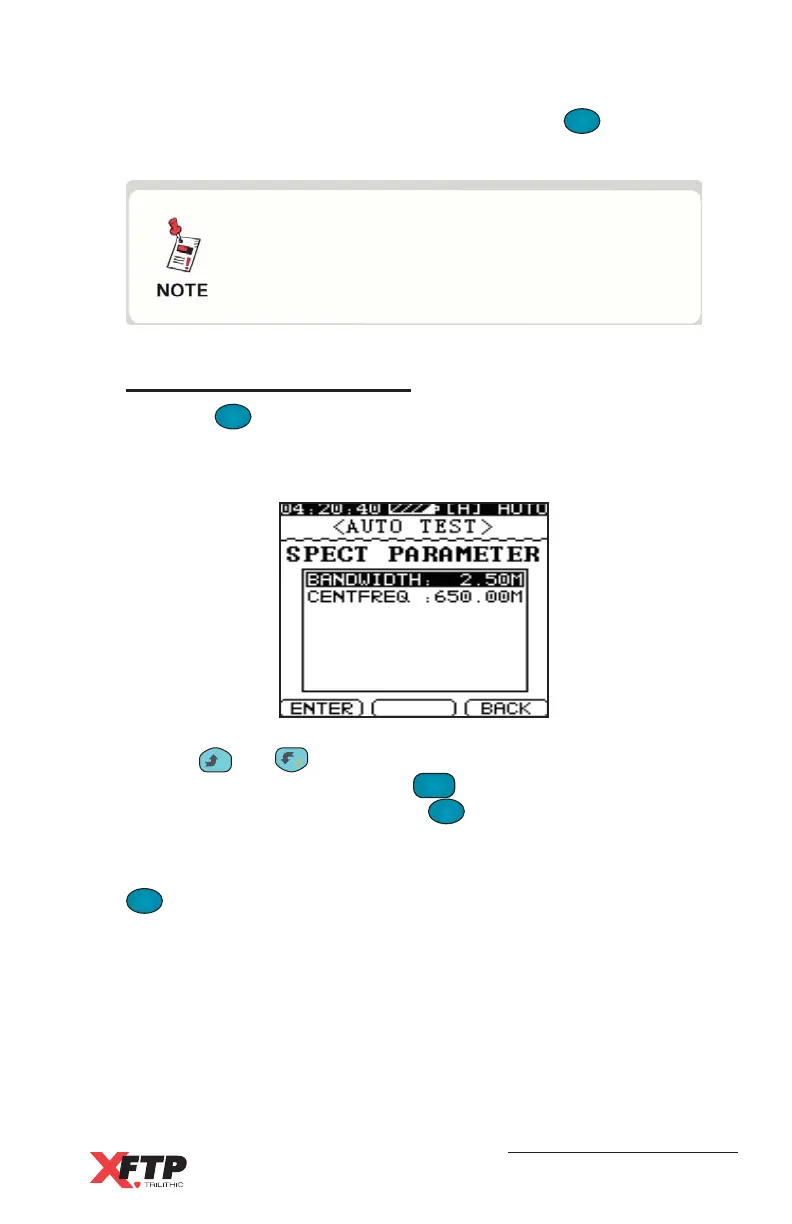
Spectrum Parameters
Press the
F
1
F
1
(ENTER) key to change the highlighted Spectrum test
bandwidth to 2.50 MHz, 6.25 MHz, 12.50 MHz, 25.00 MHz, 62.50
MHz, or a full-spectrum scan of the User Plan Base Channel Plan.
Use the
__
and keys to highlight the center frequency selection
for the Spectrum test. Press the
FCN
0
key, enter the center frequency
numerically in MHz, and press the
F
1
F
1
(ENTER) key. This parameter
is not used if the full-span bandwidth is selected.
When the desired frequency and bandwidth have been set, press the
F
3
(BACK) key to return to the Auto test screen for STEP 3.
There are no default channels enabled for the
Level test parameter. If Level test is selected
for the Auto test program, you must enable
one or more channels.



 To Next Page